Disclosure: Travlists is reader-supported. We may earn a small commission if you book through some of the links on this page, at no additional cost to you. The Nomad eSIM was provided to us for testing. See how we review and my purchase receipts.
In a Nutshell
- Budget-friendly. One of the eSIMs that I enjoyed using in South Korea is Klook’s eSIM. It took me just 3 minutes to set up, and I was able to connect to SKT, one of the three major networks in the country. I used apps like Google Maps, Naver, Kakao, and TikTok with no issues. What I like most is that it’s affordable: the eSIM starts from just $0.85, which is much cheaper than the entry plans from Airalo, Nomad, and Ubigi at $4. If you are considering Klook, book with our promo code TRAVLISTS to get up to 5% off on eSIMs, attractions, tours, and more.
- Unlimited data. I compared the unlimited plans of several providers — Airalo, Nomad, Klook, Ubigi, BNESIM, Yesim, and Jetpac — and found that the cheapest Korea eSIM with unlimited data depends on the length of the trip. For 3–7 days, Klook’s eSIM is the cheapest at around $3.30 per day, while for 15–30 days, Ubigi offers the lowest cost at $1.60-$2.20 per day. Klook provides 15GB of high-speed data per day before speeds are reduced to 1Mbps, while Ubigi includes 25GB of high-speed data before speeds drop to 2Mbps.
- Phone number. If you need a South Korea eSIM with a phone number, you can book an LG U+ eSIM. They are one of the major mobile carriers in Korea and offer a specific option that includes a +82 number. Getting an eSIM with a local number requires an extra step: for LG U+, you’ll need to stop by the airport counter and show your passport for identity verification. It takes a little more time, but it’s mandatory and can be worth it if you need a Korean number to use local apps, make reservations, or book rides with Kakao T.
Coupon Codes
Quick Book: South Korea eSIMs
Use Travlists’ promo codes to save on eSIMs from Klook, Ubigi, Nomad, Airalo, BNESIM, Yesim, and more. I’ve personally verified that the codes or links provide the discount. If anything seems off, feel free to drop me a message.
Choose an eSIM
- CODE
- TRAVLISTS
- OFFER
- 3% off
- USER
- New and existing customers
- NOTE
- New users can get 5% off with the same code, TRAVLISTS
- CODE
- TRAVLISTS
- OFFER
- 10% off
- NOTE
- Verified as a permanent promo code with no expiration
- CODE
- TRAVLISTS
- OFFER
- 5% off
- USER
- New and existing customers
- NOTE
- Fastest Korea eSIM in my tests so far, reaching 1,247.72 Mbps
- CODE
- TRAVLISTSNEW
- OFFER
- 15% off
- USER
- New customers
- NOTE
- Existing users can use Airalo coupon code TRAVLISTSALL to get 10% off
- CODE
- TRAVLISTS
- OFFER
- 30% off
- USER
- New and existing customers
- NOTE
- Discount capped at €10 (around $11.70)
- CODE
- TRAVLISTS20
- OFFER
- 20% off
- USER
- New customers
- NOTE
- 20% off with no minimum purchase or discount caps
- CODE
- TRAVLISTS10
- OFFER
- 10% off
- USER
- New and existing customers
- NOTE
- Applies to data plans worth $10 or more
- OFFER
- 20% off
- USER
- New and existing customers
- NOTE
- Discount applied automatically through this partner link — no code needed
- CODE
- TRAVLISTS
- OFFER
- 3% off
- USER
- New and existing customers
- NOTE
- New users can get 5% off with the same code, TRAVLISTS
- CODE
- TRAVLISTS
- OFFER
- 3% off
- USER
- New and existing customers
- NOTE
- Fastest network based on SpeedGeo mobile test data. New users can get 5% off with the same code, TRAVLISTS
- CODE
- TRAVLISTS
- OFFER
- 3% off
- USER
- New and existing customers
- NOTE
- New users can get 5% off with the same code, TRAVLISTS
Use Travlists’ Data Usage Calculator → Get an estimate of how much mobile data you’ll need for your trip. See More Travel Promo Codes → Save on other travel essentials, activities, and tours for your South Korea trip.
Reviews: South Korea eSIM Providers I Used & Would Book
Before becoming a resident in South Korea, I spent a few years visiting as a tourist and exploring Seoul, Busan, Daegu, Jeonju, Namwon, and other places. This was between 2017 and 2019, and I mostly stayed online using a KT SIM card or KT pocket WiFi. Travel eSIMs were unheard of then, but after using Korea eSIMs a few years later, I probably would have booked one if they had been available. In my experience, the eSIMs I’ve used are cheaper, more convenient, and even rewarding.
Below, I’ve included some of the Korea eSIMs I’ve tested, along with others I would consider booking. These include some of the most notable eSIM providers today, as well as branded eSIMs from travel platforms like Klook. I’ve also included eSIMs from KT, SKT, and LG U+, the three major mobile networks in South Korea. I’ve personally connected to all three through mobile data or broadband while living in Seoul. Each review also includes our promo code or partner link where available, so you don’t have to pay the full price.
Before purchasing an eSIM, verify that your phone is carrier-unlocked and eSIM-compatible. To check eSIM compatibility, dial *#06# on your phone. If you see an EID, which is a 32-digit identification number, your device supports eSIM. To check whether your iPhone is carrier-unlocked, go to Settings → General → About → Carrier Lock. If it says “No SIM restrictions”, your iPhone is unlocked. Android users may need to check with their carrier, as the steps vary by device and mobile provider.
1. Klook
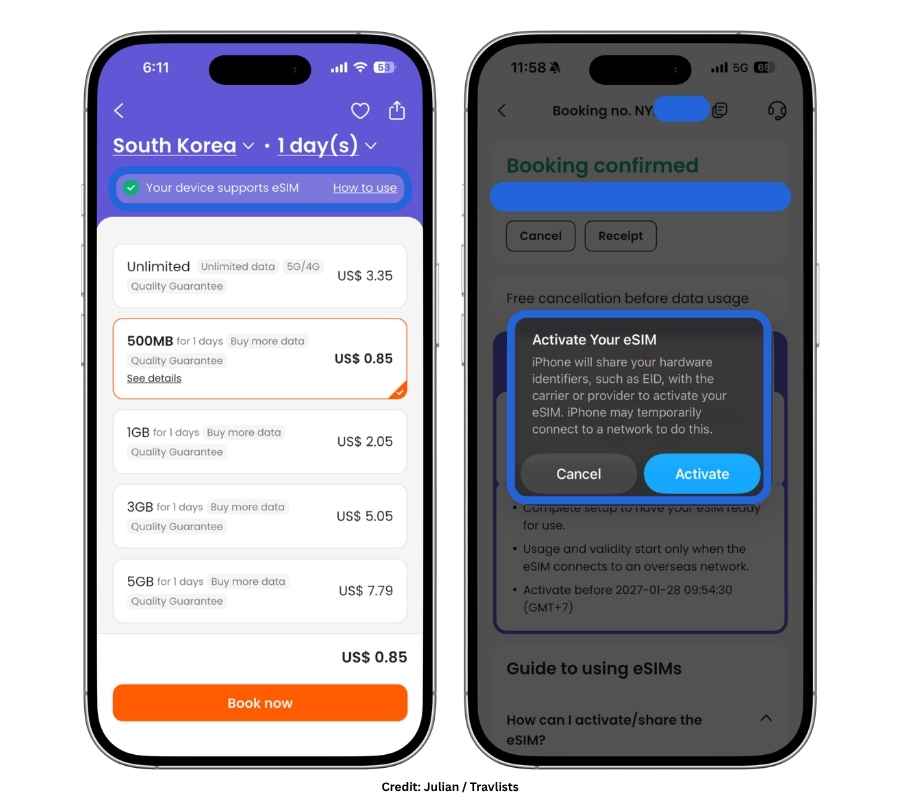
Klook is a travel activity booking platform that I’ve used to book Nami Island tours, T-Money, and airport charters from Incheon. In many cases, I’ve found their offers cheaper than other websites. On the same platform, Klook also sells their own branded eSIM, which is priced very competitively. I first saw their Korea eSIM in action when two of my college friends visited me in Seoul. They were able to set it up easily on the way to the hotel and use WhatsApp and Google Maps during our DMZ tour without any issues.
Cheap and reliable for travel, it’s not surprising that Klook is quite popular. It was the most booked Korea eSIM among Travlists readers from January to June 2026. Of the 1,092 purchases made through our affiliate links during that period, 43% were for Klook. Since I was seeing so much interest in this provider, I decided to test it myself in Yeouido, Seoul, and found a few interesting things.
First, the eSIM was easy to install and took me around 3 minutes to set up. In terms of speed and performance, I had no issues. I connected to SKT right away, although the eSIM only showed 4G on my phone. This didn’t quite match the 5G wording in the product name, although the product details do mention 4G/5G/LTE. Even on 4G, my speed test reached 89.4 Mbps download and 33.1 Mbps upload, which Google described as very fast. I recorded higher speeds when testing BNESIM, Ubigi, and Yesim, but in actual use around the Han River and The Hyundai Seoul, Klook felt comparable to my regular KT 5G postpaid SIM. So while I didn’t see 5G, it wasn’t really an issue performance-wise.
As someone who writes about eSIMs, the main thing I think would make Klook’s eSIM even more complete is a Korean phone number. But for price and plan flexibility, it’s a solid data-only option and one I’d recommend to friends and family.
- Price: From $0.85
- Data plans: Unlimited data for 1–30 days or 500MB–50GB for 1–30 days
- Network: SKT
- Compatible devices: Select smartphones are supported. On my iPhone 15 Pro, I noticed that the Klook app already showed “Your device supports eSIM” on the Korea eSIM page, which made it easy to check before booking.
- Mobile hotspot: Available
- Rewards: Friend referral program & Klook Cash (up to 4% cashback on eligible transactions)
- Customer support: Chat and email are available. When I contacted support, Klook’s AI chatbot also responded to my questions.
- Offers: 5% discount for new users and 3% off for existing users with code TRAVLISTS. Usable up to 3 times in eSIM purchases, as well as other travel activities in various destinations (excluding select products). Valid until 2040.
2. Ubigi
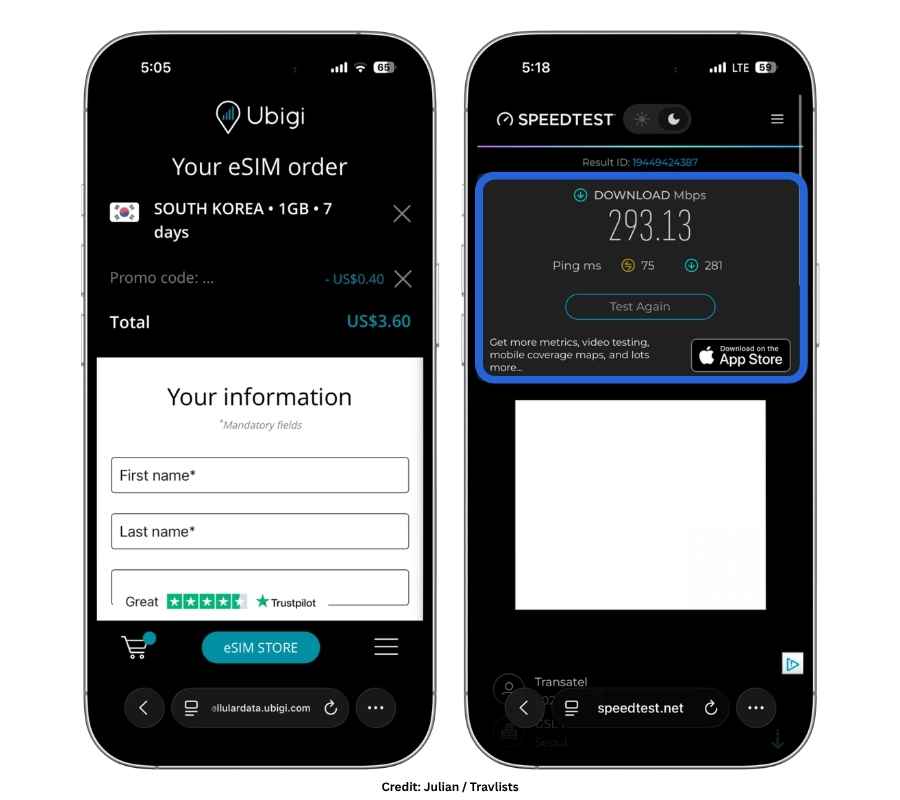
Ubigi may be more associated with Japan eSIMs, but their Korea eSIM worked excellently for me in Seoul. The installation process was beginner-friendly, and it took me only 2 minutes before getting connected to SKT. Shortly after, I was able to use Naver to check the fastest way to get to Gyeongbokgung, as well as KakaoTalk, Google, YouTube, TikTok, and other apps. The connection showed LTE throughout my usage, but I recorded 293.13 Mbps on Ookla. That’s significantly higher than the speed test result I shared earlier for Klook, although in actual use, I didn’t notice a major difference between the two.
There’s also a reason why Ubigi comes second on this list: based on my comparison of seven providers as of this article’s update, they are the cheapest option for Korea eSIMs with unlimited data for trips of 15–30 days. For stays of around two weeks to a month, Ubigi costs about $1.60–$2.20 per day, compared with around $2.30–$3.70 for Airalo and $2.20–$3 for Klook. Ubigi also offers recurring monthly and annual data plans, which can be useful if you visit Korea regularly for short leisure or business trips. (I wouldn’t recommend these long-term plans if you’re actually moving to Korea. Having a Korean phone number from KT, SKT, or LG U+ becomes much more important for app verification, banking, and other local services.)
The main downside for me is the app interface. Compared with providers like BNESIM and Airalo, which have more polished apps, Ubigi’s current app feels more like a stripped-down version of their mobile website. I’ve shared screenshots and more detailed observations in my full Ubigi eSIM review.
- Price: From $4
- Data plans: Unlimited data for 7–30 days, fixed 1–25GB for 7–30 days, & recurring monthly or annual plans
- Network: SKT & LG U+
- Compatible devices: Select smartphones, tablets, laptops, and connected cars. The eSIM can be transferred between devices up to five times under the same account, although it needs to be installed again each time.
- Mobile hotspot: Available
- Rewards: UbiClub (earn up to 8% in Ubigi Coins when you purchase an eligible plan in the app)
- Customer support: Chat and email are available. Ubi, Ubigi’s AI chatbot, responded first when I contacted support, and a human agent became available after I requested one.
- Offers: 10% off with code TRAVLISTS (verified with no expiration date listed)
3. Nomad
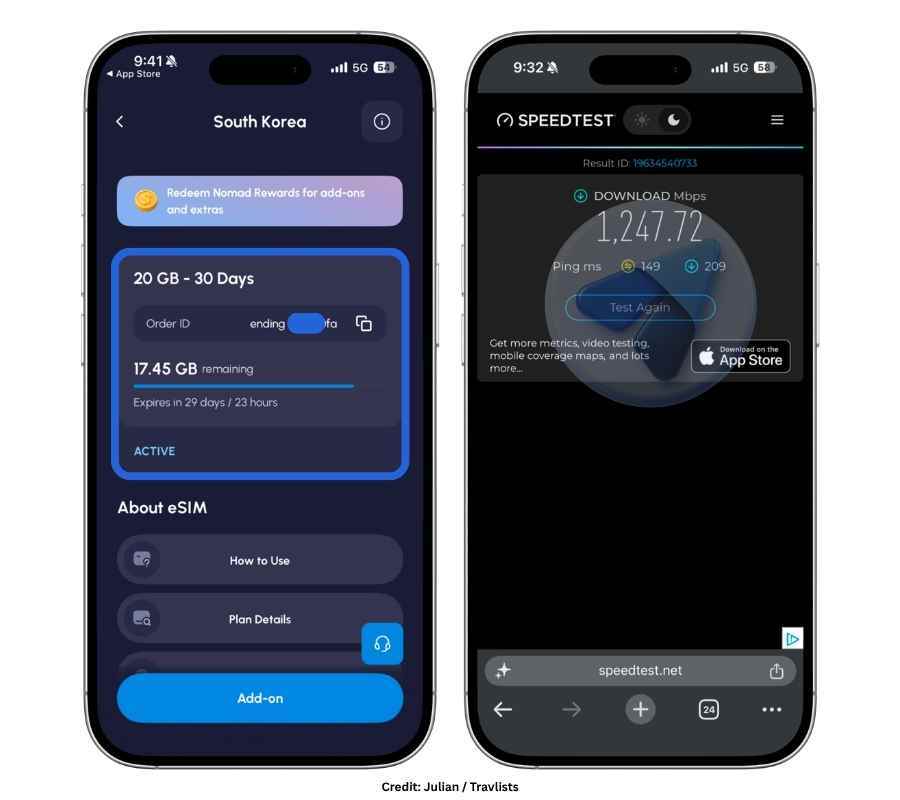
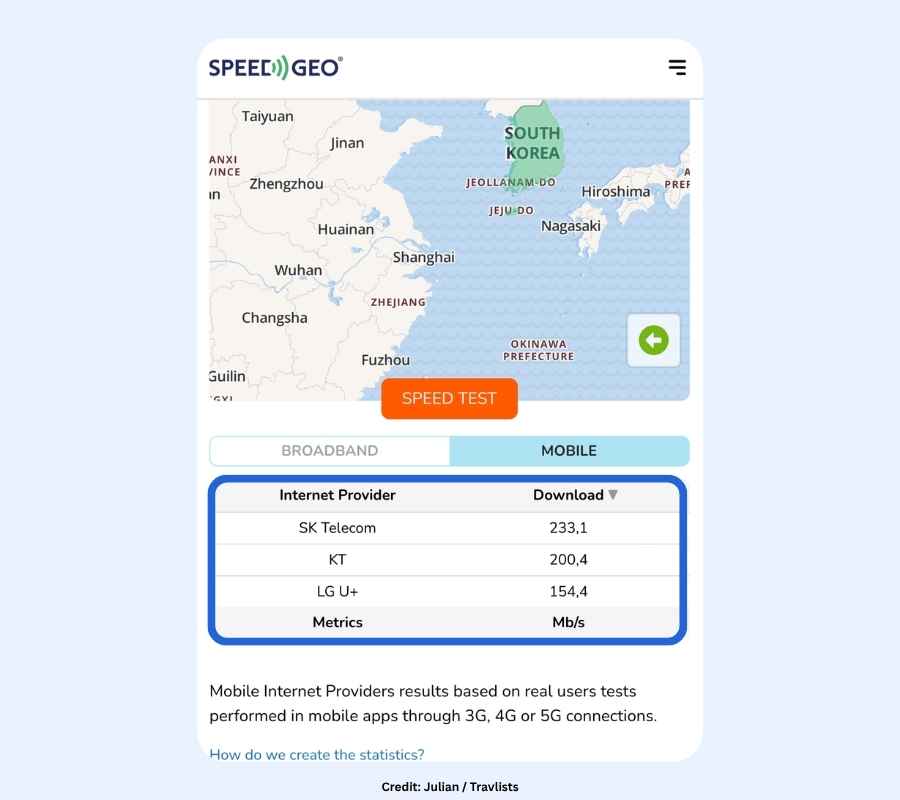
A tiny disclaimer: Nomad reached out to Travlists and offered a South Korea eSIM in exchange for this review. I took the opportunity so I could see how it compares with other providers. I’ll start with the quantitative stuff: my Ookla speed test reached 1,247.72 Mbps download, while Google’s Internet Speed Test measured 111.3 Mbps download and 14.8 Mbps upload. These are excellent numbers that simply mean I had a very fast connection. To put them in context, SpeedGeo reported average mobile speeds in Korea of 233.1 Mbps for SK Telecom, 200.4 Mbps for KT, and 154.4 Mbps for LG U+. Compared with these figures, my Ookla speed test result for Nomad eSIM was 5.4 to 8.1 times faster, depending on the network used as a reference.
But it’s not just the speeds that I checked. Installation was also user-friendly and took me only a minute. I tested Nomad at night in Yeongdeungpo, Seoul, using TikTok, Google Maps for directions to Myeongdong, Naver to find restaurants nearby, and Facebook Messenger to chat with my high school friend. Everything worked without issues, and the connection was stable. I also connected my MacBook using mobile hotspot smoothly. (If you need an eSIM for your laptop, Nomad also supports eSIMs on select Windows laptops.)
My only reservation was my experience with human support. Contacting customer service is part of my eSIM tests even when I encounter no problems. I reached out to ask whether I could manually switch networks since Nomad says it connects to LG U+ and SK Telecom. The AI agent escalated me to Nathan from live support quickly, but I was then asked to send several screenshots of my settings. The exchange with Nomad’s customer support took more than 15 minutes before I got the answer to what was a fairly simple question. Nathan may have been simply following routine troubleshooting checks or may not have understood my question initially (he apologized at the beginning even though I said everything was working well). But when I asked Nomad’s AI agent the same question later on, it answered almost instantly without the screenshots and lengthy exchange.
My verdict: Nomad was the fastest Korea eSIM in my speed tests so far. Installation was easy, browsing and apps worked without issues, and mobile hotspot was seamless. I also liked Nomad’s modern and easy-to-navigate app, where I could quickly see my remaining data, validity, rewards, and setup information. Based on my experience in Seoul, I would happily recommend Nomad to my friends and family.
- Price: From $4
- Data plans: Unlimited data for 3–10 days or 1GB–50GB for 7–30 days
- Network: SK Telecom, KT Olleh, & LG U+
- Compatible devices: eSIM-compatible smartphones and select Windows laptops. I tested Nomad on my iPhone 15 Pro and installed the eSIM by long-pressing the QR code and selecting “Add eSIM.”
- Mobile hotspot: Available. I was able to connect my MacBook using mobile hotspot during my test.
- Rewards: Nomad Rewards. Use your Rewards Points to redeem a 1-day extra validity, a small data add-on, and other benefits.
- Customer support: AI chat and live customer support are available.
- Offers: 5% off for new and existing users with code TRAVLISTS
4. Airalo
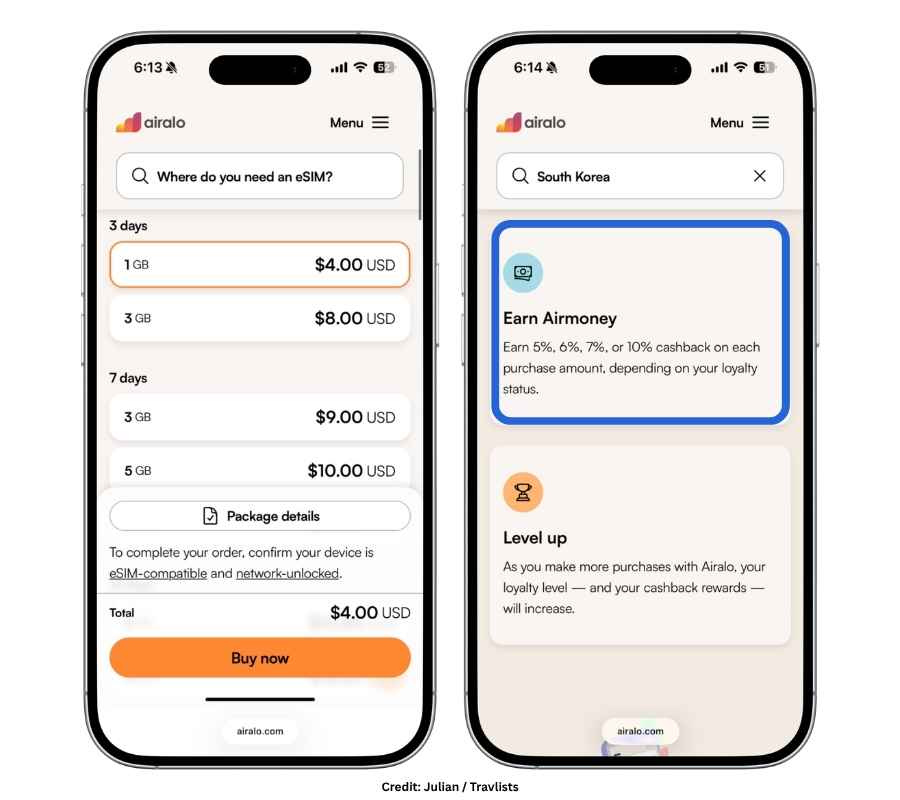
I started writing about eSIMs in 2022, and Airalo was one of the first brands we featured. At first, I hesitated to recommend them for travelers going to Korea because they only had a single 30-day unlimited plan from LG U+ that cost at least $30. That was much more expensive than providers like BNESIM and Ubigi. Since then, Airalo has made their Korea eSIMs much more affordable. They now offer 5G Korea eSIMs that connect to SKT, with more flexible plans starting from $4 for both short and longer trips.
When I searched for Airalo Korea eSIM on TikTok, a lot of creators highlighted the 1-minute activation and flexible payment options. These are the features I would care about as a customer. However, one good feature I don’t see mentioned as much is their tiered cashback program. Klook offers up to 4% and Ubigi up to 8%, while Airalo offers cashback (in the form of AirMoney) from 5% and increases to 10% once you reach $200 in accumulated spending. AirMoney expires after one year, but the validity resets whenever you make another purchase. To compare, Ubigi Coins also have a one-year validity, but I couldn’t find a clear statement on whether their expiry resets in the same way.
Airalo would be an excellent choice if you travel frequently, want simple activation, and want to make the most of the higher cashback tier. However, if you want to save money, you may find other eSIMs at slightly lower prices.
- Price: From $4
- Data plans: Unlimited data for 3–30 days or 1–50GB for 3-30 days
- Network: SKT
- Compatible devices: Select smartphones, tablets, & laptops with eSIM support.
- Mobile hotspot: Available
- Rewards: Referral program & AirMoney (5-10% cashback program)
- Customer support: 24/7 via WhatsApp (available in multiple languages) and Alo, Airalo’s AI Agent Chatbot
- Offers: 15% off for new users with TRAVLISTSNEW and 10% off for existing users with TRAVLISTSALL
5. BNESIM
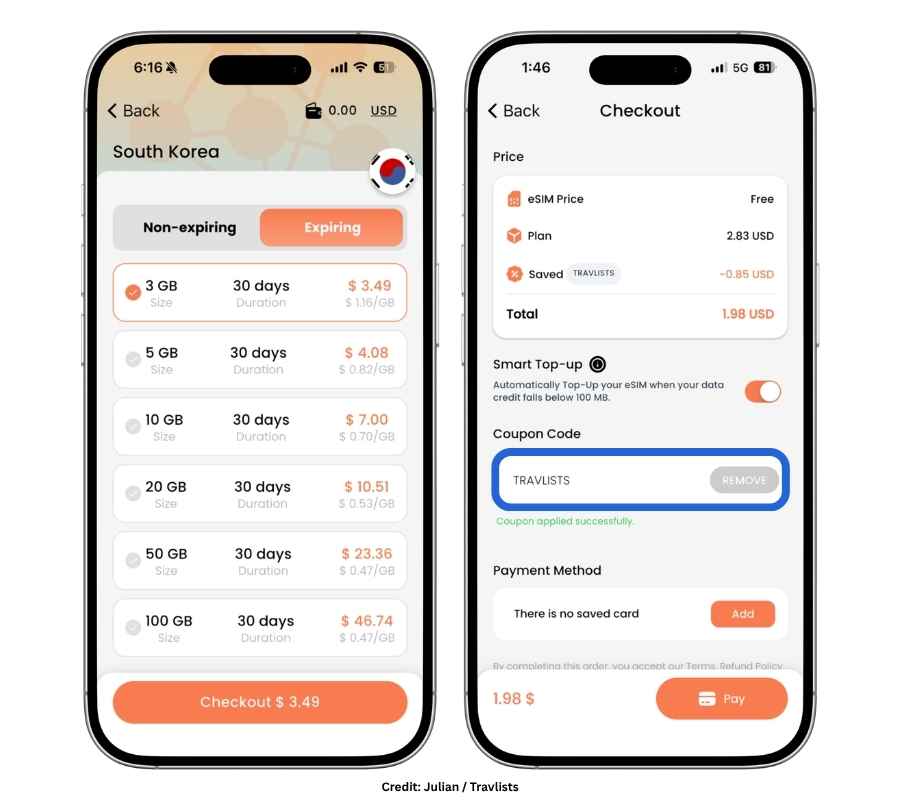
If you’re looking for an alternative to Klook, which is a broader travel platform rather than an eSIM-first company, BNESIM is one provider worth considering. Out of all the eSIMs I’ve used, this is actually my personal favorite and one that I intend to use long-term. I’ve used BNESIM in South Korea and Hong Kong, and my family of four also used it on one of our trips (even for Facebook Live). We all found it easy to install, even though my brothers were first-time eSIM users at the time. In Korea, it provides access to multiple networks, including KT and SKT.
Next to Klook, BNESIM was the second most booked Korea eSIM among Travlists readers, accounting for 22% of tracked purchases from January to June 2026. Across Travlists overall, BNESIM was also the most booked eSIM across our destination-specific eSIM articles based on sitewide affiliate sales from January to June 2026. From my experience, the simple setup, easy top-ups, and industry recognition from bodies like the World Travel Tech Awards make it a strong option for travelers who prefer an eSIM-focused provider.
That said, BNESIM’s Korea eSIM would not be my first choice if you specifically need a +82 Korean phone number or unlimited data for more than 10 days. Their unlimited Korea plan is limited to 10 days, and only their eSIMs with fixed data plans provide mobile hotspot capability. This can be inconvenient if you plan to share your connection across multiple devices. Overall, though, BNESIM would be my personal pick if I wanted an eSIM-first provider with competitive pricing, reliable connection, and flexible plans.
- Price: From $2.88
- Data plans: Unlimited data for 10 days or 1–100GB for 30 days (lifetime or non-expiring data also available)
- Network: SKT & KT (both networks up to 5G)
- Compatible devices: Select smartphones and tablets
- Mobile hotspot: Available for fixed plans only
- Rewards: Referral program & BNE Coins (5% cashback with e-Wallet payments only)
- Customer support: 24/7 live chat (human support or BEN, the Smart Assistant), email, & WhatsApp
- Offers: 30% off for new and existing users with promo code TRAVLISTS (discount capped at €10 or around $11.7)
6. Yesim
Yesim is another eSIM I’ve personally used in South Korea. On my iPhone 15 Pro, the eSIM installed in around 4 minutes with fewer than 10 taps. My Ookla test reached 210.2 Mbps download while connected to the LG U+ network. That’s incredibly fast, although South Korea’s strong mobile infrastructure plays a big part in that.
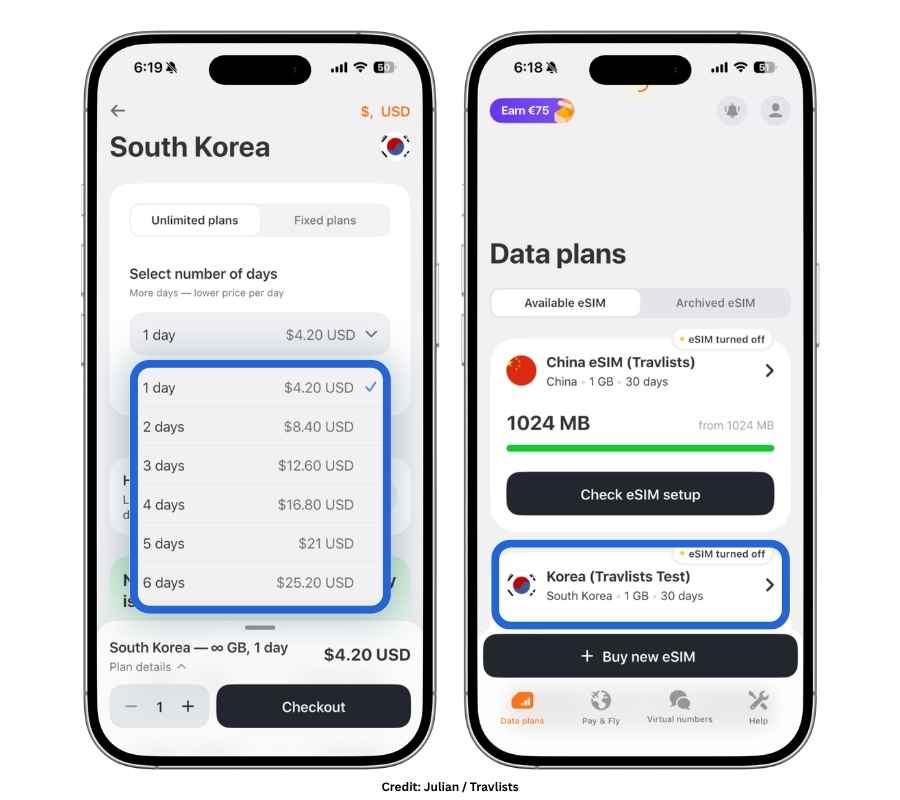
Two things stand out to me with Yesim: the free VPN for iOS users and the 10% discount when you purchase at least two eSIMs. Korea has relatively open internet access, so the VPN isn’t something most travelers will necessarily need. However, it’s still a useful extra if you want more privacy or security while browsing on an iPhone or iPad. The multi-eSIM discount is also something that can appeal to families or groups of friends. Yesim currently gives 10% off when you purchase at least two eSIMs, but this bulk discount can’t be combined with our 20% coupon code TRAVLISTS20. If you want to get the higher discount, you may use our Yesim promo code instead. (Upon checkout, simply remove the automatic bulk 10% discount from Yesim and enter our code.)
Yesim also offers unlimited data plans that let you choose the exact number of days you need between 1 and 30 days. That flexibility is useful, although Klook currently offers a similar setup at a lower price.
- Price: From $3
- Data plans: Unlimited data for 1–30 days or 1–30GB for 30 days
- Network: LG U+ (up to 5G)
- Compatible devices: Select smartphones and tablets
- Mobile hotspot: Available
- Rewards: Cashback & referral program (referral code is provided after spending €5 or around $5.84)
- Customer support: Live chat (When I contacted support about hotspot/tethering, I reached a human agent (Nick) in under 2 minutes rather than a chatbot.)
- Offers: 20% off with coupon code TRAVLISTS20 (for first-time users only)
7. Jetpac
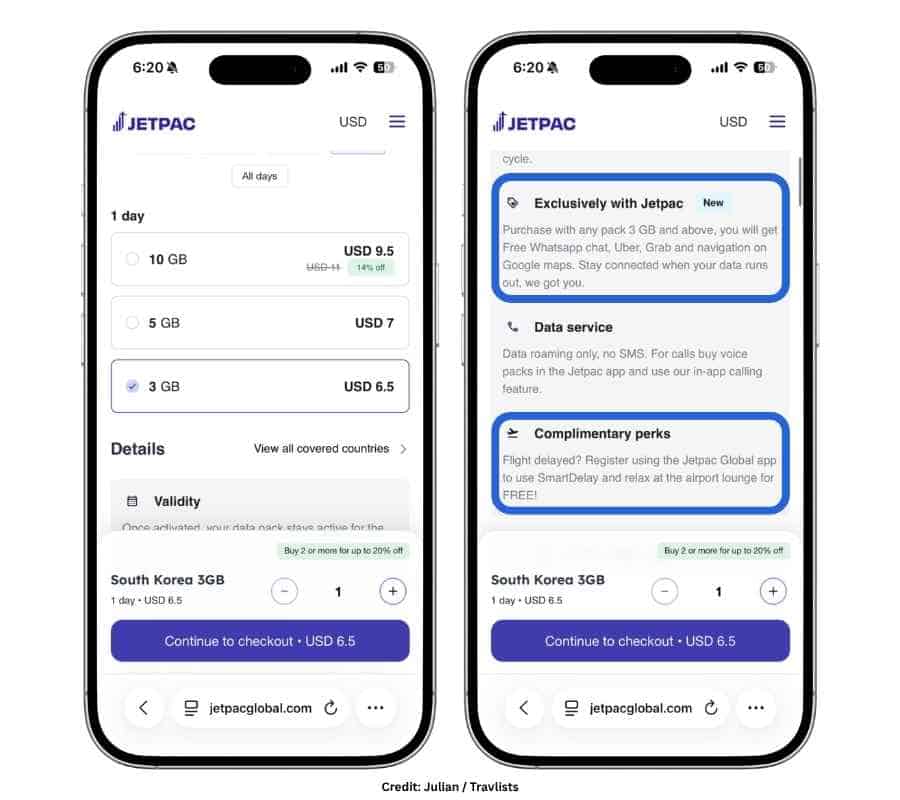
A quick look at Jetpac’s Korea eSIM showed me two features that make them worth considering: offline access to select essential apps and complimentary airport lounge access when an eligible flight is delayed.
When you purchase a data plan with at least 3GB, Jetpac gives you offline access to apps like Uber, Google Maps, Grab, and WhatsApp. Grab doesn’t operate in South Korea, but knowing that you can still access some of the other apps if your data runs out is reassuring. The second perk is even more exciting. If you register an eligible flight through SmartDelay in the Jetpac app, you may receive complimentary airport lounge access if the flight is delayed long enough to qualify. Airport lounge passes can be expensive, so this is a genuinely useful benefit if you ever get the chance to use it.
If price matters more to you than these additional perks, though, I’d probably look at a cheaper Korea eSIM. Jetpac’s plans start from around $6.50, while several other options like Ubigi, BNESIM, Superalink, and Klook start lower.
- Price: From $6.50
- Data plans: Unlimited data for 3–30 days or 3–40GB for 1-30 days
- Network: SKT and KT
- Compatible devices: Select smartphones and tablets
- Mobile hotspot: Jetpac says tethering is available without limits or restrictions, but hotspot performance can still depend on the local network
- Rewards: Referral program
- Customer support: 24/7 chat, email, WhatsApp
- Offers: 10% off for plans worth $10+ with code TRAVLISTS10
8. Superalink
Except for the eSIMs from KT, SKT, and LG U+ that I’ll cover separately below, Superalink is the only provider on this list that is actually based in South Korea. That doesn’t necessarily mean better internet performance. Superalink still relies on the major Korean networks, but it may appeal to travelers who specifically want to book from a Korean company. (Superalink is the global eSIM brand of Gadget Korea, the same company behind USIMSA.)
Of course, more important than where the company is based is the price. I’ve mentioned that Klook is budget-friendly, but Superalink is actually slightly cheaper. Klook’s Korea eSIM starts at $0.85, while Superalink starts from $0.75. Even if you use our Klook code for up to 5% off, Superalink currently gives Travlists readers 20% off through our partner link, with no separate coupon code needed. You can also activate the eSIM within 180 days of purchase, which makes it useful if you prefer buying your travel essentials well before your trip.
There are a few situations where I probably wouldn’t choose Superalink. For Hong Kong, Macau, and Taiwan, they require an e-KYC process that involves submitting identification such as a passport before using the eSIM. Korea is not listed among their e-KYC-required destinations, but if you’re taking a multi-country trip that includes those places, another regional option may be more convenient. I’d also look elsewhere if I needed more than 10GB of fixed data (10GB is currently their highest fixed-data option) or if I planned to share a lot of data through hotspot (Superalink limits tethering to 2GB per day).
- Price: From $0.75
- Data plans: Unlimited data for 1–30 days or 1–10GB for 1-30 days
- Network: SKT and LG U+ (up to 5G)
- Compatible devices: Select smartphones and tablets
- Mobile hotspot: Available, but limited to 2GB per day
- Rewards: Referral program
- Customer support: 24/7 chat
- Offers: 20% off on South Korea eSIM data plans with our partner link
LG U+, SKT, & KT: eSIM Comparison & Speed Performance
Which network in Korea is the fastest? Let’s start here. I have lived in Seoul since 2020, and I use a 5G postpaid SIM card from KT and SKT broadband at home. I have also connected to LG U+ through Yesim. Here’s my take: I have not noticed any significant differences in my browsing experience across the three networks. The speeds were all fast, but that doesn’t come as a surprise since South Korea is generally known for having fast internet.
But if you want the numbers, I recommend looking at sites like SpeedGeo. They share aggregate, long-term, and average speed results that show how networks perform across countries and cities. For Q2 2026, SpeedGeo reported in its Korea Mobile Test that SKT had the highest average download speed at 233.1 Mbps. KT followed at 200.4 Mbps, while LG U+ recorded 154.4 Mbps.
When I used Ubigi’s Korea eSIM, I connected to SKT on LTE and recorded 293.13 Mbps on Ookla and 171.8 Mbps on Google’s Speed Test. With Yesim, which connected through LG U+, I recorded 210.2 Mbps. That was even higher than the average LG U+ speed reported by SpeedGeo for Q2 2026.
However, the fastest provider that I have tested is Nomad. It connected to SK Telecom during my test in Seoul and reached 1.2 Gbps (1,247.72 Mbps) on Ookla. Google’s Internet Speed Test gave me a much lower but still fast result of 111.3 Mbps download and 14.8 Mbps upload. The Ookla result was roughly 5.4 to 8.1 times faster than the average speeds reported by SpeedGeo. Of course, this was one speed test and should not be taken as the speed you will always get with Nomad, but it was the fastest result I have recorded from any Korea eSIM I have tested so far.
Should You Get a Carrier-Direct eSIM or a Third-Party eSIM?
Speed tests are a useful indicator of performance, but there’s more to choosing a Korea eSIM than just the numbers. Third-party platforms and resellers like Airalo, Ubigi, BNESIM, and Nomad still rely on the three major Korean networks to provide service.
Personally, I would choose a third-party eSIM over a carrier-direct option for most short trips. Buying directly from SKT, KT, or LG U+ gives you the reassurance of purchasing from the network itself, but third-party providers often offer more than just connectivity. Airalo has cashback rewards, Yesim includes a free VPN for iOS, and Jetpac offers complimentary airport lounge access through SmartDelay. Some providers also offer reusable eSIMs and multilingual support, which can be useful if you travel often. The main downside is that third-party eSIM providers may change their network partners over time. If a provider supports more than one local network in Korea, you may also not be able to choose which one your phone connects to.
If you specifically want a carrier-direct Korea eSIM from SKT, KT, or LG U+, especially if you want a Korean number or unlimited data for more than 30 days, you can book through the carrier’s official website or purchase their branded tourist eSIM through travel platforms like Klook. Klook sells separate SKT, KT, and LG U+ tourist eSIMs in addition to their own branded Korea eSIM.
| Network | Official Site Price | Klook Price |
|---|---|---|
| KT | From $4.70 (₩6,500) | From $4.69 |
| SKT | $8.66 | $8.60 |
| LG U+ | From $4.70 (₩6,500) | From $4.05 |
If you are booking on Klook, you can use our promo code TRAVLISTS before checking out. You can get a 3% discount if you’re an existing user and a 5% discount if you’re a new Klook customer.
South Korea eSIMs with Unlimited Data
When purchasing an unlimited data eSIM, not just for South Korea, do consider the Fair Use Policy (FUP). As a heavy internet user myself, I look at the FUP with equal importance as the price. It tells me how much high-speed data I can use per day before speeds are reduced for continued unlimited browsing. This matters even more if you plan to use your eSIM as a mobile hotspot, whether for work or to connect someone else’s device. Below is a quick comparison:
| Provider | Plans | FUP |
|---|---|---|
| Klook |
1–30 days From $3.35 |
15GB/day, then unlimited at 1 Mbps |
| Ubigi |
7–30 days From $25 |
25GB/day, then unlimited at 2 Mbps |
| Airalo |
3–30 days From $12 |
3GB/day, then unlimited at 1 Mbps |
| BNESIM |
10 days only From $33.94 |
3GB/day, then unlimited at 1 Mbps |
| Yesim |
1–30 days (customizable) From $4.20 |
Depends on local network |
| Nomad |
3–10 days From $11 |
2GB/day, then unlimited at 512 Kbps |
| Superalink |
1–30 days From $0.84 |
2GB, 3GB, or 5GB/day (your choice), then unlimited at reduced speed |
| KT |
1–90 days From $4.69 |
11GB/day, then unlimited at 5 Mbps |
| Jetpac |
3–30 days From $12.99 |
3GB/day, then unlimited at 1 Mbps |
If you’re choosing based on how much high-speed data you get before speeds are reduced, I would look at Ubigi, Klook’s branded eSIM, or the KT eSIM sold on Klook. Ubigi provides 25GB of high-speed data per day before speeds are reduced to 2 Mbps, while Klook provides 15GB per day before speeds drop to 1 Mbps. KT provides a lower 11GB per day, but its reduced speed is 5 Mbps — five times Klook’s and more than twice Ubigi’s.
If you’re choosing based on price, the cheapest option changes depending on the length of your trip. Here’s what I found:
- For 3 days: Klook ($3.35/day), Nomad ($3.67/day), Airalo ($4.00/day)
- For 7 days: Klook ($3.34/day), Nomad ($3.57/day), Ubigi ($3.57/day)
- For 15 days: Ubigi ($2.27/day), Jetpac ($2.80/day), Klook ($3.02/day)
- For 30 days: Ubigi ($1.63/day), Jetpac ($2.20/day), Klook ($2.23/day)
- For 90 days (prices based on Klook): SKT ($1.12/day), KT ($1.15/day), LG U+ ($1.32/day)
Based on both trip length and the amount of high-speed data included, Ubigi and Klook are the two options that stand out to me. They’re among the cheaper choices for the trip lengths I compared, while also providing more high-speed data than most of the other international providers above. If I were purchasing a Korea eSIM with unlimited data, I would definitely choose between the two.
South Korea eSIM with Phone Number & Calls
Getting a South Korea eSIM with a local phone number (+82-10-xxxx-xxxx) requires tourists to complete an identity verification process. Depending on the carrier, this can be done online using your passport or in person at an airport counter.
Among the Korea eSIMs featured in this guide, only the carrier eSIMs from LG U+, KT, and SKT offer plans with a Korean phone number. If you’re booking through Klook, I would consider either SKT or LG U+. KT’s eSIM on Klook does not currently include an option with outgoing calls, although you can book one directly through KT’s official website.
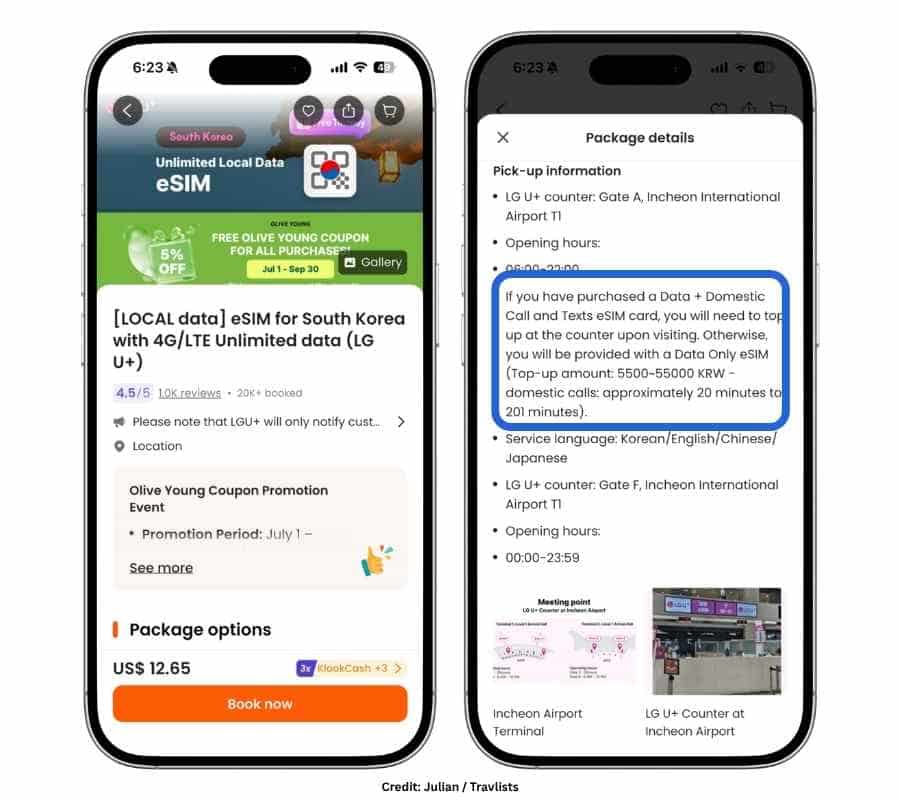
- LG U+: Offers data plans for 1–30 days with incoming and outgoing calls and texts. I would consider this if you’re staying for up to a month. To activate the phone number and add calling credit, you’ll need to visit an LG U+ counter at Incheon International Airport. Book LG U+ on Klook →
- SKT: Offers data plans for 2–90 days with incoming and outgoing calls and texts. You can complete passport verification online between 8 AM and 10 PM KST or visit an airport counter. After verification, you’ll need to top up your eSIM before making outgoing calls or sending texts to Korean numbers. Book SKT on Klook →
If you don’t specifically need a Korean number, aloSIM is another option worth considering. Their Korea eSIM includes a free international phone number through Hushed. It is not a Korean +82 number, but after adding calling credit, you can use it for calls and texts to local and international numbers.
Do You Really Need a Phone Number in Korea?
If you’ve done some research before your trip, you may have read that a Korean phone number is required to access certain apps and services. However, a Korea eSIM with a phone number is not necessary for everything. Even if you have a Korean number, you may still have restricted access to services that require Korean identity verification.
- Naver: You can create a basic account without a Korean phone number. If you’re only using Naver for search or navigation, you may not need an account at all. You may also be able to make some reservations through Naver Map using passport verification instead of a Korean number. Naver Booking can be particularly useful for making restaurant reservations or booking spas and salons.
- KakaoTalk: You can sign up and use KakaoTalk with an international phone number. I did this myself before moving to Korea, and it worked. You can also sign up using a Korean eSIM with a phone number, but having one does not necessarily remove all restrictions since some Korean services require identity verification rather than just a local number.
- Kakao T: You can book a taxi in Korea without a Korean phone number. One option is to choose a ride that allows you to pay the driver directly instead of paying through the app.
- KakaoPay: This requires a Korean phone number and Korean identity verification, typically using a Residence Card (RC), formerly known as an Alien Registration Card (ARC).
- Coupang: To use the domestic online shopping and delivery service, you typically need a Korean phone number. Foreign-issued cards may be accepted depending on the service and payment method.
- Baemin: If you want to order food through Baemin, ordering as a guest is available without a Korean phone number. Foreign cards are accepted.
- NOL World: You can book concert tickets and shows without a Korean phone number through NOL World, the English/global service of NOL. When you sign up, you can create an account using your email address. Many shows have a “Verify Member Only” tag, which means you need to verify your identity before booking. I checked this process myself, and passport verification was available. A Korean phone number was not required in that case. (Booking on NOL’s Korean site requires a Korean number and identity verification.)
If you expect to make frequent calls to Korean numbers, getting an eSIM with a local number can definitely be worth it. But if your main goal is navigation, messaging, booking taxis, ordering food, or using the global versions of Korean apps, a data-only eSIM may be enough.
More importantly, having a Korean phone number does not automatically mean you can complete Korean identity verification. Some local services still require a Residence Card or another form of identity verification, so I wouldn’t get a Korea eSIM with a phone number solely for app access.
Regional or Global eSIMs for Korea, Japan, China, Southeast Asia, & More
If South Korea is just one stop on your trip, you can either get a regional eSIM or a global eSIM depending on where else you’re going. If you’re traveling around East Asia, specifically Japan, China, and South Korea, Nomad has a regional eSIM that works across all three countries. You can choose from 1–20GB of data valid for 7–45 days and connect to networks such as KDDI in Japan, China Unicom and China Mobile in China, and SKT and LG U+ in South Korea. Just note that Nomad does not specifically advertise 5G for this regional plan.
For trips covering Korea and other parts of Asia, you can also consider an Asia eSIM from Klook, which covers 13 countries, Airalo, which covers 18, or Yesim, which covers 16. If your itinerary crosses different continents, a global eSIM from one of these providers may make more sense than purchasing separate country plans.
South Korea eSIM vs. Pocket WiFi vs. SIM Card
I’ve tried all three, and here’s how I’d choose if I were deciding between them.
Pocket WiFi. On my first trip to Seoul, I rented a pocket WiFi from KT because I needed internet access for my laptop. I also rented one from KT for my family when they visited me in Korea. It can be a good option if you’re traveling as a group and want to share the cost and connection across several devices. However, I wouldn’t choose one if I didn’t want to pay a credit-card deposit, carry another device while traveling, or have one more gadget to keep charged. If you’re working from cafés, many also have good WiFi, so you may not need a separate pocket WiFi just for your laptop.
SIM card. This is the closest alternative to an eSIM, except you need to pick it up and physically insert it into your phone. Buying a physical SIM can make sense if you prefer choosing directly between KT, SKT, and LG U+ or want a package that comes with extras. Some tourist SIMs include limited-time benefits such as shopping coupons or transportation cards.
eSIM. This is the option I would usually choose for convenience. You don’t need to visit an airport counter unless you’re purchasing a plan that requires identity verification for outgoing calls or SMS. You can install an eSIM before arriving in Korea, top-ups are usually easier, and depending on the provider, you may be able to reuse the same eSIM for a future trip to Korea or another country.
In Closing: The South Korea eSIMs I Would Buy
BNESIM is still my preferred international eSIM provider overall, but I would definitely consider Klook and Ubigi for cheaper unlimited data plans. I would also consider Nomad for its excellent speeds and beginner-friendly installation, which took me just one minute. If I were going back to when I was still visiting Korea as a tourist and needed a local phone number, I would choose LG U+ for trips of up to 30 days or SKT for longer stays of up to 90 days. Both offer options with outgoing calls and SMS.
If you’re still deciding between an eSIM, a physical SIM, or pocket WiFi, our Travel eSIM Hub brings together destination guides, provider reviews, phone compatibility, and a section comparing all three connectivity options side by side. For everything else worth sorting before you land, you can find travel essentials, transportation, tours, attraction tickets, and more on Klook and book with our coupon code TRAVLISTS.
FAQ: South Korea eSIM
How do I know if my phone supports eSIM?
Dial *#06# on your phone. If you see an EID, a 32-digit identification number, your device supports eSIM. On iPhone, you can separately check whether your phone is carrier-unlocked under Settings → General → About → Carrier Lock. If it says “No SIM restrictions,” your iPhone is unlocked.
When should I install my South Korea eSIM?
You can install most South Korea eSIMs before your flight, as long as you have Wi-Fi to download the profile. Check the provider’s activation policy before installing, since validity rules can differ. If the plan starts only when it connects to a supported network in Korea, installing it before departure can make arrival easier.
Do I need Wi-Fi to install an eSIM?
You generally need an internet connection to download and install an eSIM profile. This is why I recommend installing your Korea eSIM before your flight while you still have reliable Wi-Fi, rather than waiting until you arrive at the airport.
Do I need to visit the airport to activate my eSIM?
Not for most data-only eSIMs. Providers such as Klook, Ubigi, Nomad, Airalo, BNESIM, Yesim, Jetpac, and Superalink can generally be installed without visiting an airport counter. However, some Korean carrier plans that include a local phone number, outgoing calls, or SMS may require passport verification or activation procedures at a counter.
Will I lose my home SIM or phone number if I install a Korea eSIM?
No. Installing an eSIM does not remove or replace your existing SIM. On compatible dual-SIM phones, you can keep your home line available for calls and texts while setting your Korea eSIM as the line used for cellular data.
Should I turn off data roaming on my home SIM in Korea?
Yes, if you want to avoid accidental roaming charges. You can keep your home SIM enabled if you need to receive calls or SMS, but make sure cellular data is assigned to your Korea eSIM and that data roaming is disabled on your home line unless you intentionally want to use your carrier’s roaming service.
Do I need to turn on data roaming for my Korea eSIM?
Many international travel eSIMs require Data Roaming to be turned on for the eSIM line because they connect through partner networks in Korea. Follow the setup instructions provided with your specific eSIM rather than assuming the same setting applies to every plan.
Which network is best in South Korea: SKT, KT, or LG U+?
Based on SpeedGeo’s Q2 2026 Korea Mobile Test, SKT had the highest average download speed at 233.1 Mbps, followed by KT at 200.4 Mbps and LG U+ at 154.4 Mbps. In my own daily use in Seoul, however, I have not noticed a significant practical difference between the three for normal browsing and apps.
Which South Korea eSIM was fastest in your tests?
Among the Korea eSIMs I have personally tested for this guide, Nomad recorded my fastest Ookla result at 1.2 Gbps (1,247.72 Mbps) in Seoul. Ubigi reached 293.13 Mbps on Ookla, while Yesim reached 210.2 Mbps. These are individual tests under different conditions, so they should not be interpreted as guaranteed speeds or proof that one provider will always be faster than another.
Why was Nomad’s Google speed test much slower than its Ookla result?
Different speed-testing services can use different servers, routing, and testing methods, so results from the same connection can vary substantially. During my Nomad test, Ookla measured 1,247.72 Mbps download, while Google’s Internet Speed Test measured 111.3 Mbps download and 14.8 Mbps upload. I therefore treat speed tests as evidence of how the eSIM performed during my test rather than a guaranteed speed travelers should expect.
Why did my Nomad eSIM connect to a different Korean network after restarting my phone?
Nomad supports multiple networks in South Korea. During my test, it initially showed LG U+ and LTE, but after restarting my iPhone it connected to SK Telecom and showed 5G. A multi-network eSIM may automatically select among its supported networks. Nomad’s support also confirmed to me that I could turn off Automatic Network Selection and manually select a supported network.
Can I manually switch networks with a Korea eSIM?
It depends on the provider and plan. With Nomad, I was able to access manual network selection because its Korea eSIM supports multiple Korean networks. On iPhone, this can be found under Settings → Cellular → your eSIM → Network Selection. Turn off Automatic if you want to see the networks available to that eSIM. Do not select an unsupported network just because it appears in the list.
Does a Korea eSIM include 5G?
Some Korea eSIMs can connect to 5G, but availability depends on the provider, local partner network, plan, device, location, and network conditions. For example, Nomad showed 5G during my Seoul test after I restarted my phone, while my Ubigi test connected to SKT on LTE and still reached 293.13 Mbps on Ookla. I would not choose an eSIM based on the 5G icon alone.
Can I use a South Korea eSIM as a mobile hotspot?
Most providers support hotspot or tethering, but restrictions can vary by plan. Check the provider’s Fair Use Policy because some plans limit hotspot data separately from regular mobile data. During my Nomad test, I connected my MacBook through my iPhone’s mobile hotspot without issues.
Does unlimited data really mean unlimited data?
Not necessarily unlimited at full speed. Many unlimited Korea eSIM plans use a Fair Use Policy that gives you a certain amount of high-speed data before reducing your speed. For example, the plans compared in this guide can have different high-speed allowances and throttled speeds, so compare the FUP rather than choosing a plan simply because it says “unlimited.”
How much data do I need for a trip to South Korea?
It depends on how you use your phone. Messaging, navigation, restaurant searches, and occasional social media require much less data than watching videos, uploading content, using TikTok extensively, or tethering a laptop. If you are unsure, use the Travlists Data Usage Calculator to estimate your needs based on your trip length and usage.
Do I need a Korean phone number to use Naver Maps, KakaoTalk, or other Korean apps?
Not necessarily. You can use many useful Korean apps and services with mobile data alone. A Korean phone number can be useful for certain reservations, calls, deliveries, or local services, but having a Korean number does not automatically give you access to services that require Korean identity verification.
Does a Korean eSIM phone number let me complete Korean identity verification?
Not necessarily. A tourist eSIM that provides a Korean phone number is different from having a mobile account tied to Korean identity verification. Some Korean services require more than simply receiving a call or SMS, so do not buy a local-number eSIM assuming it will unlock every Korean app or payment service.
Which Korea eSIM should I choose if I need a phone number?
For travelers who specifically need a local Korean number with calling or SMS options, I would look at the Korean carrier eSIMs rather than standard international data-only eSIMs. In this guide, I recommend LG U+ for trips of up to 30 days and SKT as an option for longer stays of up to 90 days, depending on the plan and calling features you need.
Can I receive calls or SMS with a data-only Korea eSIM?
A standard data-only eSIM does not give you a traditional Korean mobile number for regular cellular calls and SMS. You can still use internet-based communication services such as KakaoTalk, Messenger, WhatsApp, FaceTime, and similar apps using the eSIM’s mobile data.
Can I keep receiving OTP or verification texts on my home number?
Potentially, yes, if your phone supports dual SIM and your home carrier allows your line to remain connected in Korea. You can use the Korea eSIM for cellular data while keeping your home line enabled for incoming SMS. However, roaming availability and charges depend on your home carrier, so check its policies before traveling.
Can I install a Korea eSIM directly from a QR code on my iPhone?
Yes, depending on your iOS version and how the QR code is displayed. During my Nomad test on an iPhone 15 Pro, I long-pressed the QR code and selected “Add eSIM,” so I did not need to display the QR code on a second device. The installation itself took me about one minute.
What should I do if my Korea eSIM only shows LTE instead of 5G?
First, make sure the eSIM is enabled, cellular data is assigned to the correct line, and the provider’s required roaming settings are turned on. You can also check your network settings and restart your phone. During my Nomad test, the eSIM initially showed LTE on LG U+, but after I restarted my iPhone it connected to SK Telecom on 5G. However, LTE itself does not necessarily mean the connection will be slow.
Should I choose a Korea eSIM based only on speed?
No. Speed matters, but I would also compare price, high-speed data allowance, Fair Use Policy, hotspot support, network options, installation experience, app usability, customer support, and whether you need a Korean phone number. My fastest tested eSIM was Nomad, but Klook, Ubigi, BNESIM, and the Korean carrier options each make more sense for certain travelers.
Methodology
I live in Seoul and have tested several of the eSIMs featured in this guide myself. When I use one, I look at the full experience — from purchase and installation to speed, hotspot use, customer support, and how easy the plan is to manage.
I also compare current prices, data allowances, Fair Use Policies, local networks, and phone-number options. More importantly, I ask what those differences actually mean for a trip. A cheaper plan is not always better if the high-speed allowance is lower, and a faster network on paper does not always feel different in everyday use.
Where available, I also look at Travlists booking data to see what our readers actually chose. This reflects Travlists readers only, not the entire eSIM market.
Article Updates
- September 5, 2026: Tested and added Nomad eSIM to this guide, including installation, speed tests, mobile hotspot, app experience, and customer support.
Purchase Receipts
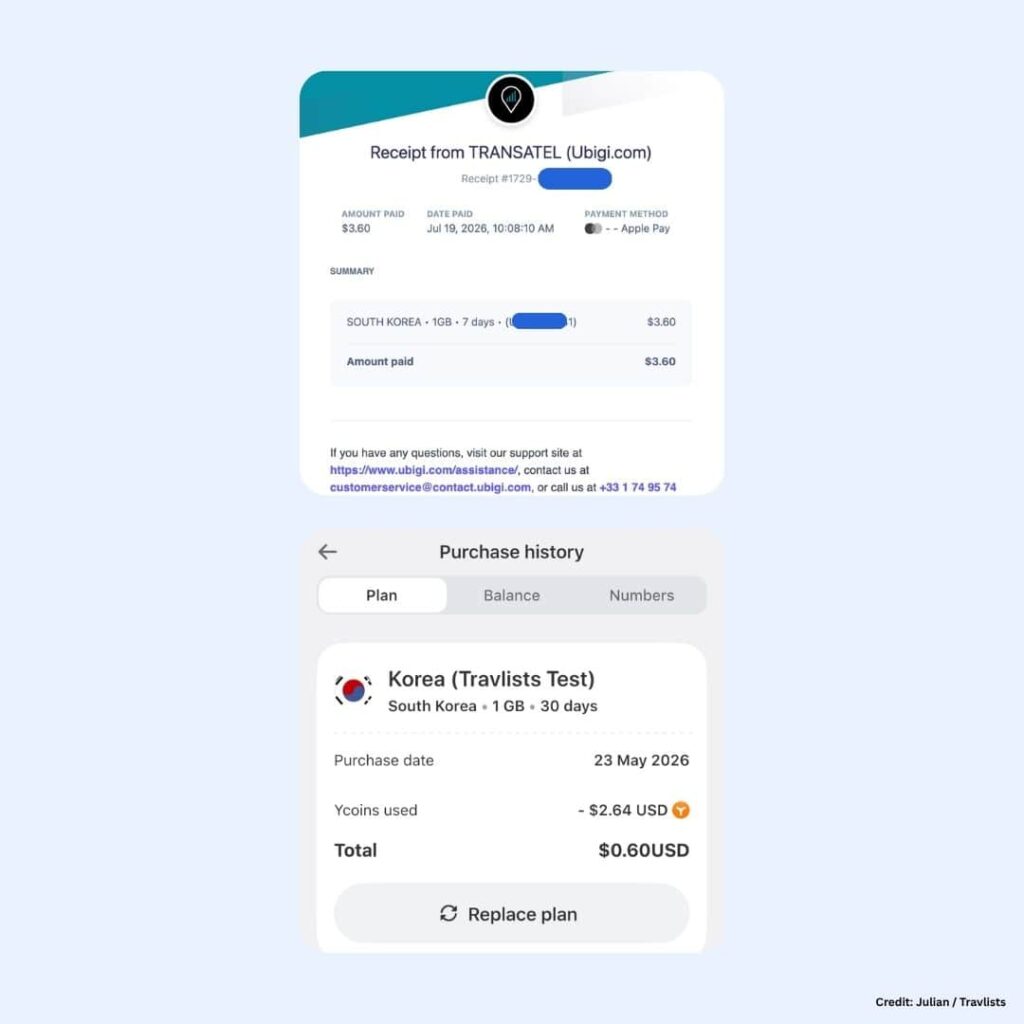
I have below the receipts for some of the South Korea eSIMs I purchased for this review.