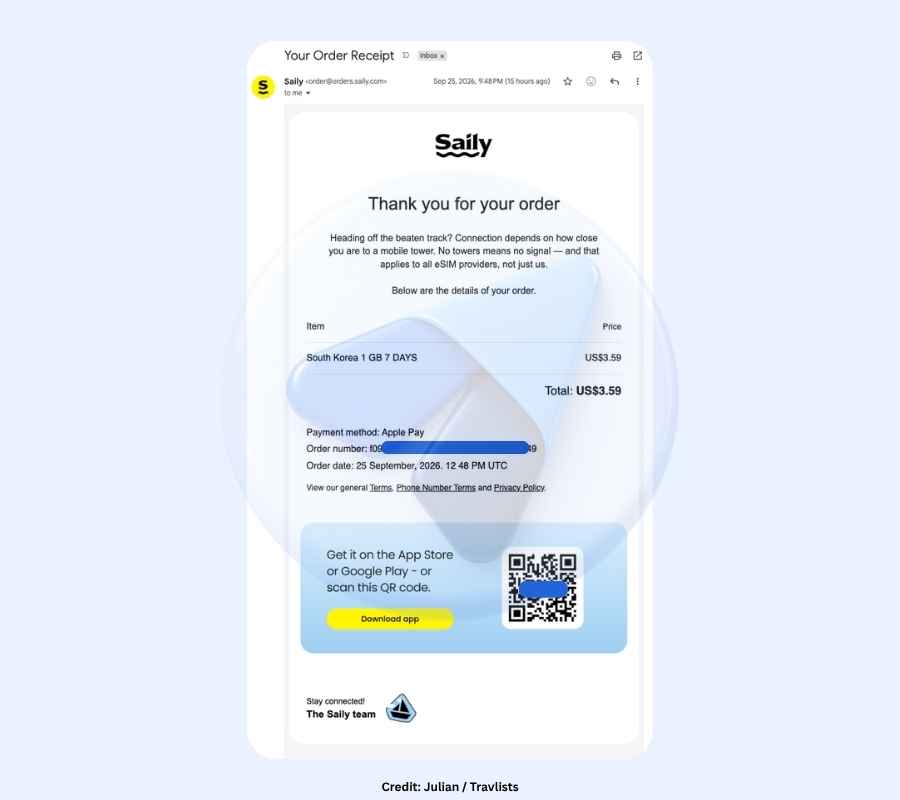
Disclosure: This is not a sponsored review, but Travlists is reader-supported. We may earn a small commission if you book through some of the links on this page. See how we test eSIMs and my purchase receipt.
In a Nutshell
- Setup. Installing Saily was fairly easy based on my experience. It took me just about 1 minute to install the eSIM on my iPhone 18 Pro, and the process was intuitive and beginner-friendly. The app provides a guided installation, so even if you haven’t used an eSIM before, you can easily refer to the step-by-step instructions. View compatible devices and data plans ➜
- Speeds. Saily does not specifically mention the network their eSIM connects to, but the South Korea eSIM I used connected to SKT, a major network in the country. Although my connection stayed on LTE even after restarting my phone, my Ookla Speedtest showed 289.73 Mbps download. This is still pretty fast, and I had no issues using Google Maps, TikTok, YouTube Music, Safari, and KakaoTalk. To compare with other providers I tested in Seoul, Nomad scored higher on Ookla at 1,247.72 Mbps (5G), while Ubigi was only slightly faster at 293.13 Mbps (LTE).
- Saily and NordVPN. Saily is the eSIM created by the team behind NordVPN, one of the leading VPN providers offering tools for encrypted connections and enhanced privacy. When I used Saily in South Korea, I was able to browse with no ads and even changed my virtual location to Japan and the US. However, know that NordVPN and Saily are still different products, and you won’t get all the functions of NordVPN with a Saily eSIM.
Saily Promo Code
Quick Book: Get Saily eSIM
Use Saily coupon code TRAVLISTS to get 10% off your eSIM plan. I personally used the code when purchasing the South Korea eSIM tested in this review, and it also worked on other plans I checked, including Japan, China, the UK, and more. Feel free to send a message if anything seems off.
Choose your Saily eSIM
How Travlists Met Saily
When I started reviewing eSIMs in 2023, Saily wasn’t around yet. According to their website, Saily launched in March 2024, making it newer than providers like Airalo, BNESIM, Nomad, Ubigi, and Yesim. Interestingly, however, they are already one of the most rated eSIMs online with more than 31,000 reviews posted on sites like Trustpilot alone. Other providers like Airalo, Nomad, and Ubigi have 40-50k reviews on the same website, as of October 3, 2026.
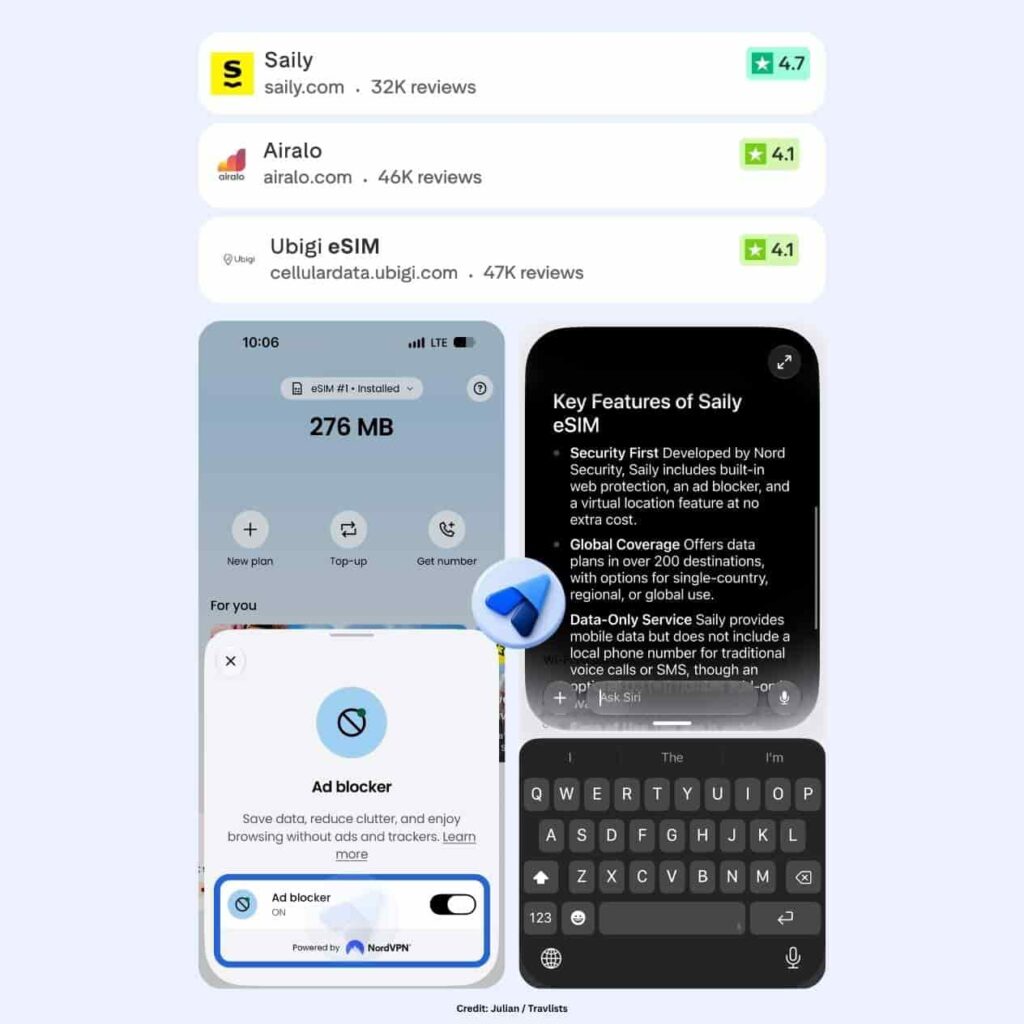
One thing that distinguishes Saily from other brands is their ties with NordVPN. I definitely think that this has helped with their branding. I first heard about Saily from one of their affiliate managers who introduced the brand as “crafted by the brilliant minds behind NordVPN.” This caught my attention because NordVPN was already a brand I knew, and it really got me curious whether Saily eSIMs could offer similar security features.
While Saily does not come with the full VPN service offered by NordVPN, their eSIMs do have security features that I find appealing. These include an ad blocker and a virtual location switcher, both of which I tested for myself. They come at no additional cost, so anyone using a Saily eSIM can access these extra features. I think this is one of Saily’s key selling points and helps make the service more appealing to travelers.
However, it is worth noting at this point that their offerings are not unique to the brand. For example, Yesim offers a free VPN for iPhone users, while aloSIM eSIMs come with a complimentary phone number. But as I’ll share in my detailed hands-on review later on, I had an overall pleasant experience with Saily and it won’t be the last time I use their eSIMs.
Reusable and Transferable eSIMs
Two things worth knowing before you buy: Saily eSIMs are reusable and can also be transferred to another compatible device. This is particularly good to know if you don’t want to keep installing a new eSIM every time you travel (whether you’re returning to the same country or visiting a different destination) or if you plan on changing your phone soon.
You can keep the same Saily eSIM installed and add data for other supported destinations through the app. If you switch phones, Saily also lets you transfer the eSIM to another eSIM-compatible device instead of purchasing a completely new profile.
Pricing and Coupon Code
Saily is not always the cheapest data eSIM for tourists. However, I find that they still offer competitive pricing and good value for money, especially with the free security tools.
For South Korea, Saily’s 1GB plan for 7 days originally costs $3.99 without any coupon codes. For the same data allocation, Klook offers their eSIM for $3.40 while BNESIM is priced at $2.80 (and has a longer 30-day validity). When compared to Airalo’s $4 pricing for 1GB for 3 days and Nomad’s $4 cost for 1GB for 7 days, Saily is just cheaper by a cent.
Here’s a quick pricing comparison for three countries:
| Destination | Saily 10% off with code TRAVLISTS | Airalo 10% off with code TRAVLISTSALL | Ubigi 10% off with code TRAVLISTS |
|---|---|---|---|
| China | Saily 10% off with code TRAVLISTS $4.49 – $39.99 1-20GB for 7-30 days $22.99 – $72.99 Unlimited data for 5-30 days | Airalo 10% off with code TRAVLISTSALL $4 – $49 1-50GB for 3-30 days $12 – $69 Unlimited data for 3-30 days | Ubigi 10% off with code TRAVLISTS $4 – $33 1-25GB for 7-30 days $24 – $69 Unlimited data for 8-30 days |
| Spain | Saily 10% off with code TRAVLISTS $3.99 – $22.99 1-20GB for 7-30 days $16.99 – $63.99 Unlimited data for 5-30 days | Airalo 10% off with code TRAVLISTSALL $4 – $39 1-50GB for 3-30 days $11 – $63 Unlimited data for 3-30 days | Ubigi 10% off with code TRAVLISTS $5 – $34 3-50GB for 30 days $18 – $44 Unlimited data for 8-30 days |
| Canada | Saily 10% off with code TRAVLISTS $5.29 – $43.99 1-20GB for 7-30 days $16.99 – $63.99 Unlimited data for 5-30 days | Airalo 10% off with code TRAVLISTSALL $7 – $84 1-50GB for 3-30 days $19 – $86 Unlimited data for 3-30 days | Ubigi 10% off with code TRAVLISTS $5 – $59 1-50GB for 7-30 days $29 – $69 Unlimited data for 8-30 days |
Based on unlimited data plan prices I checked on October 3, 2026, Saily was the cheapest of the three for a 30-day plan in Canada, while Ubigi was cheaper in Spain, and Airalo and Ubigi were tied in China.
For fixed data plans, Saily’s largest plan tops out at 20GB, while Airalo and Ubigi offer larger plans in some destinations that work out cheaper per GB. If you only need a small plan for a short trip, though, starting prices are fairly close across all three, so features like Saily’s ad blocker and Virtual Location may matter more than a dollar or two.
To get a 10% discount on Saily eSIMs, apply coupon code TRAVLISTS upon checkout. The code was provided to us by Saily with no expiration date.
Saily eSIM Review: Hands-On Test in South Korea
Even if South Korea is not your destination, you may still find this section helpful, especially if you’re looking for information on how to install Saily. If you’re traveling to Seoul, Busan, Jeju Island, or other parts of Korea, you’re in luck. You’ll be able to see a real-world test before deciding whether to buy. For reference, I purchased Saily’s 1GB data plan for 7 days on September 25, 2026, and paid $3.59 after applying coupon code TRAVLISTS. I tested it on my iPhone 18 Pro in Seoul near Yeouido.
| What Saily Says | My Experience |
|---|---|
| Purchase: Easy online purchase and multiple payment methods | I paid $3.59 with Apple Pay after applying TRAVLISTS. I had to log in before paying since there is no guest checkout. |
| Installation: App-guided installation | Installing the eSIM through the Saily app took about 1 minute, with no QR code needed, and the guided steps made it easy. |
| Activation: Plan activates at your destination or automatically after the activation period | I turned on the line in Seoul and was online by 9:53 pm. The app detected each step I completed in my iPhone settings. |
| Speed: 3G, 4G, LTE, or 5G depending on the local network | In my Seoul test, Saily reached 289.73 Mbps download on Ookla while connected to SK Telecom on LTE, but latency was higher than I expected at 209 to 230 ms. |
| Security: Built-in Ad Blocker and Virtual Location | Both worked. Ad spaces on the BBC website were blank with Saily, and I switched my Virtual Location to Japan and the US. |
| Support: 24/7 chat | Saily AI replied in under a minute, but it didn’t recognize “VPN,” and I never reached a human agent. |
Purchase
Beyond the straightforward checkout flow and payment methods, I noticed several things that are worth highlighting for when you decide to get Saily:
First, the 3% Saily Credits. Every plan earns 3% back in the form of Saily credits, which you can use toward future purchases. Mine was credited instantly, which is very useful if I ever want to top up or purchase another plan. The credits that I had showed a 1-year validity.
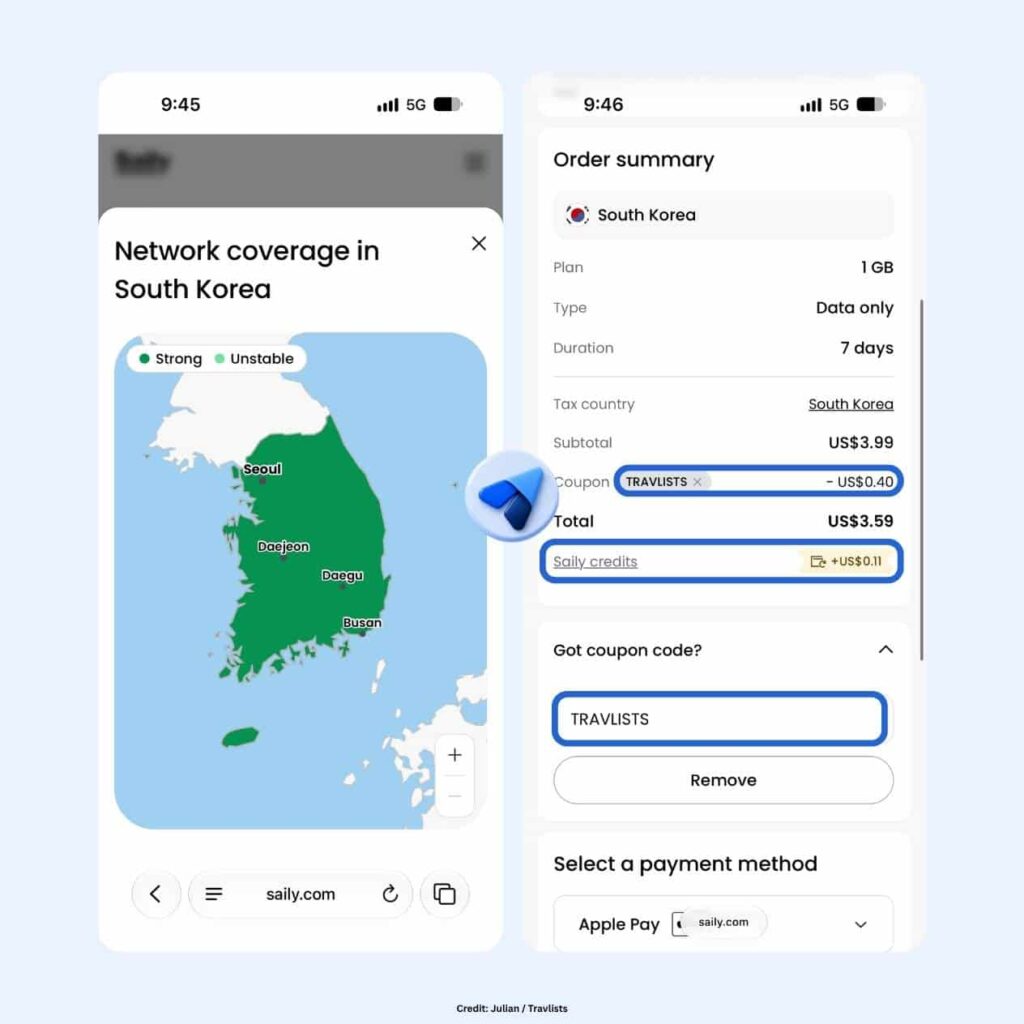
Second, Saily’s Coverage Map. This is the first time I have seen something like this when purchasing an eSIM, and it showed that the entire country, including Jeju Island, is covered by Saily with strong signal indicated across South Korea. It would be easy for anyone to dismiss this as a gimmick, so I checked some of their other maps. In the United Kingdom, strong connections are mostly shown around places like London, Birmingham, and Manchester, with some weaker spots farther north. I noticed a similar mix of strong and weaker coverage in Japan and the USA. For China, the Strong Connection spots include Beijing, Shanghai, Chongqing, Wuhan, and nearby areas, while many other parts of the country are shown with weaker or no coverage. Coverage can change over time and the map is still Saily’s own estimate, but I find this a useful and fairly transparent indicator of where their service is expected to work best. View Coverage Map of your destination ➜
Third, Auto Top-up. Saily gives you the option to turn on auto top-up during checkout. For most users, I’d recommend keeping this off so you can control the charges, unless you don’t want to keep thinking about topping up or potentially running out of data in the middle of your trip. Just keep in mind that if you bought your plan using a discount code or with Saily credits, the automatic top-up will be charged at full price.
For my final observation, which is more practical: there is no guest checkout. While I was able to apply the Saily coupon code TRAVLISTS and see the 10% discount while logged out, I had to create or link an account before I could make the payment. I linked my Google account on the spot, checked out using Apple Pay (other options include Google Pay, PayPal, credit/debit cards), and received the confirmation email right away.
Installation & Activation
The order confirmation I received from Saily did not include any instructions on how to install the eSIM. There was just a QR code to download the app on an iPhone or Android device. Setup methods are usually covered in the emails sent by other providers, including Nomad, BNESIM, Yesim, Klook, and Ubigi. Typically, I would receive a separate QR code for the eSIM and proceed to long-press it to install. However, Saily has a helpful onboarding screen on their app, which I found just as simple.
Once I opened the Saily app, it retrieved my eSIM automatically and walked me through three steps: set up your eSIM, arrive at your destination, and select your Saily eSIM to use your plan. There is also a “Set up later” option if you are not ready yet. Saily then asked whether I was installing the eSIM on my own device or on someone else’s. The second option is a thoughtful touch for anyone managing eSIMs for family members, like kids or parents who don’t have their own Saily account.
I started the installation at 9:49 pm, and my iPhone showed the usual system “Activate eSIM” prompts. At 9:50 pm, just a minute later, it showed that my Saily eSIM was ready. This ties Saily with Nomad for the fastest installation I have experienced, compared with 3 minutes for Klook and 4 minutes for Yesim. As I went through the installation and activation steps, it also felt like the Saily app was guiding me in real time.
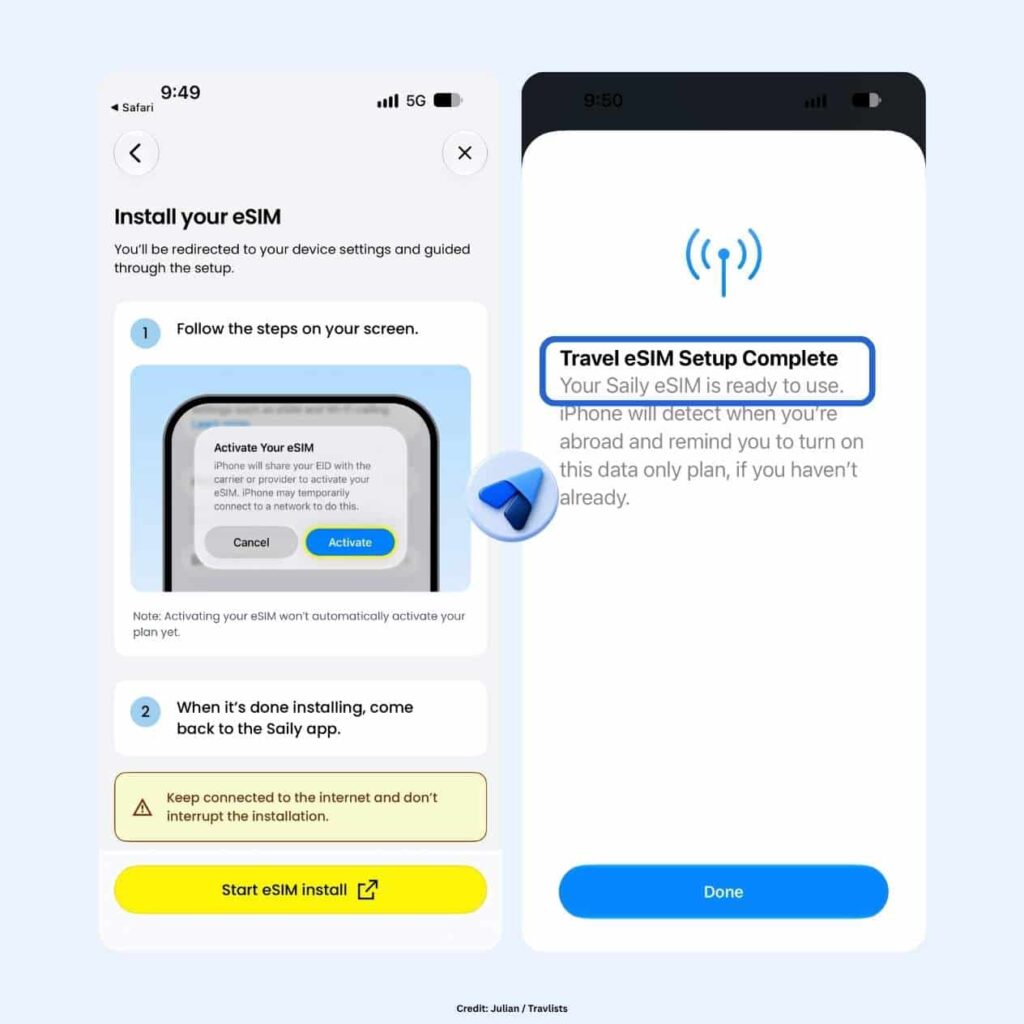
How to Install Saily eSIM on an iPhone
Before you proceed, note that installing the eSIM doesn’t start your plan.
- Download the Saily app and log in to the account you used for your purchase.
- Tap “Let’s start” on the onboarding screen, then choose whether you are installing the eSIM on your own device or on someone else’s.
- Start the installation and follow your iPhone’s prompts to activate the eSIM. No QR code scanning is needed.
- When asked where you will use the eSIM, select Abroad and Data Only.
- Wait for the Saily app to confirm that your eSIM is installed.
How to Turn On Saily eSIM for Mobile Data
Follow these steps once you have arrived at your destination or are ready to use your plan. The Saily app shows the same steps as you go, so you can also follow along there. Moreover, know that Saily plans have a 180-day activation period. You get 180 days from purchase to start using your plan. If you haven’t done so by then, Saily says the plan will be automatically activated.
- Go to Settings > Cellular on your iPhone and find your new eSIM under SIMs. Mine was labeled “Travel – Webbing” by default.
- Open it and switch on Turn On This Line. Scroll below, and turn Data Roaming on.
- Return to the Saily app. In my case, the app detected that the line had been turned on and moved me to the next step.
- Go back to Cellular > Cellular Data and select your Saily eSIM so your phone uses it for data.
- Keep Allow Cellular Data Switching turned off. Saily recommends this to avoid roaming charges on your primary line.
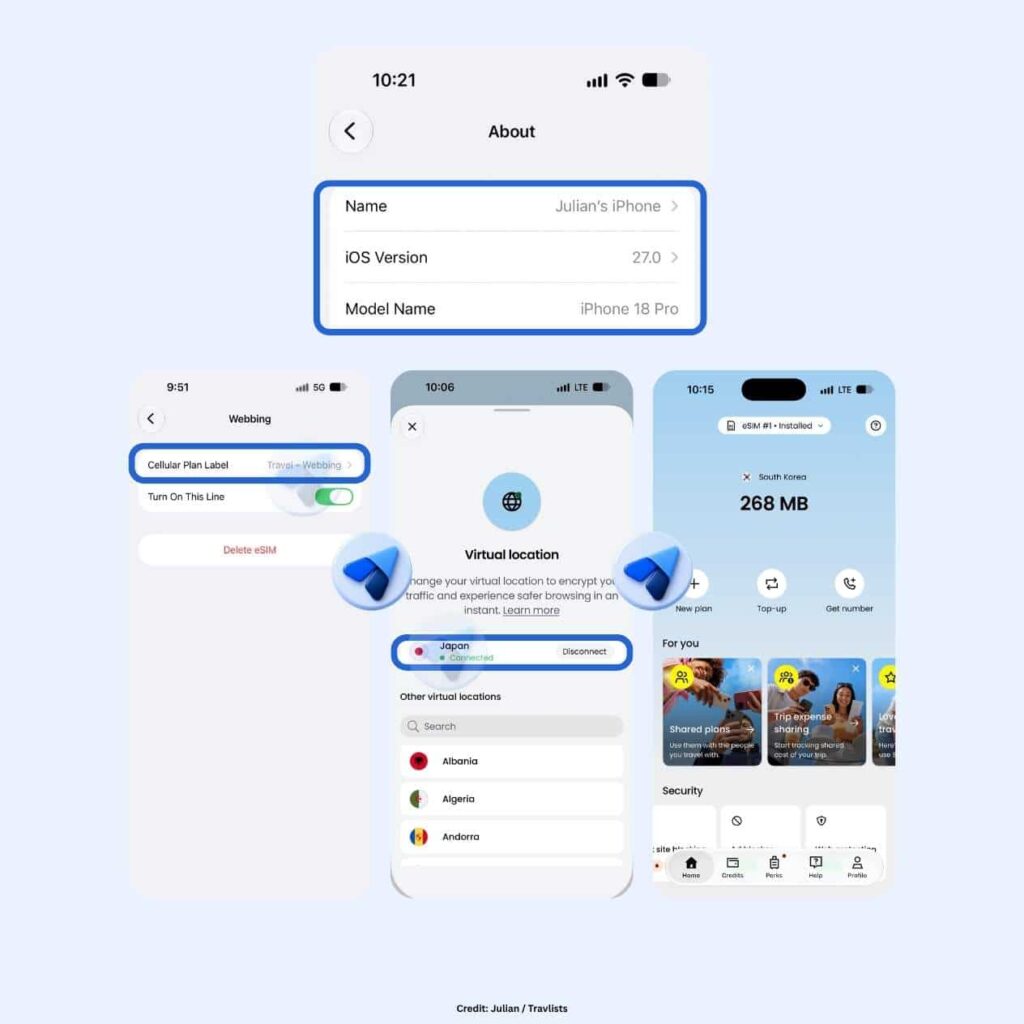
You may notice that your iPhone shows “Webbing” instead of “Saily.” This surprised me at first, since I was expecting to see the Saily name somewhere on the cellular line. In my case, the eSIM appeared as “Travel – Webbing,” while Network Selection showed KOR SK Telecom once the line was active. You can rename the line to “Saily” under Cellular Plan Label if you want to make it easier to recognize later. (Webbing is a global data connectivity company, and several publications list them as one of the network partners Saily works with, along with 1GLOBAL.)
Saily eSIM Speed Test
After installing the eSIM, I was able to see that I was connected to SKT on LTE speeds. Before running my speed tests, I restarted my iPhone just as I did with Nomad. However, unlike Nomad, which switched from LTE to 5G after the reboot, Saily stayed on LTE even though my iPhone was set to 5G Auto. Both eSIMs connected to SK Telecom, so this was an interesting difference.
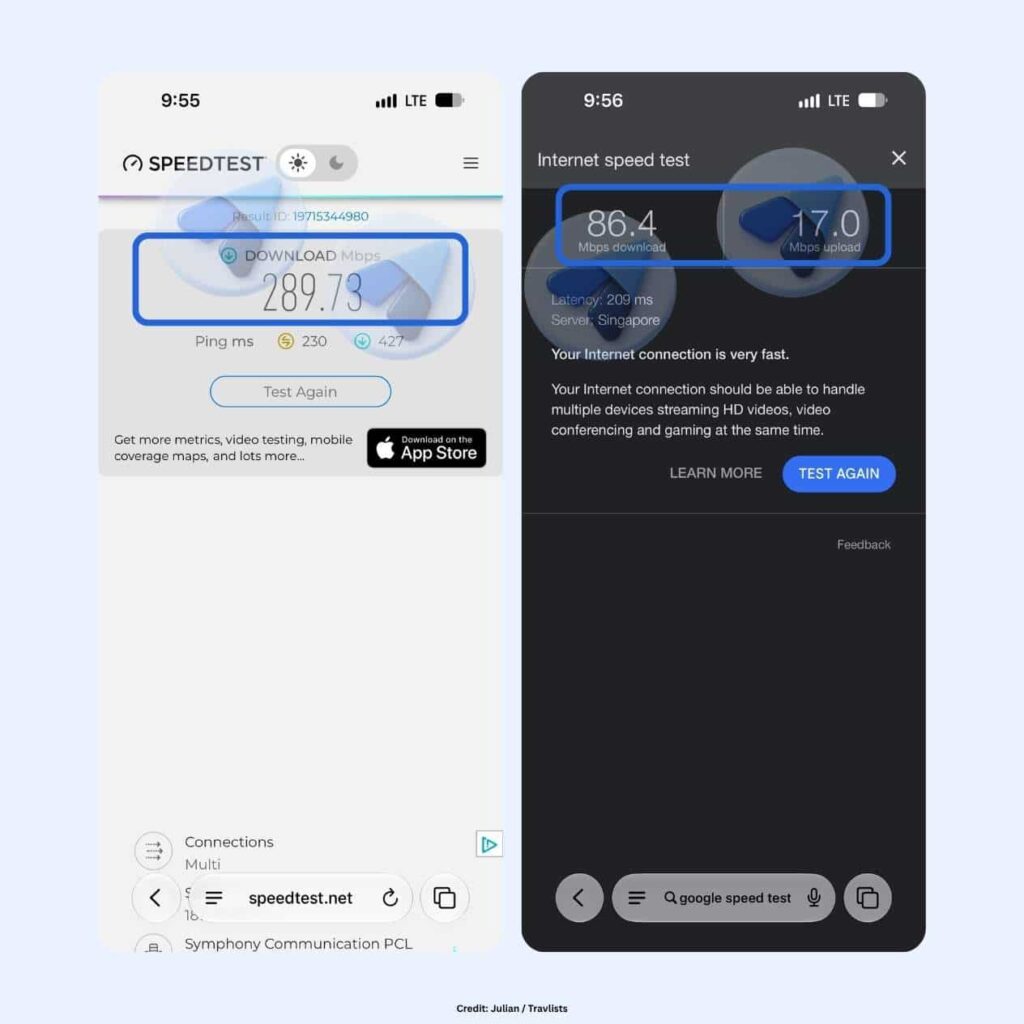
Still, Saily was fast. Ookla recorded 289.73 Mbps download with 230 ms latency, while Google Internet Speed Test showed 86.4 Mbps download, 17.0 Mbps upload, and 209 ms latency. For context, SpeedGeo reported an average mobile speed of 233.1 Mbps for SK Telecom in Q2 2026, meaning my Ookla result was about 24% higher even on LTE.
What stood out more was the latency. Both tests automatically connected to servers in Singapore (even though I was in Seoul), which may have contributed to the delay. In actual use, though, I had no issues with maps, messaging, social media, or streaming. Higher latency may be more noticeable during video calls or online gaming, but for typical travel use, Saily still felt fast to me.
Here’s how Saily compared with other eSIMs I have tested in Korea on Ookla:
- Nomad: 1,247.72 Mbps (SK Telecom 5G)
- Ubigi: 293.13 Mbps (SK Telecom LTE)
- Saily: 289.73 Mbps (SK Telecom LTE)
- Yesim: 210.2 Mbps (LG U+ 5G)
- Klook (Asia eSIM): 88.58 Mbps (SK Telecom 4G)
These tests were done on different dates, devices, and locations, so I wouldn’t treat this as an exact ranking. Living in Seoul has gotten me used to fast mobile connections, and for traveling and everyday use, all of these providers felt fast enough.
While speed tests are a good indicator of the browsing experience, keep in mind that the quality of your internet connection ultimately depends on the local networks Saily partners with. Your device, location, and network conditions can also affect the experience.
Performance
Speed tests are useful, but what matters most when traveling is whether your apps actually work. I’m happy to say I encountered no issues. I searched for Seoul Station on Naver Map, looked up restaurants on Google Maps, checked KakaoTalk, browsed Coupang, scrolled through TikTok, streamed music on YouTube Music, and even chatted with ChatGPT, Claude, and Gemini.
My speed tests showed relatively high latency and both connected to servers in Singapore, but I did not notice any obvious slowdown during everyday use. Korean apps like Naver Map, KakaoTalk, and Coupang also loaded normally, which is reassuring if you’re worried about using local apps while connected through a travel eSIM.
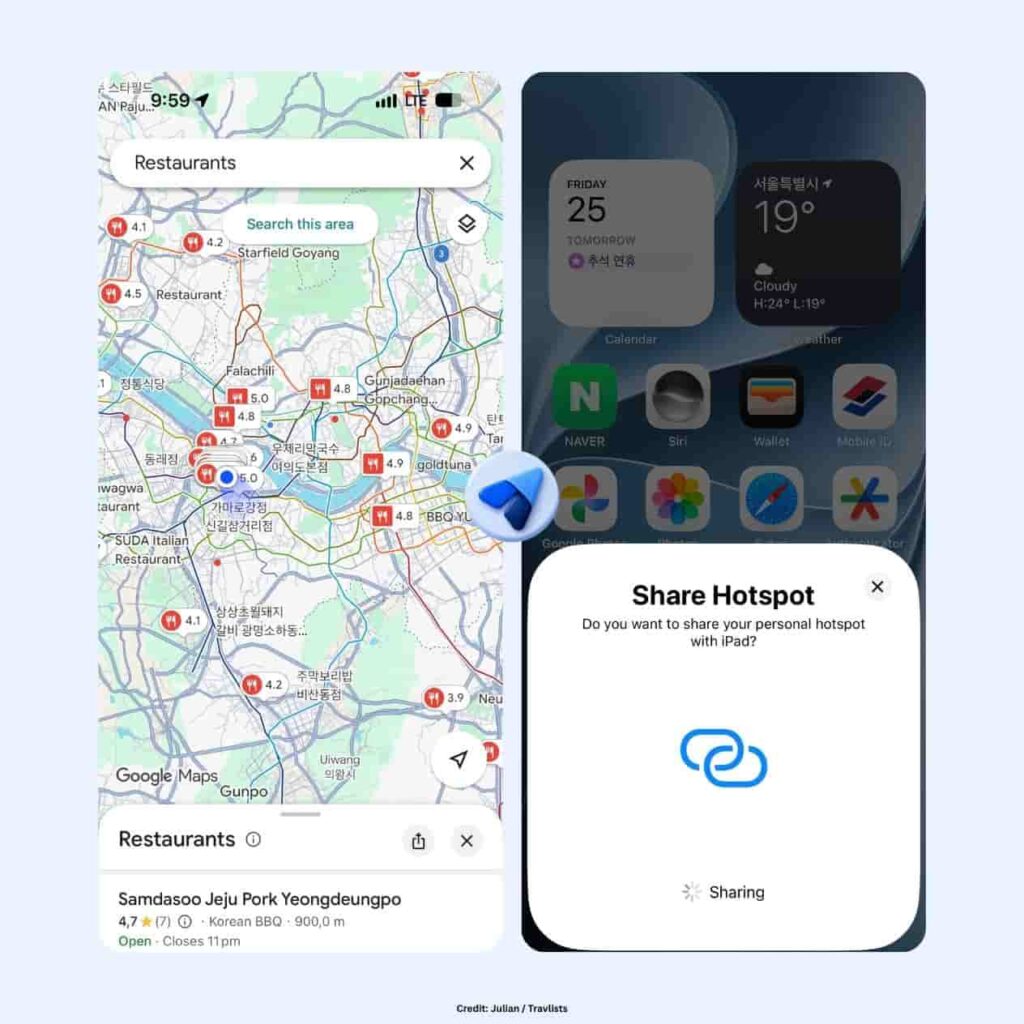
Mobile Hotspot
Yes, Saily supports hotspot or tethering and it worked well in my test. I turned on Personal Hotspot on my iPhone, connected my iPad with its own cellular data switched off, and opened travlists.com using the Saily connection. The page loaded without any problems, so if you need to share data with a tablet or laptop while traveling, this is one feature I can confirm worked for me.
Saily App, iPhone Widget, & Referral Program
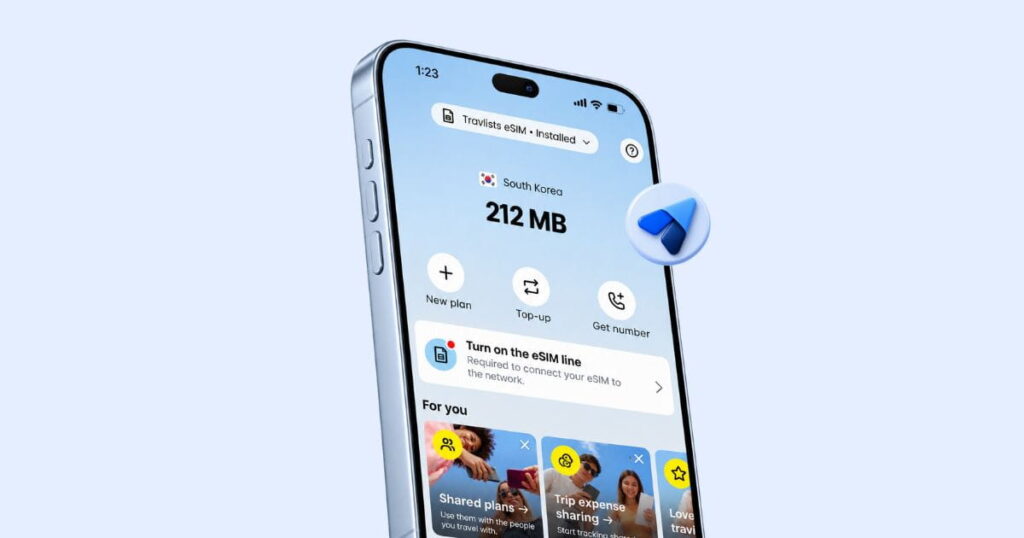
By the time I finished setting up the eSIM, I had already spent quite a bit of time inside the Saily app, and this is probably where I started appreciating the service more. Unlike some eSIM apps that I mainly open to install a plan or check how much data I have left, Saily packs quite a lot into one place. From the home screen, I could see my remaining data, buy a new plan, top up, get a US phone number, manage shared plans, split trip expenses, and access the security features I mentioned earlier.
There is also a Credits section, which is where I saw the 3% cashback from my purchase. I earned US$0.11 from this test, and the app showed that my credits would remain valid for one year. Saily also has a referral program, where you and a friend can each get US$5 in credits, or US$10 if your friend buys an Ultra plan. The app also has a Perks section with travel-related extras such as airport lounge access, fast-track services, luggage storage discounts through Bounce, and airport transfers through Welcome Pickups. I wouldn’t say these are reasons on their own to choose Saily, but I like that the app gives you more to do with your credits than simply applying them to another eSIM.
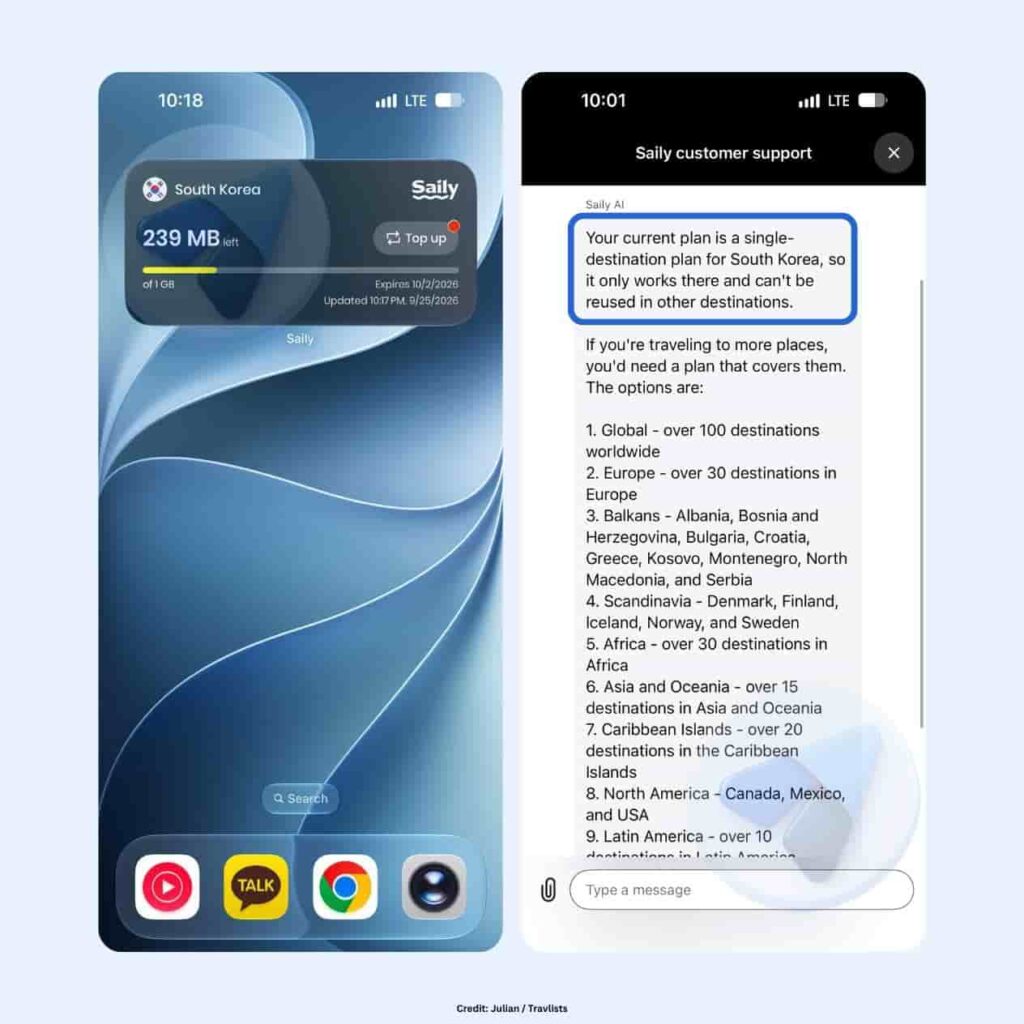
One feature I ended up liking more than expected was the iPhone home screen widget. I tested both the small and medium versions, and both showed my remaining data and a progress bar without requiring me to open the app. The medium widget was more useful because it also showed my plan’s expiry date and a Top up button. At one point, mine showed 239MB left out of 1GB and an expiry date of October 2, 2026, which matched the 7-day validity of my plan.
Saily Customer Support
Since I didn’t run into any connectivity problems during my test, I used Saily’s support chat to ask a few questions that I thought travelers might realistically have. The Help tab itself is easy to find and includes the Help Center, a “Chat with us” option, refund requests, network details, and a short getting-started section.
My first question was whether I could reuse my South Korea eSIM in another country. Saily AI replied in under a minute and explained that my plan was only valid in South Korea, while regional and global plans would be better if I wanted coverage across multiple destinations. So far, so good.
Then I asked, “How do I turn on VPN?” This was where Saily AI stumbled. It told me the question was outside what it could help with, even though Saily has a feature called Virtual Location that serves a similar purpose inside the app. When I changed my wording and asked how to change my Virtual Location instead, it immediately gave me the instructions I needed.
I also tried asking for a human agent. Rather than transferring me right away, Saily AI first asked what I needed help with, and I never ended up speaking with a person during this test. At one point, the chat also briefly disconnected and duplicated one of my messages after reconnecting. I couldn’t tell whether that came from the support chat or my connection, so I wouldn’t read too much into that one incident.
My takeaway is that Saily AI is fast when you use the same terminology as the app, but it could do a better job understanding how regular travelers might phrase their questions. Someone looking for a “VPN,” for example, may not immediately know that Saily calls the feature “Virtual Location.”
Saily Security Features
If you’ve read this far, you already know that Saily’s security features are one of the reasons the brand caught my attention in the first place. According to Saily’s own timeline, these tools were added to the app in December 2024, and they come at no extra cost when using a Saily eSIM.
I don’t normally have this much to test on an eSIM beyond the internet connection itself, so I spent some extra time playing around with these features. Some turned out to be more useful to me than others, and I’ll make it clear which ones I actually tested.
Virtual Location
Saily’s Virtual Location lets you change the country your internet traffic appears to be coming from. Saily says there are more than 115 virtual locations available, and the app also describes the feature as encrypting your traffic.
During my test, I connected to Japan first and then switched to the United States within the same minute. Both changes happened quickly, and choosing another country was as simple as searching the list and tapping the location I wanted.
If you’re looking around the Saily app for something similar to a VPN, this is probably the feature you’re looking for. Just remember that Saily calls it “Virtual Location,” not VPN, which became surprisingly important when I tested their customer support.
Ad Blocker
This was the security feature I was most curious about, and it ended up being the one I appreciated the most. Saily’s Ad Blocker was already turned on when I checked the app, and its settings page showed that the feature is “Powered by NordVPN.”
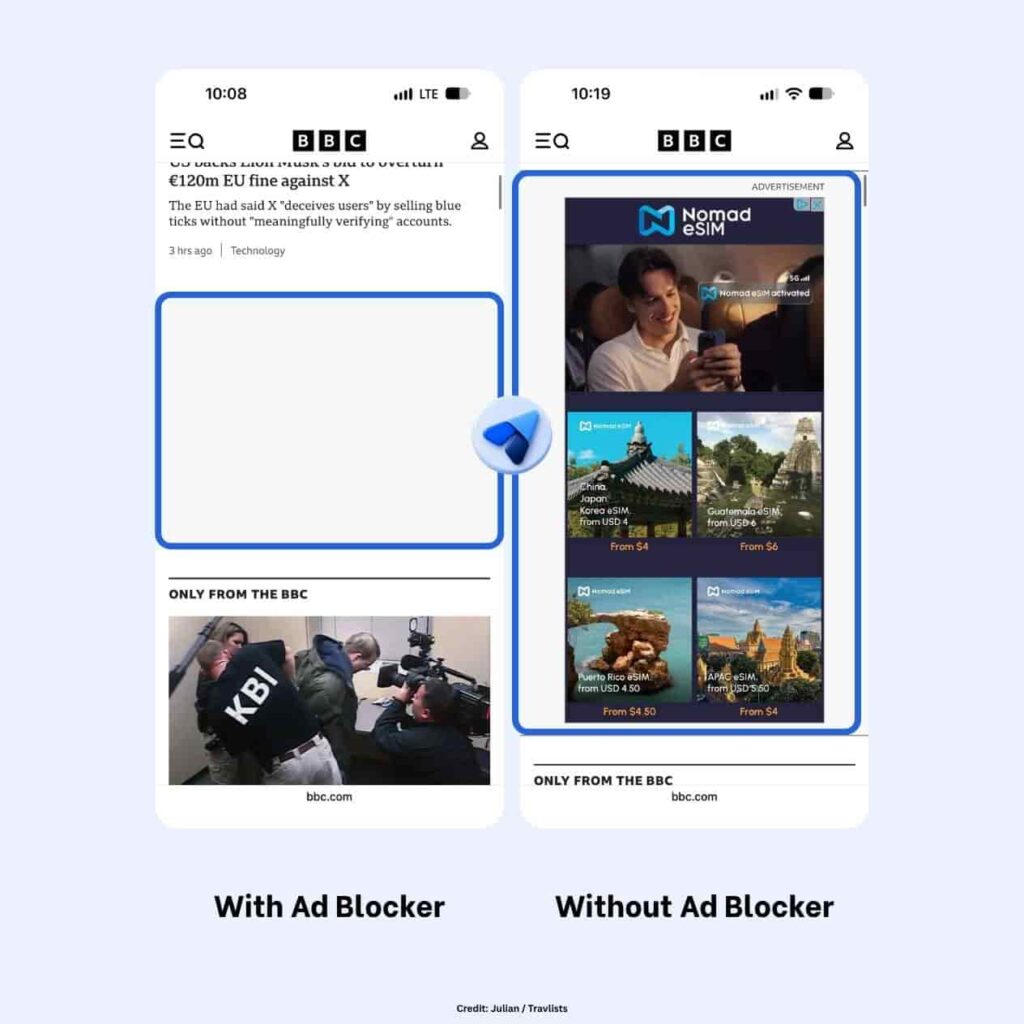
Naturally, I wanted to see if it actually did anything. I opened the BBC website while using Saily and saw blank gray spaces where advertisements would normally appear. Later that evening, I opened the same page without Saily, and those spaces were filled with labeled ads.
I liked this more than I expected. Aside from making some websites feel cleaner and less distracting, Saily says blocking ads can also reduce data usage. I was testing with only a 1GB plan, so anything that could help stretch that allowance a little further was welcome.
Saily Phone Number
Saily’s regular eSIM plans, including the South Korea plan I tested, are data-only, so they do not include a phone number for calls or texts. If you need one, though, Saily sells a separate US phone number add-on, which you can find by tapping “Get number” on the app’s home screen.
Saily describes it as “one phone number that works everywhere,” which I can see being useful for travelers who want a separate number for calls and texts without relying entirely on their home SIM. At the time of my test, the add-on cost US$1.99 per month, US$4.99 per quarter, or US$11.99 per year. The yearly option works out to about US$1 per month, and all three plans also earn 3% back in Saily credits.
I did not subscribe to the phone number for this review, so I cannot comment on call quality, texting, or how reliable it is in everyday use. If having a phone number is important for your trip, it may also be worth comparing Saily with other providers. For example, aloSIM includes a complimentary phone number with its eSIMs, while BNESIM sells virtual numbers separately.
Saily Coverage, Saily Ultra, & Cruise Plans
Saily has expanded quite a bit beyond the regular single-country eSIM I tested in South Korea. Depending on how you travel, you can also choose regional and global plans, subscribe to Saily Ultra for frequent trips, or even get a dedicated data plan for a cruise. I spent some time going through these options because they may make more sense than a standard eSIM if you’re visiting several countries or traveling more often.
Coverage
Saily says their eSIMs cover more than 200 destinations. Aside from single-country plans like the one I bought, you can also choose regional plans for Europe, Asia and Oceania, North America, Latin America, and the Middle East and North Africa, as well as a Global plan if you’re visiting several regions in one trip. Plans range from 1GB up to unlimited data, depending on the destination. If you want to know how well Saily is expected to perform in a specific country, I suggest checking the coverage map on the destination page, like I did for South Korea, the UK, Japan, the US, and China.
Saily Ultra
Saily Ultra is Saily’s premium monthly plan, and it goes beyond a regular eSIM. Instead of buying data for each trip, you pay a subscription that renews automatically every month and gives you data in more than 121 destinations. Saily markets it as unlimited, but it’s worth knowing how that works: you get 30GB of high-speed data each month, after which your speed drops to 1 Mbps.
What makes Ultra interesting is everything bundled with it. According to Saily, subscribers get one airport lounge pass and one fast-track pass every month, both of which can roll over for up to three months, automatic lounge access at selected airports if your flight is delayed by more than two hours, and a subscription to NordVPN, NordPass, NordLocker, and Incogni. Ultra also earns 8% back in Saily credits instead of the usual 3% and comes with priority customer support. Saily also says you can cancel anytime.
I haven’t tried Saily Ultra, so I can’t say whether it’s worth it yet. For frequent travelers who already pay for a VPN or airport lounge access, though, it could be worth doing the math. If you’re only traveling once or twice a year, a regular plan like the one I bought will likely be enough.
Cruise Plans
This is one of the more unique offerings I’ve come across while reviewing eSIMs. Saily’s cruise plans work on more than 25 cruise lines, including Royal Caribbean, Carnival, Disney Cruise Line, Norwegian, Princess, MSC, Celebrity, and Holland America. According to Saily, these plans activate automatically once your ship is more than 12 nautical miles from the coast and connect through a maritime satellite network. When connected, your phone may show “901-18,” “WMS,” or “Cellular at Sea” as the network name.
A few things to keep in mind: cruise plans don’t support regular calls or SMS, so you’ll need to rely on apps like WhatsApp, FaceTime, or Telegram. Hotspot is supported. Cruise data is also much more expensive than land data. At the time of writing, plans ranged from US$16.99 for 500MB valid for one day to US$109.99 for 10GB valid for 30 days. For comparison, my 1GB South Korea plan cost US$3.99 before the discount, while the 1GB cruise plan costs US$29.99.
I haven’t used a Saily cruise plan myself, so I can’t speak to the satellite connection yet, but if you’d rather not pay for your cruise ship’s own Wi-Fi package, it may be worth comparing.
Saily eSIM Plans Booked by Travlists Readers
Aside from plans and pricing, I also looked at what Travlists readers actually booked after reading our eSIM guides. Between April 19, 2025 and September 11, 2026, we tracked 54 Saily eSIM bookings made through our affiliate links. The UK and China stood out clearly, accounting for 33 of those bookings, or just over 60% combined.
Here are the Saily destinations booked most often by Travlists readers during that period:
There were also bookings for Belgium, Brazil, Croatia, the Dominican Republic, Iceland, Morocco, Panama, and Portugal, with one booking each. I find the UK and China results particularly interesting because the difference between them was only one booking, while the rest of the destinations were much more spread out.
Of course, 54 bookings is still a relatively small sample, so I would not use this data to say where Saily performs best or what travelers in general prefer. It simply reflects what Travlists readers booked through our affiliate links during the stated period.
Saily is also still a much less frequently booked provider among Travlists readers compared with some of the other eSIM brands we cover. Over the exact same period, we tracked 13,495 bookings for BNESIM, compared with 54 for Saily. Still, based on my own test, I think Saily is worth considering if you value an easy setup process and extras like an optional US phone number, Virtual Location, an ad blocker, and a trip expense-sharing tool.
In Closing: Would I Recommend Saily eSIM?
Yes, I would recommend Saily based on my experience. Although my connection stayed on LTE instead of the 5G speeds I am used to in Korea, and I did not know in advance which local network I would be connected to, I was happy to see my eSIM connect to SK Telecom. Speeds were still relatively fast, and more importantly, I had a good browsing experience throughout my test. Maps, messaging, social media, streaming, and the other apps I normally use all worked without any issues.
Personally, I would use Saily again if I wanted to take advantage of features like the ad blocker. Removing distracting ads while browsing is something I personally liked, and it is one of the few Saily features that genuinely made the experience feel different from using a regular travel eSIM. I also liked having Virtual Location, the iPhone widget, and other extras available in the same app.
If budget is your main concern, however, I would definitely compare Saily with cheaper alternatives like Klook and BNESIM before booking. Saily was not always the lowest-priced option in the comparisons I checked, so whether it is worth paying a little more may come down to how much you value its additional features.
To compare Saily with other providers, read my reviews for Yesim, BNESIM, Ubigi, and more on Travlists’ eSIM Hub.
FAQ
Is Saily eSIM Legit? Is It Worth It?
Yes. Saily launched in March 2024 and was created by the team behind NordVPN, and it already had more than 31,000 reviews on Trustpilot as of October 3, 2026. Based on my own test in Seoul, the eSIM worked well from purchase to activation, and I had no issues using maps, messaging, social media, or streaming.
Whether it’s worth it depends on what you value. Saily isn’t always the cheapest option, but its free Ad Blocker and Virtual Location features can make it a good value.
Does Saily Have a Coupon Code?
Yes. You can use the Saily coupon code TRAVLISTS to get 10% off an eSIM plan. I used the code myself when purchasing the South Korea eSIM tested in this review, and I also verified the discount on several other destination plans.
Enter the code during checkout before completing your payment.
Does Saily Give You a Phone Number?
Saily’s regular eSIM plans are data-only, so they don’t include a phone number for calls or texts. However, Saily sells an optional US phone number add-on, which you can find by tapping “Get number” in the app.
At the time of my test, it cost US$1.99 per month, US$4.99 per quarter, or US$11.99 per year. I haven’t tested the phone number myself.
Does Saily Have a VPN?
Saily doesn’t come with the full NordVPN service, but it has a similar feature called Virtual Location, which lets you change the country your internet traffic appears to come from.
Saily says there are more than 115 virtual locations, and the app describes the feature as encrypting your traffic. I tested it by switching to Japan and then the US. Saily also has an Ad Blocker powered by NordVPN, and the premium Saily Ultra plan includes a NordVPN subscription.
Can I Reuse My Saily eSIM?
Yes. You can keep the same Saily eSIM installed and add data plans for other destinations through the app, so you don’t need to install a new eSIM every time you travel.
Saily also lets you transfer the eSIM to another compatible device if you change phones.
Why Does My Saily eSIM Say “Webbing”?
During my test, my iPhone labeled the Saily eSIM as “Travel – Webbing” instead of “Saily,” while the network selection showed KOR SK Telecom.
This can happen with Saily eSIMs. Webbing is a global data connectivity company, and several eSIM guides list it as one of the network partners Saily works with, along with 1GLOBAL. You can rename the line to “Saily” under Cellular Plan Label in your iPhone settings.
When Does My Saily Plan Start?
Installing the Saily eSIM doesn’t start your plan, so you can set it up before your trip. According to Saily, plans have a 180-day activation period.
You have 180 days from purchase to start using your plan, and if you haven’t by then, it will be activated automatically. My 7-day plan expired exactly 7 days after I started using it.
Does Saily Work on 5G in Korea?
Saily says its eSIMs support 3G, 4G, LTE, or 5G depending on the local network. In my test in Seoul, my Saily eSIM connected to SK Telecom but stayed on LTE, even after I restarted my phone with 5G Auto turned on.
Still, I recorded 289.73 Mbps download on Ookla. For comparison, my Nomad eSIM switched to 5G on the same network after a restart.
Does Saily Support Mobile Hotspot?
Yes. I tested it by turning on Personal Hotspot on my iPhone and connecting my iPad with its own cellular data turned off.
I was able to load websites through the Saily connection without any issues.
Do Saily Credits Expire?
Yes. Saily credits earned from purchases remain valid for one year, based on my credits history in the app.
Regular plans earn 3% back in Saily credits, while Saily Ultra earns 8%.
How I Reviewed Saily eSIM
I purchased a Saily eSIM myself and documented the experience from checkout to everyday use. Here’s exactly what I did, and what I didn’t test, for this review:
- Purchase: I bought Saily’s 1GB, 7-day South Korea plan on September 25, 2026, applied our coupon code TRAVLISTS, and paid US$3.59 with Apple Pay.
- Installation and activation: I installed the eSIM on my iPhone 18 Pro through the Saily app and tracked how long the installation and activation took using the timestamps on my screenshots.
- Speed and network: I restarted my phone before testing, then ran speed tests on Ookla and Google Internet Speed Test near Yeouido in Seoul. I also recorded the network my eSIM connected to, SK Telecom, and whether it reached 5G.
- Everyday use: I used apps I’d normally rely on while traveling, including Naver Map, Google Maps, KakaoTalk, Coupang, TikTok, YouTube Music, ChatGPT, Claude, and Gemini.
- Mobile hotspot: I shared my Saily connection with my iPad while the iPad’s own cellular data was turned off.
- Customer support: I contacted Saily through the in-app chat with real questions about reusing my eSIM, turning on a VPN, changing my Virtual Location, and reaching a human agent.
- Security features: I switched my Virtual Location to Japan and the US and tested the Ad Blocker by comparing the same BBC page with and without Saily.
- App features: I explored the Saily app, including the credits section, referral program, perks, and the small and medium iPhone widgets.
- Research: I checked Saily’s website and Help Center for details on coverage, Saily Ultra, cruise plans, auto top-up, and the activation period. I also compared prices with other providers on October 3, 2026.
What I did not personally test for this review: Saily’s Web Protection and Adult Site Blocking features, the optional US phone number, Saily Ultra, cruise plans, and refund requests. I also didn’t reach a human agent during my support test, and I haven’t tested Saily on an Android device. I’ve made these limitations clear in the relevant sections, and I plan to update this review once I’ve tested them firsthand.
Purchase Receipt
Here is the receipt I received after buying a Saily South Korea eSIM for my iPhone 18 Pro. I paid a discounted price of $3.59 after using my 10% off coupon code TRAVLISTS.