Disclosure: Travlists is reader-supported. We may earn a small commission if you book through some of the links on this page, at no additional cost to you. See how we review and our purchase receipt.
When I first started writing about embedded SIMs in 2023, BNESIM didn’t land in the top 3 results when I Googled “best eSIM providers”. Even as of this article’s latest update, there are other brands that have more reviews on sites like Trustpilot. However, BNESIM was the first eSIM I tried, and it gave me a good first impression of the technology. I was happy with the setup process and connection speed, so much so that I asked my family to skip renting pocket WiFi in Hong Kong and get BNESIM instead. My brothers and I relied on it for Uber, Google Maps, and Instagram, and my mom even went on Facebook Live while watching Momentous in Hong Kong Disneyland.
While BNESIM may not seem like the most popular eSIM today, it’s a solid choice for travel and one that I plan to keep using. The BNESIM review below includes my detailed firsthand experience, what stood out, what I think it could improve, and the 30% discount that you can get with Travlists’ coupon code.
In a Nutshell
- What is BNESIM? BNESIM was founded in 2017 and offers eSIMs, personal pocket WiFi, and a VPN called BNE Guard. On their website, they show that they’ve won the World Travel Tech Awards multiple times since 2019. Having compared BNESIM with other brands, I simply find them a suitable choice for first-time eSIM users and budget travelers.
- How did my experience go? I bought an eSIM three months in advance and was able to select my activation date through the Scheduled Activation Feature. You’d probably like this, too, if you plan and book trips ahead. I installed the eSIM on the app and activated it in less than 3 minutes.
- What countries do they cover? BNESIM offers plans for 200 destinations. On Travlists, our readers have booked BNESIM for destinations around the world, with Turkey, China, and the United States leading our tracked bookings. This is based on 16,154 purchases made through our affiliate links from January 1, 2025 through September 25, 2026.
- When wouldn’t I pick BNESIM? Despite being a heavy internet user, I opted for a fixed plan because BNESIM only had a single 10-day unlimited data plan in most countries and my trip was less than a week. I wouldn’t choose BNESIM if I needed unlimited data for a duration outside of what they offer.
BNESIM Promo Code
Quick Book: Get BNESIM
Choose your destination below and get 30% off on BNESIM when you book with our coupon code TRAVLISTS. Verified working for new and existing users as of this article’s last update. Feel free to contact us if anything seems off.
Choose your destination
Meet BNESIM
Travel eSIMs or embedded SIMs are no longer new technology, but if it’s your first time using one, know that it is essentially a digital SIM card. It replaces the plastic SIM card that needs to be physically inserted inside the phone, which typically involves dropping by the airport counter or a store.
BNESIM states that their eSIM can get people connected online within a few minutes. This was true based on my personal and my family’s experience. I’d recommend it if you want to start using an eSIM with little to no learning curve. Here’s a quick factsheet about the brand:
- Coverage: 200+ destinations, with Local, Regional, and two Global plans
- Reusable eSIM: Possible, depending on the eSIM Model. If the first eSIM you purchased for one country allows top-up for another, you may reuse the same model. Otherwise, you may need to set up a new eSIM profile.
- Plan types: Unlimited data for 10 days OR fixed 1-100GB worth of data with a 30-day validity (Expiring) or lifetime duration (Non-expiring)
- Mobile hotspot: Yes, excluding unlimited data plans
- Smart Top-up: Automatically tops up data when the balance falls below 100MB
- Scheduled Activation: Buy up to 3 months in advance and select your activation date.
- Network access: Local 4G or 5G network, depending on the destination’s infrastructure and the user’s device
- Virtual numbers & voice plan: Virtual phone numbers with smart caller IDs, encrypted calls, and free SMS between BNESIM app users. BNESIM’s Voice or Numbers are sold separately.
- VPN: BNESIM’s VPN service is called BNE Guard. It’s free if you activate automatic eSIM data plan renewal, or available as a monthly or annual subscription. Works on up to 5 devices, and BNESIM says they offer a 7-day money-back guarantee.
- Payment methods: Card (credit/debit), Apple Pay, Google Pay, and crypto wallets like Ethereum, Solana, BNB, and 7 more options. Payment via BNE Wallet is also available for faster checkout.
- Cashback: Earn 5% cashback in BNE Coins when purchasing through the BNE Wallet.
- Referral Program: Earn 3 BNE Coins (worth €3), while your friends enjoy a €3 discount on their first purchase
BNESIM Pros
I know that was a long list of features, but for me, that clearly demonstrates that BNESIM offers more than just travel data. Frequent travelers can choose plans for 200+ destinations, reuse an existing eSIM on the next trip depending on the model, and automate top-ups to avoid running out of data unexpectedly. Digital nomads or business travelers can also get more value with BNESIM’s non-eSIM products like virtual numbers and VPN.
If I were just discovering BNESIM for the first time, I would think it’s almost like a one-stop shop for travel connectivity. From covering eSIMs over the years, I know that not all brands have this much to offer.
BNESIM Cons
That said, I would still like to highlight some limitations to help you choose before you buy. First, if you want to share data across devices, you can only do so with a fixed data plan. Second, unlimited data does not mean consistent high-speed data for 10 days (or true unlimited). High-speed is capped at 3GB per day, but you can still enjoy unlimited access at reduced speeds of 1 Mbps.
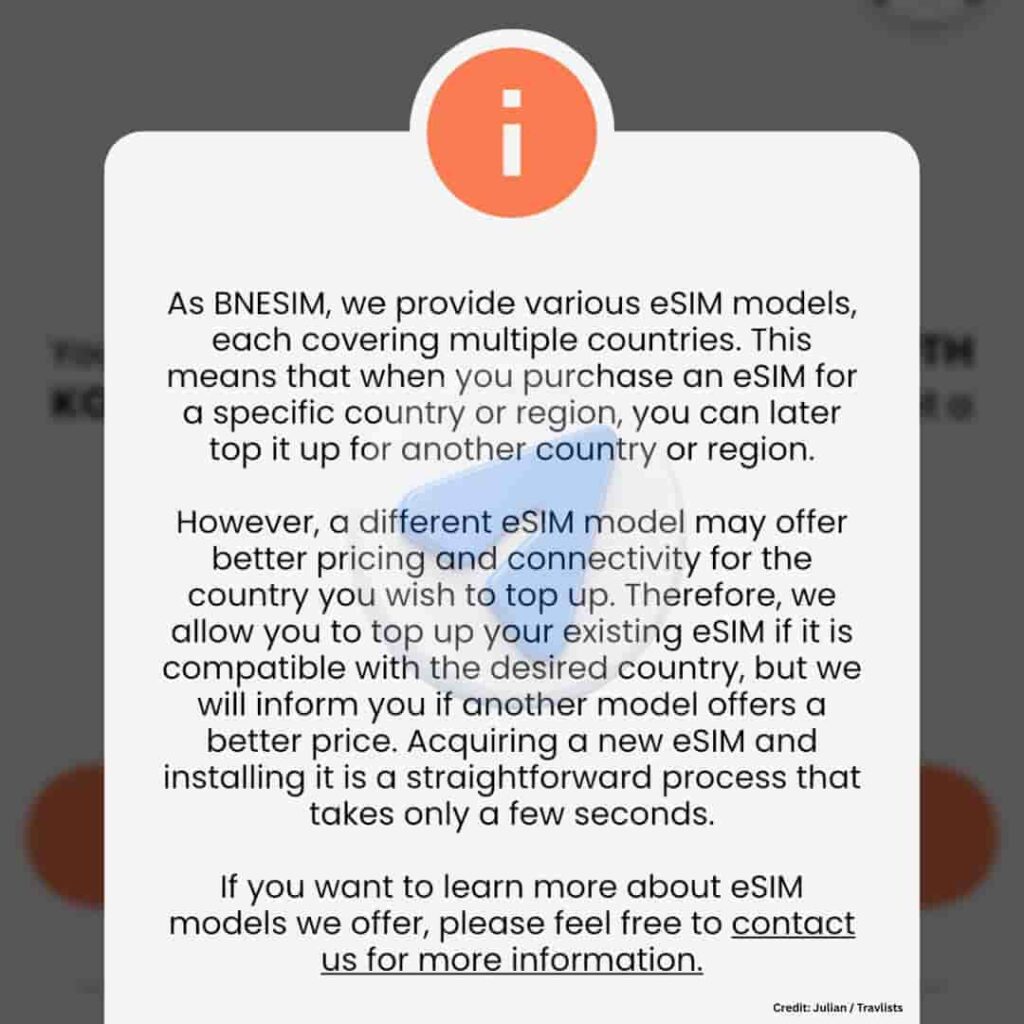
Finally, depending on your existing BNESIM eSIM model, you may have to install BNESIM again if you are topping up for a country or destination that is not supported. You don’t necessarily have to check the model — the app will prompt you if you need to install another eSIM profile.
For instance, I saw this message while trying to top up my Hong Kong eSIM with a data plan for South Korea, as shown in the image above: “…we allow you to top up your existing eSIM if it is compatible with the desired country, but we will inform you if another model offers a better price.” This is followed by a note saying: “Acquiring a new eSIM and installing it… takes only a few seconds.”
There’s no need to set up a new BNESIM eSIM profile if you’re just topping up for the same country or region.
BNESIM Review: My Experience with the eSIM
Below I share my observations from the first time I used BNESIM on my iPhone 15 Pro in Hong Kong. Where applicable, I also share my experience in South Korea.
| What BNESIM Says | My Experience |
|---|---|
| Purchase: Flexible payment options, with a 5% discount automatically applied | I checked out using Apple Pay. Instead of using the default 5% discount, I applied TRAVLISTS and received 30% off. |
| Installation & Activation: “One-click installation” through the app | This was mostly true, although I still had to tap a few additional buttons. Overall, the process was simple and intuitive. |
| Speed and Browsing Experience: Local 4G or 5G network, depending on the destination | My phone connected to 5G, and I had no issues using Uber, Google Maps, Instagram, or mobile ordering during my trip. |
| Support for Top-up Inquiry: 24/7 live chat, while the app checks whether an existing eSIM can be reused | Ben, the AI chatbot, gave me a helpful answer about reusing my eSIM. The app then confirmed that I could either top up the same eSIM or purchase a new one and save up to 46%. BNESIM can also be contacted via WhatsApp or email. |
Purchase
On the mobile website, I selected a plan, used our coupon code TRAVLISTS to get a 30% discount, and scheduled the activation date. I finalized the purchase using Apple Pay, and I received the eSIM QR code via email right away.
One thing I noticed during checkout is that BNESIM automatically applies its SUPER5 code by default. If you want to get 30% off instead, use our code TRAVLISTS. It is available for new and existing customers and is valid until January 1, 2029. Feel free to use it on your future top-ups.
Installation & Activation
Aside from the email containing my eSIM QR code, I received another email with my account username and password. I used them to log in to the BNESIM app, where my eSIM appeared with a red Not Installed status.
Three months after purchasing the plan, I returned to the app and proceeded with the installation. This was right before leaving Seoul for my trip to Hong Kong. There are several ways to install a BNESIM eSIM, including scanning the QR code and configuring it manually. However, I chose to install it through the app because it seemed simpler and more intuitive. My brothers also installed their eSIMs the same way.
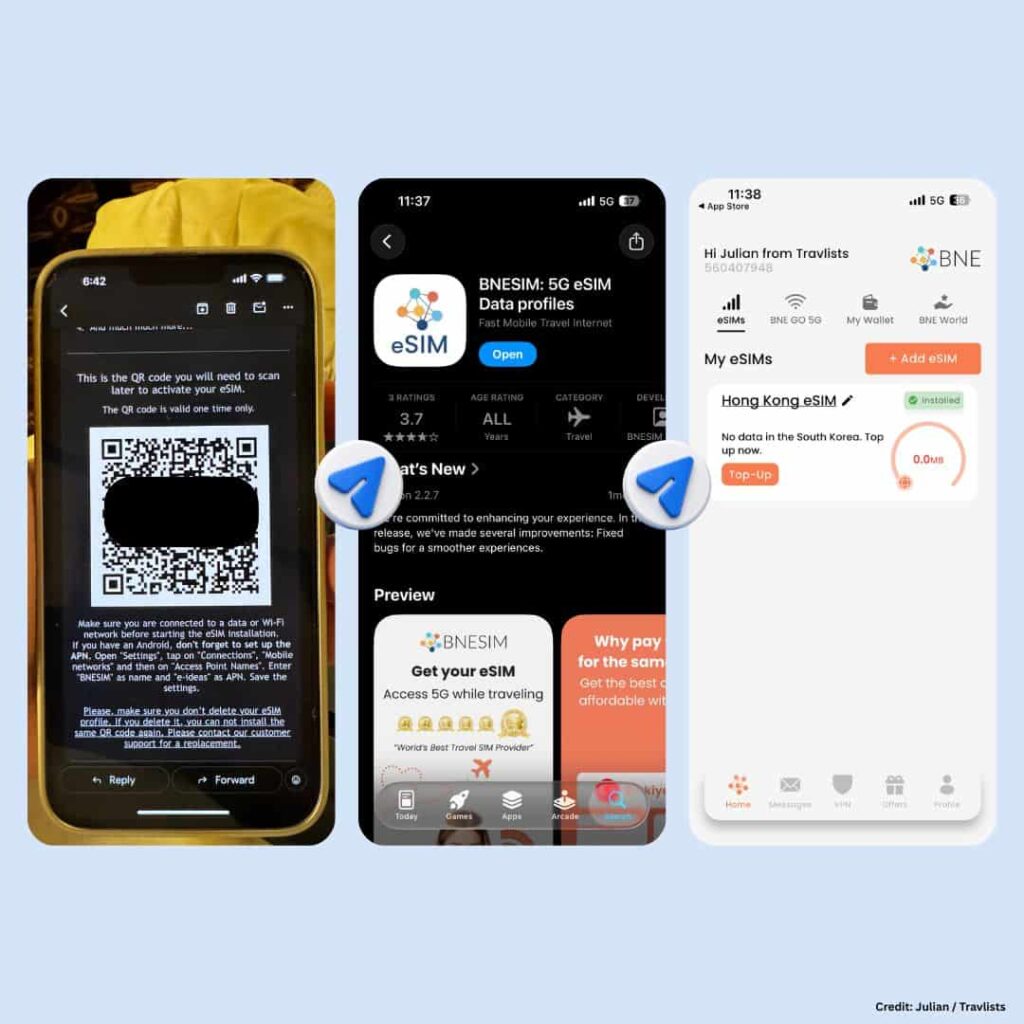
How to Install a BNESIM eSIM on an iPhone
- BNESIM requires the latest iOS version to install the eSIM on an iPhone. Update your device first if you haven’t already.
- Download the BNESIM app and log in using your account username and password.
- Select your eSIM, then tap Install eSIM Now.
- Your iPhone will prompt you to activate the eSIM. You may also be asked whether the eSIM is for data only and whether you plan to use it abroad.
Install your BNESIM eSIM while still in your home country or before arriving at your destination. This is recommended because you’ll need an internet connection during setup.
One small note: BNESIM describes the process as one-click installation through the app. Based on my experience, I still had to tap a few additional buttons (like the Activate button), but the overall process was simple. This was my first time using an eSIM, and I found it much more convenient than the old method of physically swapping SIM cards.
How to Install a BNESIM eSIM on Android
I haven’t personally tested BNESIM on Android, but the email I received also contains the following installation instructions for Android smartphones:
- Open the BNESIM app, go to My eSIMs, and tap Install now on the eSIM you want to install.
- When the “Setup your eSIM” pop-up appears, tap Setup.
- Before you start, connect to stable Wi-Fi (or a reliable mobile data connection), and don’t close the app or lock your phone during installation.
- Your phone’s Settings will open with the “Add BNESIM eSIM?” prompt. Tap Add to confirm.
BNESIM’s email contains more specific instructions for Android users, specifically on APN settings. Do check the email to ensure you’ve set up correctly.
How to Enable Your BNESIM eSIM & Data
Once you’ve landed at your destination or you’re ready to use your eSIM for internet, follow these instructions:
- Go to your phone’s Settings > Cellular (or Mobile Data).
- Select your BNESIM eSIM.
- Toggle on Turn On This Line, if it isn’t already.
- Enable Data Roaming for the BNESIM line, since this is usually off by default.
- Make sure your BNESIM eSIM is set as your primary line for cellular data, so your phone doesn’t try pulling data from your home SIM instead.
If you’re using a regional plan that also covers your current country, hold off on switching on mobile data until you actually need it abroad. Otherwise, you risk burning through your data (or starting the validity countdown) before your trip even begins.
Speed and Browsing Experience
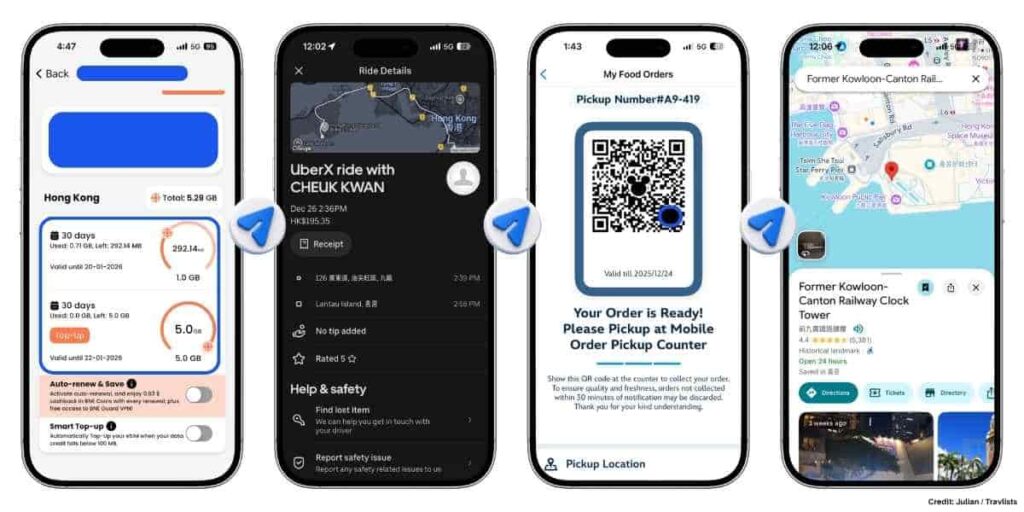
I’ve relied on BNESIM for a lot of things, like booking an Uber, making a mobile order at Hong Kong Disneyland, watching Instagram reels, and finding my way around Kowloon through Google Maps. I had no complaints, based on my usage for 5 days.
When reviewing eSIMs on Travlists, I usually run a speed test on Ookla or Google. However, since this was a personal trip, I honestly forgot to do so. While I don’t have benchmark numbers to share, I found the connection consistently fast and reliable throughout my trip. In fact, I’d go as far as saying the overall experience felt comparable to what I’m used to back home in Seoul.
BNESIM Support for Top-up Inquiry
Since everything worked well, I found no need to contact customer service during my trip. This part of the BNESIM review outlines my experience when I checked whether I can use the same Hong Kong eSIM in South Korea.
I found support on the app, under Profile > Help & Support > Live Chat. I got a response from “Ben, the Smart Assistant,” which looks like BNESIM’s AI chatbot. This is how he responded to my query: “Usually, a Hong Kong eSIM won’t automatically work in South Korea unless that plan also includes South Korea coverage. The app will tell you if you can reuse it or if you need a separate South Korea plan.”
This aligned with the eSIM model and reusability note that I shared earlier.
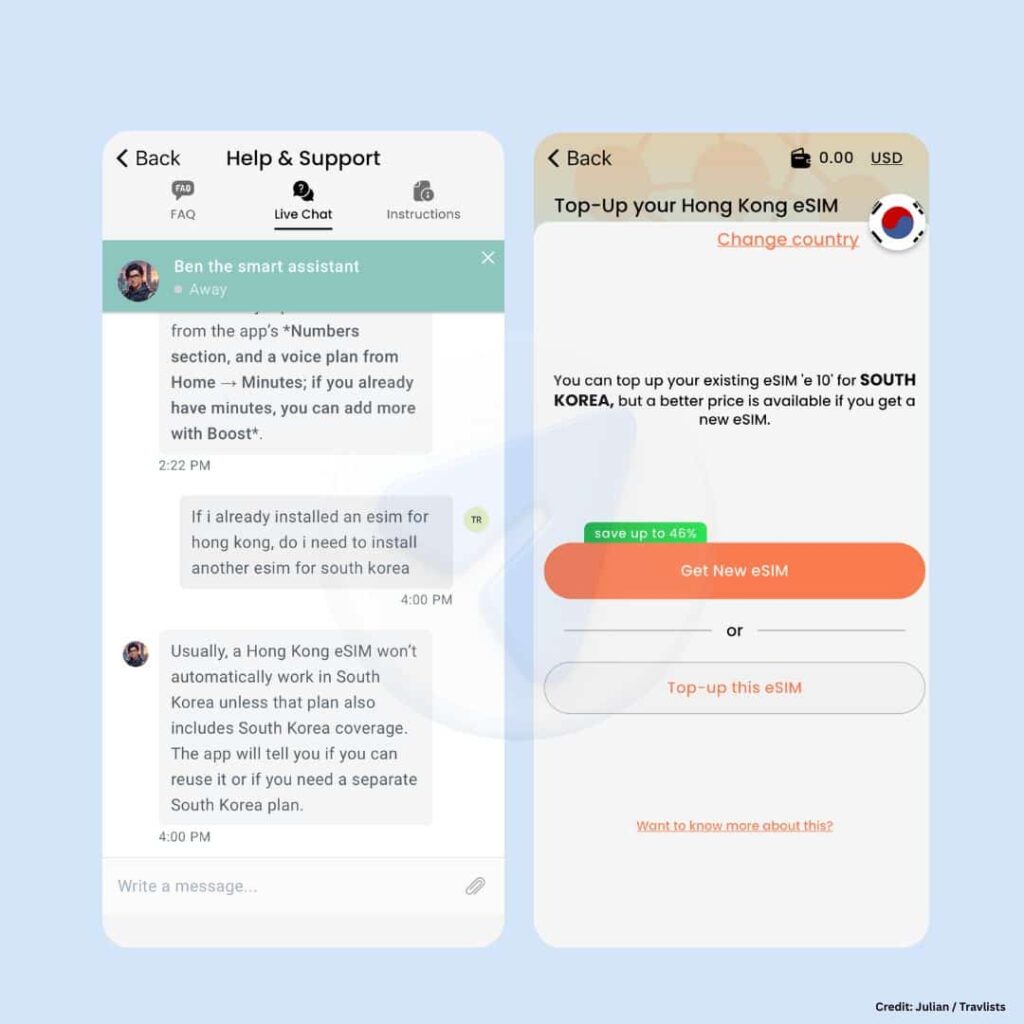
After seeing this response, I tried to top up my existing eSIM with a Korea plan. Indeed, the app let me know whether my eSIM was compatible. Here’s the message that I got: “You can top up your existing eSIM ‘e 10’ for SOUTH KOREA, but a better price is available if you get a new eSIM.”
Below the message, you can choose to get a new eSIM and save up to 46%, or top up the existing eSIM. Choosing a new eSIM saves money, but note that you will need to install another eSIM, which takes around 2 extra minutes based on my experience.
Final tip regarding support: On their website, BNESIM says they offer customer assistance via WhatsApp and email (support@bnesim.com). Read more and purchase a BNESIM eSIM ➜
BNESIM App & Extra Features
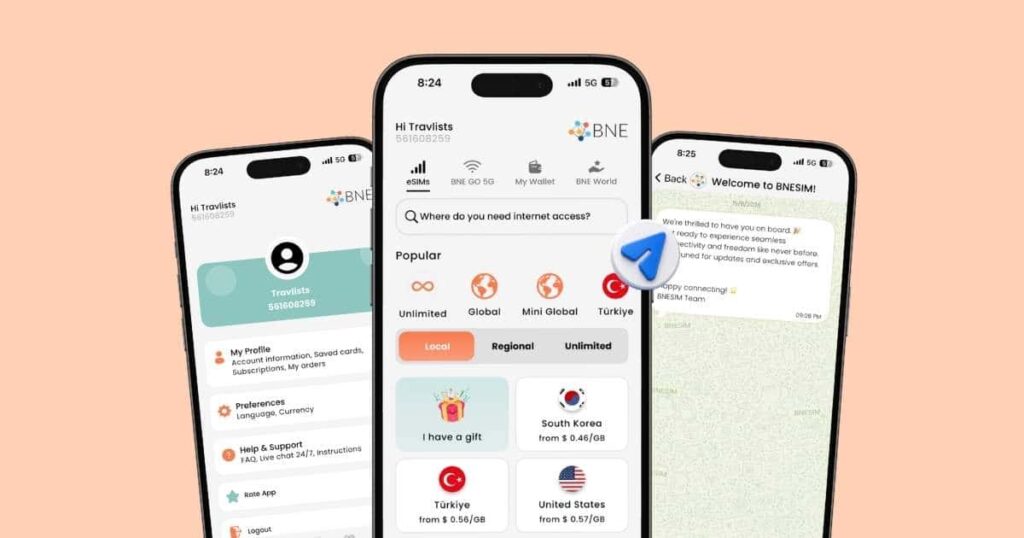
I remember reading mixed comments about BNESIM’s app design. Some liked it, some didn’t. I personally found it better than the other eSIM apps I’ve used.
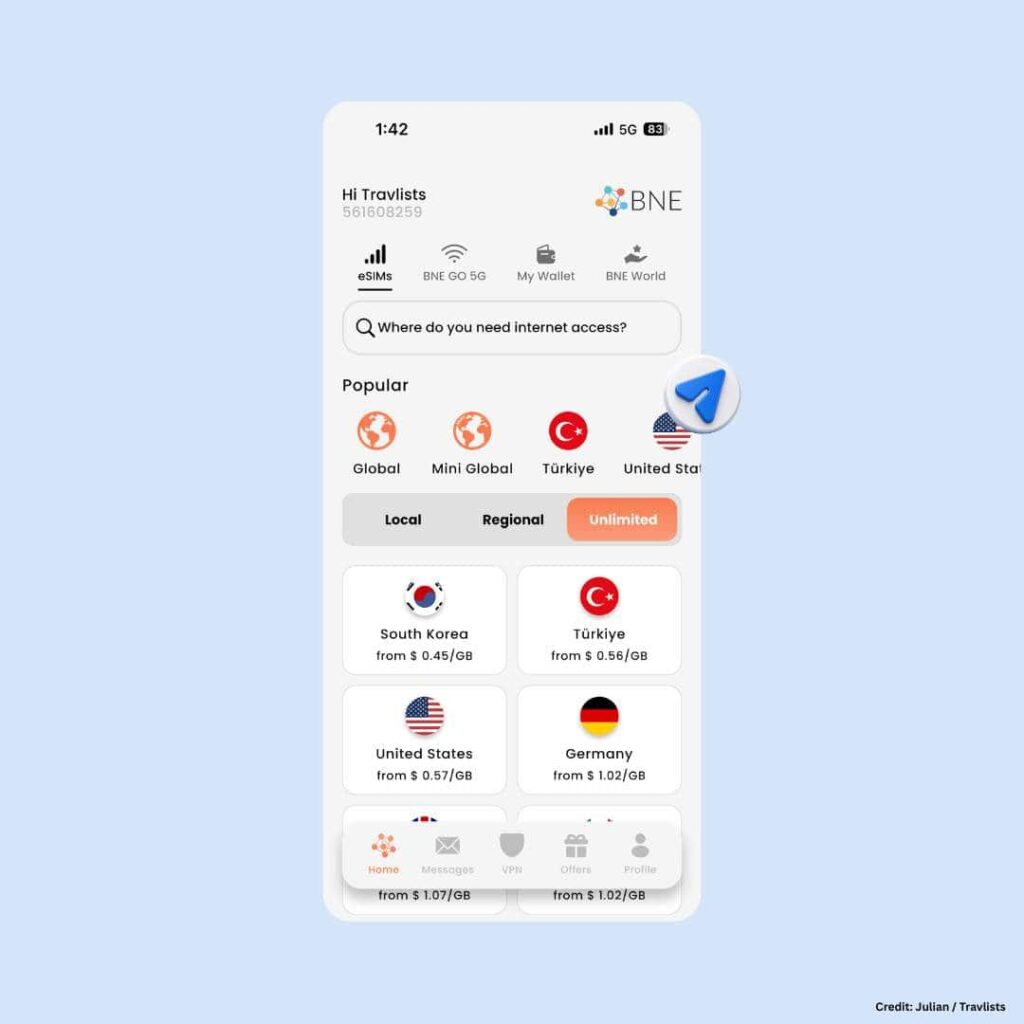
The first thing I saw when I opened the app was the eSIM I had purchased. This made it easy when I needed to install and check my remaining data. I also found the buttons and sections for help, data plan top-up, and support easy to locate.
BNESIM’s app functions, like its features, come in plenty, though. So I’d like to share some parts that are worth checking but you may miss if you are on the go:
- Home > BNE GO 5G. If you want to purchase a personal pocket WiFi router, you can do so here.
- Home > My Wallet. This is where you can top up your BNE Wallet and find the cryptocurrencies available for payment.
- VPN. Yes, this has its own category icon in the main menu. If you ever need a VPN for countries like China, this is worth visiting. On this page, you can easily click the “Activate & Save” button to turn on auto-renewal and get your complimentary access to the VPN.
- Offers > Refer and Earn. Here, you can find your referral code. Sharing your code with friends can earn you 3 BNE Coins, while they get €3 off their first purchase.
BNESIM eSIM Destinations Booked by Travlists Readers
BNESIM covers more than 200 destinations, but the list below shows the destinations most booked by Travlists readers. This is based on 16,154 purchases tracked through our affiliate links from January 1, 2025 to September 25, 2026. Treat this data not as a ranking of where BNESIM works best, but as an indication of which destinations Travlists readers chose BNESIM for:
- Turkey – 11.4%
- China – 7.9%
- United States – 6.1%
- Canada – 2.8%
- Australia – 2.8%
- Japan – 2.8%
- United Kingdom – 2.7%
- Thailand – 2.7%
- India – 2.6%
- Italy – 2.2%
- Indonesia – 2.1%
- France – 2.0%
- Vietnam – 2.0%
- Germany – 1.6%
- Spain – 1.5%
Turkey remained the most-booked BNESIM destination among Travlists readers, followed by China and the United States. However, the bookings were spread widely across the catalog: the 15 destinations above accounted for only about 53% of the 16,154 purchases we tracked during the period.
This is one reason I would not describe BNESIM as popular mainly in one region. Travlists readers booked it across Europe, Asia, North America, and Oceania, with no single destination accounting for even 12% of all tracked purchases.
If you’re ready to purchase an eSIM for your trip, you can use the BNESIM coupon code TRAVLISTS below to receive a 30% discount.
Our BNESIM Coupon Code (Valid Until January 1, 2029)
Just like with many tours and attraction tickets on Klook or KKday, you can also book an eSIM using a coupon code. This is useful if you want to save money on travel internet—in this case, up to €10.
In this section of my BNESIM review, I’ll share the coupon code I used. Hint: it is our branded code provided by BNESIM. I’ll also explain why you may want to apply it to your purchase.
30% Off With TRAVLISTS
Our BNESIM coupon code is TRAVLISTS, which provides a 30% discount. Here are the mechanics:
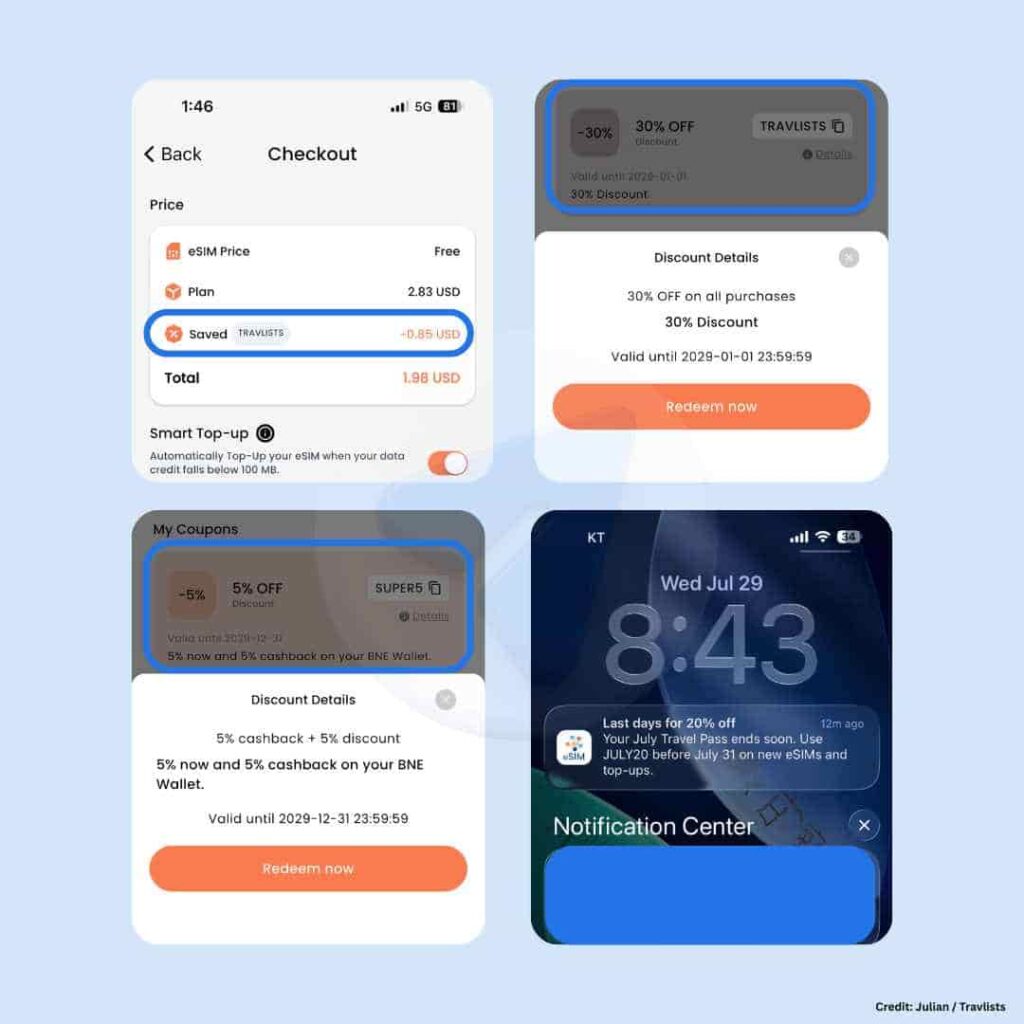
- Validity period: Until January 1, 2029 (verified as working as of this article’s last update)
- Works for: New and existing customers
- Maximum discount: Capped at €10 per order. Purchases worth more than €33.33 may receive the maximum €10 discount
- How I verified it: I manually entered TRAVLISTS during checkout. The code also appears under My Coupons in the app’s Offers menu
It is worth noting that, among the eSIM providers we work with, BNESIM currently offers the highest standard percentage discount. Yesim comes close with a 20% discount through the coupon code TRAVLISTS20, but that offer is only available to new users.
You can also check our travel promo codes page to see discounts from other travel brands and eSIM providers.
Other BNESIM Coupon Codes
Earlier, I mentioned BNESIM’s default 5% promo code, SUPER5. It was automatically applied when I tried to purchase a BNESIM eSIM for the first time.
Although TRAVLISTS provides a larger 30% discount, SUPER5 can still be a useful fallback because it includes an additional benefit. It provides a 5% discount + 5% cashback credited to your BNE e-Wallet. It is valid until December 31, 2029.
BNESIM also releases seasonal coupon codes from time to time. I discovered these not by frequently checking the website, but through occasional push notifications from the BNESIM app. They may be worth checking during major holidays like Christmas and Thanksgiving, as well as other promotional events.
In Closing: Would I Recommend and Use BNESIM Again?
Whenever I close out my reviews, I usually base my verdict on this question: will I recommend it to my family? The thing is, I already have. Perhaps the answer couldn’t be clearer.
Yes, I would recommend and use BNESIM again. It was easy to install, and I honestly didn’t encounter any issues with speeds and performance. Their AI chatbot BEN gave a clear and contextualized response. The BNESIM app is staying on my phone — it’s not one of those that I delete and re-install when the need arises.
However, as great as it sounds, I would think twice about getting BNESIM if I need a more flexible unlimited data plan or mobile hotspot capability on an uncapped plan.
FAQ: BNESIM eSIM
What is BNESIM?
BNESIM was founded in 2017 and is based in Hong Kong. They offer eSIMs, personal pocket WiFi, and a VPN service called BNE Guard, covering 200+ destinations worldwide.
Is BNESIM safe and legit?
Yes. BNESIM has won the World Travel Tech Awards in multiple years, and based on my own experience purchasing, installing, and using their eSIM with my family, the service works as described.
Does BNESIM eSIM include calls and SMS?
BNESIM’s virtual numbers and voice plans are sold separately from the eSIM data plan. Free SMS is available between BNESIM app users.
Which devices are compatible with BNESIM eSIM?
Most recent smartphones from Apple, Google, and Samsung support BNESIM’s eSIM, along with many models from Xiaomi, Huawei, Motorola, Oppo, Sony, OnePlus, Sharp, Vivo, and Nothing. On iPhone, this includes the iPhone XR/XS onward, up to the latest iPhone 17 lineup and iPhone Air. A quick way to check: dial *#06# on your phone. If an EID number shows up alongside your IMEI, your device supports eSIM. Note that support can also vary by region and software version, for example, some iPhones sold in mainland China, Hong Kong, or Macao don’t support eSIM. You can check your specific device on BNESIM’s Compatible Devices page.
Can I install BNESIM eSIM without scanning a QR code?
Yes. You can install directly through the BNESIM app instead of scanning a QR code, which is the method I used myself.
Does BNESIM offer subscription plans?
No, not anymore. BNESIM previously offered subscription/auto-renewing plans, but as of this article’s last update, they only offer expiring and non-expiring plans.
What’s the difference between expiring and non-expiring plans?
Expiring plans include fixed data (1–100GB) valid for 30 days, or a 10-day unlimited data option. Non-expiring plans only come in fixed data amounts, with no time limit, but usually cost more per GB. Plan inclusions may change, so please check the official website for the latest details.
Does one BNESIM eSIM work in multiple countries?
It depends on which eSIM model you bought. Some models cover a group of countries and can be topped up when you land somewhere new within that group. But if your eSIM doesn’t cover your new destination, you’ll need a separate eSIM. BNESIM’s app will tell you which applies before you buy.
Can I use the same BNESIM eSIM if I switch phones?
No. An eSIM can only be installed on one device. It’s reinstallable on the same device, but if you need it on a different device, you’ll need to request a replacement for €1 through BNESIM’s support team.
Does BNESIM’s mobile hotspot work?
Yes, hotspot/tethering works on data-capped plans, but it’s not available on BNESIM’s unlimited data plans.
Is BNESIM good for digital nomads or long-term travelers?
It depends on your needs. BNESIM’s non-expiring plans are useful if you return to the same destination multiple times, since unused data carries over. However, since BNESIM no longer offers subscription plans and unlimited data is capped at 10 days, they may not be the most flexible option if you need continuous, long-term connectivity in one place.
Does BNESIM have a referral program?
Yes. Open the BNESIM app, go to Refer and Earn on the side menu, and share your unique referral code with friends. Once your friend makes their first purchase, you’ll earn 3 BNE Coins (worth €3), while they get a €3 discount.
How do I earn BNESIM rewards (BNE Coins)?
You earn 5% cashback in BNE Coins on every purchase made through the BNE Wallet, plus 3 BNE Coins for every successful referral.
Does BNESIM have a promo code?
Yes. Our coupon code TRAVLISTS gives you 30% off, valid until January 1, 2029, for new and existing customers. BNESIM also automatically applies a smaller default code (SUPER5) if you don’t use ours.
What happens if I delete my BNESIM eSIM profile?
BNESIM’s QR code is valid for one-time use only. If you delete your eSIM profile after installing it, you won’t be able to reinstall it using the same QR code. You’ll need to contact BNESIM support for a replacement instead.
If you’re still deciding whether BNESIM is right for your specific trip, our Travel eSIM Hub covers how it compares to other providers by travel style, destination, and use case.
How I Reviewed BNESIM
This review is based on my own purchase, installation, and use of a BNESIM eSIM during a family trip to Hong Kong, along with a separate top-up test for South Korea. Here’s exactly what I did and didn’t test:
- Purchase and installation: I bought a BNESIM eSIM through the mobile website, applied our coupon code, and installed it on my iPhone through the app. My brothers also purchased and installed their own eSIMs the same way.
- Everyday use: Over the course of the trip, I used the eSIM for Uber, Google Maps, Instagram, and mobile ordering at Hong Kong Disneyland, with no connectivity issues.
- Top-up and multi-country compatibility: I tested whether my existing Hong Kong eSIM could be topped up for South Korea. The app confirmed compatibility and additionally surfaced a better-priced option, which I’ve detailed earlier in this review.
- Customer support: I contacted BNESIM support directly through the app’s Live Chat to ask about reusing my eSIM across countries, and documented the actual response I received.
- App exploration: I went through BNESIM’s app beyond the basics to review features such as BNE GO 5G, My Wallet, the built-in VPN, and the referral program.
What I did not personally test for this BNESIM review: mobile hotspot performance, the BNE Guard VPN, and the BNE Coins rewards/cashback mechanics. I’ve made those limitations clear in the relevant sections rather than relying on secondhand claims, and I plan to update this review once I’ve tested these firsthand.
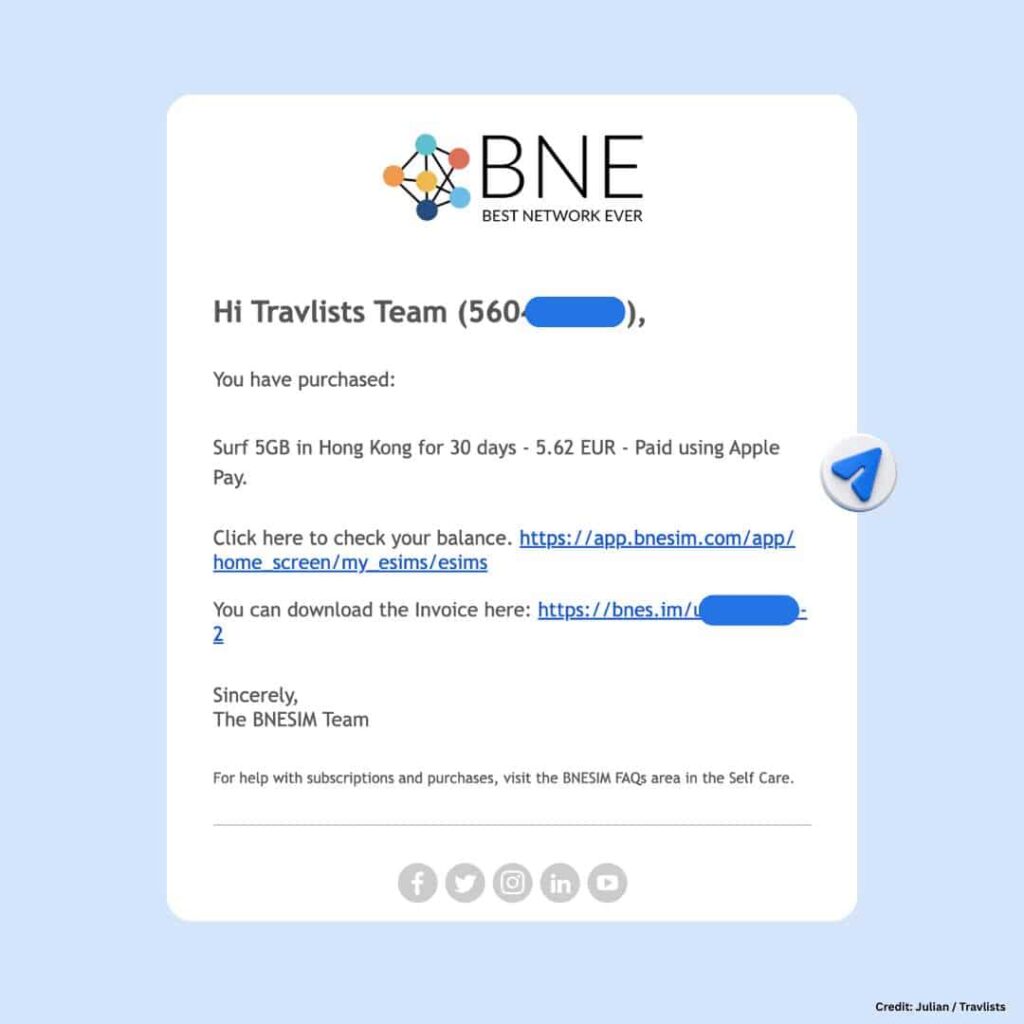
Purchase Receipt
This is the receipt for my BNESIM eSIM for Hong Kong.
Updates
- September 26, 2026: Tracked affiliate sales period and data updated. Previously covered January 2025 – July 2026 only.