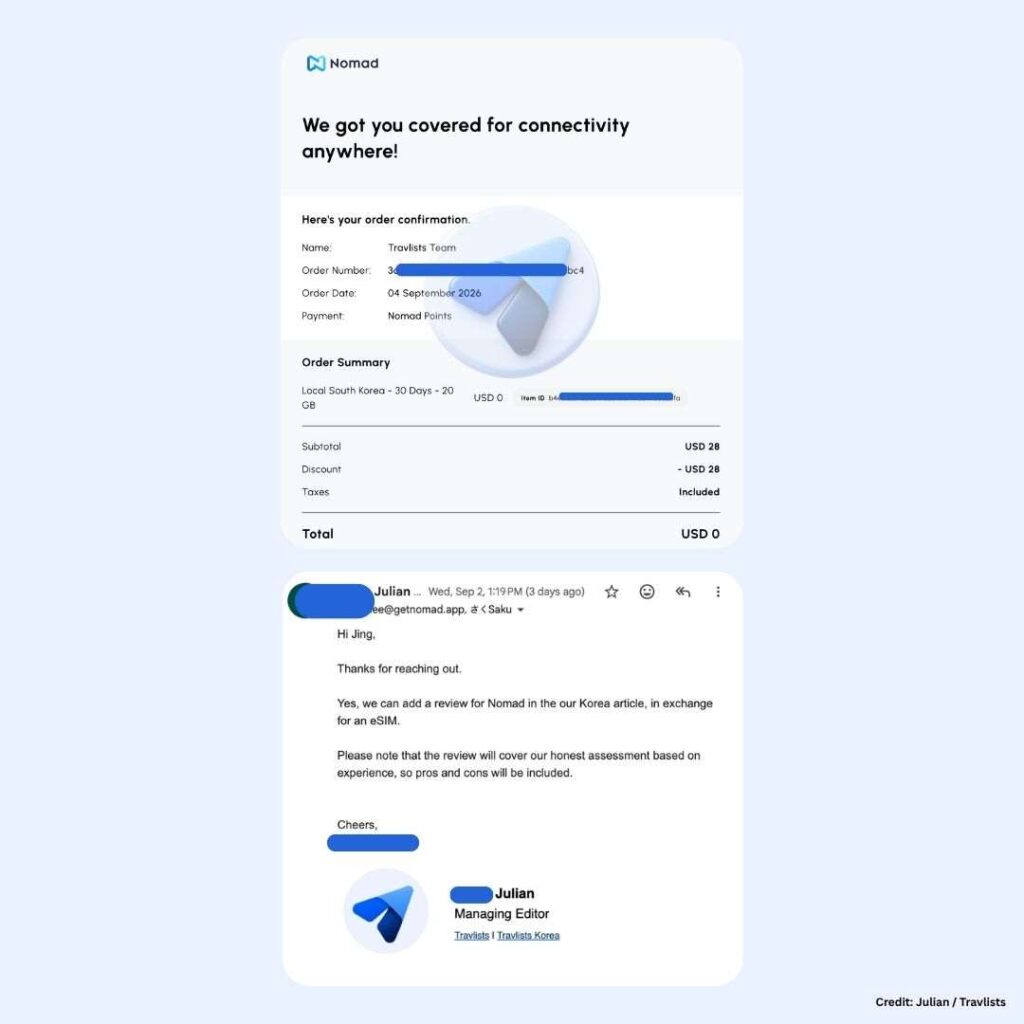
Disclosure: Nomad provided the Korea eSIM at no cost, in exchange for an independent and honest review. We may earn a small commission if you book through some of the links on this page. See how we test and my order confirmation.
In a nutshell
- Nomad eSIM review. Nomad is one of the easiest eSIMs I’ve used. It only took me a minute to install their eSIM, which gave me a good first impression of the brand. I used the eSIM in Seoul and was able to connect to 5G through SK Telecom. My speed test from Ookla gave me a result of 1,247.72 Mbps (around 1.25 Gbps), which is actually the highest speed among the eSIMs I tested in Korea. I would say Nomad is worth it, especially if you are looking for a fast internet connection and simple setup.
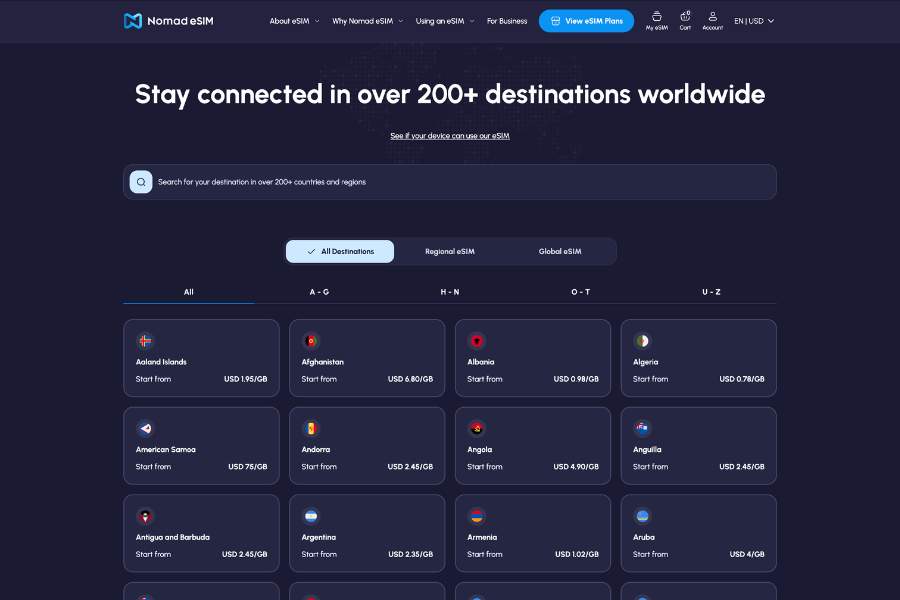
- Plans, coverage, & pricing. Nomad has single-country, regional, and global data-only plans with unlimited and fixed data. They also have sub-regional plans, such as an eSIM specifically for China, Korea, and Japan. This makes them a flexible choice for heavy internet users and trips that cover one destination or multiple countries. But Nomad is not always the cheapest eSIM provider. The way I see it, they are a mid-tier travel eSIM brand with a slightly higher but reasonable pricing for the convenience, flexibility, and benefits they offer. Browse Nomad eSIM plans ➜
- App, hotspot, & customer service. I have reviewed several providers now, and I must say that Nomad eSIM’s app is one of the most polished and functional apps to date. I also liked that I was able to connect my iPhone to my MacBook easily via hotspot. The only downside of my eSIM test was the 15-minute chat I had with the support team for a simple question about whether I could manually select the network.
Nomad Promo Code
Quick Book: Get Nomad eSIM
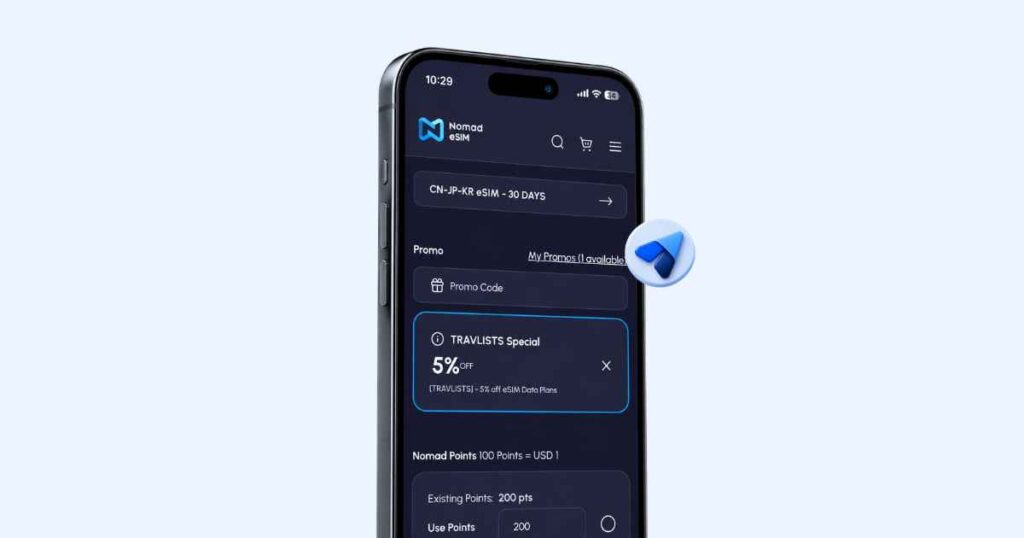
Use our Nomad promo code TRAVLISTS to get 5% off your eSIM plan. The code works for both new and existing users, so you can always get a discount. I have verified that the promo code is working as of this article’s latest update, but feel free to contact us if anything seems off.
Choose your Nomad eSIM
Meet Nomad eSIM
Like Airalo, Ubigi, Yesim, and BNESIM, I consider Nomad one of the forefront travel eSIM providers. They launched in 2020, three years before I started covering embedded SIMs in January 2023. My first impression of Nomad was actually not strong then. It was easy for me to dismiss them as just another major provider based on their homepage. But I found that this was not the case after trying Nomad eSIM in Seoul. From setup to referrals, Nomad makes it easy for travelers, even first-time eSIM users, to connect online at up to 5G speeds. I think this is one of the reasons why our readers have booked Nomad for China, South Korea, the US, Europe, and other destinations. More on that later.
What I will say, though, is that Nomad would not be the best option if you are looking for the cheapest tourist eSIM. For example, in South Korea, Nomad’s 1GB for 7 days plan costs $4, while Klook sells the same plan for around $2.50. BNESIM, which is one of the most booked eSIMs on Travlists, has a 1GB plan with a longer 30-day validity for around $2.90 (before the BNESIM 30% discount code TRAVLISTS is applied). However, if you are specifically thinking about getting Nomad and don’t mind the slightly higher cost for the online connectivity experience they offer, I would definitely say they are worth getting for the reasons I’ll share in my detailed review below.
Nomad eSIM Review: My Experience in South Korea
I tested Nomad’s South Korea eSIM in Yeongdeungpo, Seoul, on an iPhone 15 Pro. The eSIM was provided by Nomad at no cost; I received a special coupon code from their team, which applied as Nomad Points to cover the purchase. I specifically told them beforehand that my review would include both pros and cons. (Before using an eSIM, make sure to check if your device is compatible and carrier-unlocked. Read our Before You Buy guide to check your phone conditions.)
| What I Tested | My Experience |
|---|---|
| Payment | Nomad supports card, Apple Pay, Alipay, PayPal, and Nomad Points. I recommend creating an account before checkout so you can apply eligible coupon codes and see the discount reflected before paying. |
| Installation & Activation | I installed the eSIM by long-pressing the QR code on my iPhone and selecting “Add eSIM.” Setup took only about 1 minute. |
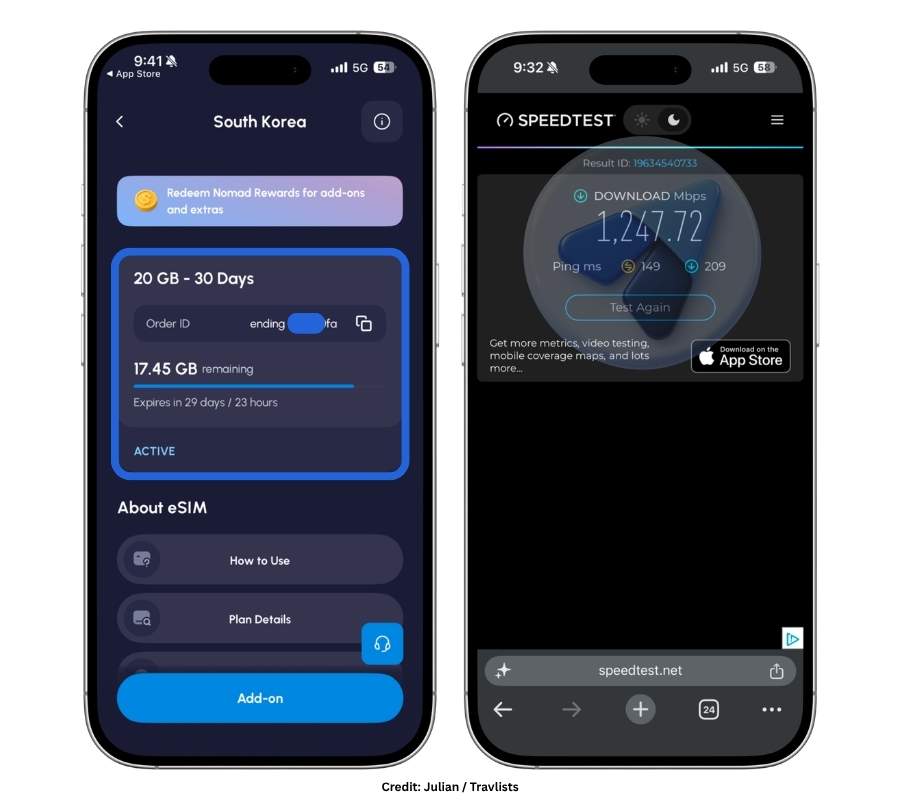
| Speed Test | Nomad connected to SK Telecom 5G and reached 1,247.72 Mbps download on Ookla, the fastest South Korea eSIM in my tests so far. |
| Performance | Naver Map, Google Maps, Facebook Messenger, TikTok, and other apps worked with no issues during my test in Seoul. |
| Mobile Hotspot | I connected my MacBook Air through my iPhone’s Mobile Hotspot and browsed smoothly using Google Chrome. |
| Customer Support | Live support wanted to check my phone settings before answering my network-selection question. The exchange took more than 15 minutes, while Nomad’s AI Agent answered the same question almost immediately. |
| Nomad eSIM App | The iOS app was intuitive and organized, with remaining data, expiry, Nomad Points, referrals, help guides, and rewards easy to find. |
Purchase
Nomad offers flexible payment options, including credit or debit card, Apple Pay, Alipay, and PayPal. Existing users can also check out using Nomad Points. Before buying an eSIM, I suggest creating an account first. That’s because certain coupon codes can only be applied to registered users, including the 5% off discount code TRAVLISTS and the special code I received from their team.
Installation & Activation
After booking, I immediately received an email from Nomad. The email listed the different ways you can get set up on an iPhone, Android smartphone, or Windows laptop, starting with Nomad’s recommended method: Direct Installation. To install my eSIM, I went with QR Code Installation instead. No, this did not require me to have a separate device for scanning, although that would normally be the idea. What I did was to long-press the QR code until “Add eSIM” appeared. Clicking “Add eSIM” initiated the installation process for me at 9:26 pm.
At 9:27 pm, just a minute later, my iPhone displayed: “Travel eSIM Setup Complete. Your Nomad eSIM is ready to use…” Indeed, this is one of the fastest installations I have experienced. It took me 3 minutes with Klook and 4 minutes with Yesim. Note that Nomad offers other installation methods, so setup time may vary depending on the method you use.
Here’s the step-by-step process I followed to install and activate Nomad on an iPhone:
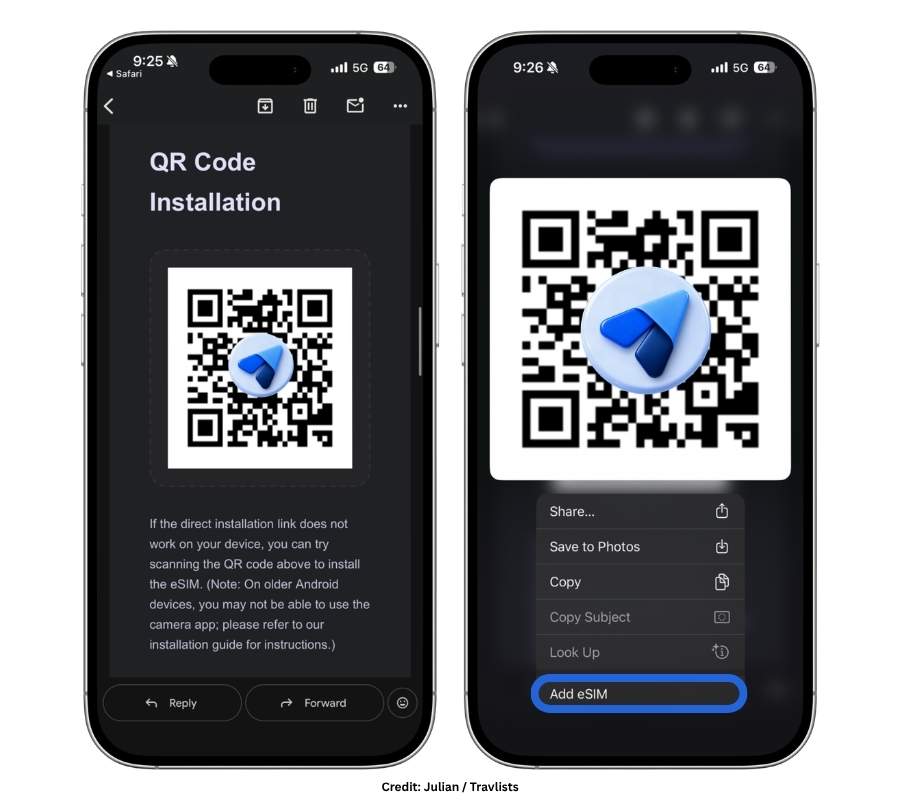
- Check the email you receive from Nomad after purchase. The subject of the email I received was “Here is how you access your Nomad plan!”
- Find the QR code and long-press it until it zooms in.
- Click Add eSIM.
- Click Activate when prompted. You will also need to select Abroad and Data Only when asked.
- Wait for your eSIM to finish activating. (Activating your eSIM at this stage simply prepares it for use. It does not necessarily mean your data plan starts being consumed immediately.)
- To start connecting online, I went to Settings > Cellular > SIMs on my iPhone. I turned on my Nomad eSIM, which was labeled “Travel – Nomad” by default, enabled Data Roaming, and turned off my primary line/SIM. I then opened Cellular Data and selected the same Nomad eSIM.
If you use an Android smartphone or Windows laptop, or simply want Nomad’s official installation and activation instructions, you can browse their documentation on the website. If you are on the app, go to Profile > Help Center > eSIM Troubleshooting and FAQs > Troubleshoot Your eSIM > How do I Activate / Start my Nomad eSIM? to find the guide.
Nomad eSIM Speed Test
When I review eSIMs on Travlists, the first thing I do after setup is check the speeds on Ookla and Google Internet Speed Test. While I don’t believe speed is the most important factor when testing an eSIM (since providers like Nomad typically rely on the destination’s local mobile networks), it is still a useful indicator for the kind of browsing experience you can expect, especially if you care about getting a 5G connection.
After installation, I initially saw my Nomad eSIM connect to LG U+ on LTE. I restarted my phone, just as I would after physically installing a SIM card in Korea. My Nomad Korea eSIM then connected to SK Telecom on 5G after the reboot. I ran my speed tests shortly after, and Nomad hit 1,247.72 Mbps download on Ookla and 111.3 Mbps download with 14.8 Mbps upload on Google Internet Speed Test.
To put that result into context, the average mobile speeds in South Korea in Q2 2026 is 233.1 Mbps for SK Telecom, 200.4 Mbps for KT, and 154.4 Mbps for LG U+, as reported by SpeedGeo. Compared with those figures, my Nomad Ookla result of 1,247.72 Mbps was roughly 5.4x-8.1x higher. Still, note that speeds can vary significantly depending on location, network coverage, congestion, and routing, but it was good to see that Nomad was capable of reaching this level of performance.
| Provider | Speed Test |
|---|---|
| Nomad | 1,247.72 Mbps |
| Ubigi | 293.13 Mbps |
| Yesim | 210.2 Mbps |
| Klook (Asia eSIM) | 88.58 Mbps |
How did Nomad compare with the other providers I tested? On my Ookla tests, Ubigi reached 293.13 Mbps (as I have shared in my Korea eSIM guide), while Nomad reached 1,247.72 Mbps. Nomad was the fastest South Korea eSIM in my tests so far. However, as someone who lives in Seoul and is already used to fast mobile connections, the actual browsing experience still felt fairly similar across the providers I tested. For typical travel use cases such as maps, messaging, social media, and general browsing, all of them felt fast enough.
Performance
As far as internet connection goes, which is really the main reason for using an eSIM, Nomad delivered. I had no issues using Naver Map, Google Maps, Facebook Messenger, TikTok, and other apps. Everything worked smoothly, and this is the main reason why I would recommend Nomad.
Mobile Hotspot
On Nomad’s homepage, they say: “Share your data across multiple devices.” This was true based on my experience. After turning on my iPhone’s Mobile Hotspot and selecting my phone as the network on my MacBook Air, I was able to connect online seamlessly and browse using Google Chrome.
Nomad eSIM Support
Contacting customer service even if I have no issues is part of my testing process. For this review, I engaged with Nomad’s AI Agent and live customer support. My question was about network switching: am I able to manually switch networks with a Nomad eSIM?
I opened a chat on the Nomad app and asked the AI Agent to escalate me to Nomad’s live customer support. I was handed over fairly quickly. I got Nathan, and I explained that my eSIM was already working well in Seoul, but I wanted to check if I could manually choose between the supported networks in Korea.
Nathan then asked me to send several screenshots of my cellular settings, including my installed eSIMs, ICCID, and Data Roaming. I appreciated that he was being thorough, especially since these checks could be useful for someone experiencing an actual connectivity problem. However, for my simple question about manual network selection, I felt like I had to send a lot of screenshots, and the process felt longer than necessary. More than 15 minutes into the chat, I asked Nathan whether all of this was necessary and relevant to my question. He said that he was just checking my phone and then immediately gave me the answer I was looking for: I could manually select a supported local network by going to Network Selection and turning off Automatic.
Out of curiosity, I later asked Nomad’s AI Agent the same question while logged out on their website. It gave me the answer almost immediately, as I would expect from a trained chatbot. Based on my test, Nomad’s AI support was much faster for a straightforward question, while live support seemed more suited to cases that may require a deeper look into connectivity or troubleshooting. For travelers who have just arrived in a foreign country and may already have a lot going on in their itinerary, I think a more straightforward answer would be appreciated. If the question is simple, getting the answer quickly can make the support experience feel much easier.
App
It feels good when you install an app that’s intuitive, organized, aesthetic, and rewarding. That’s exactly what I got with Nomad’s iOS app. Compared with the website, which feels more like a storefront, the app feels more like a travel companion. What stood out to me most were the Nomad Points section and the referral code displayed prominently on the homepage, which made the experience feel more rewarding.
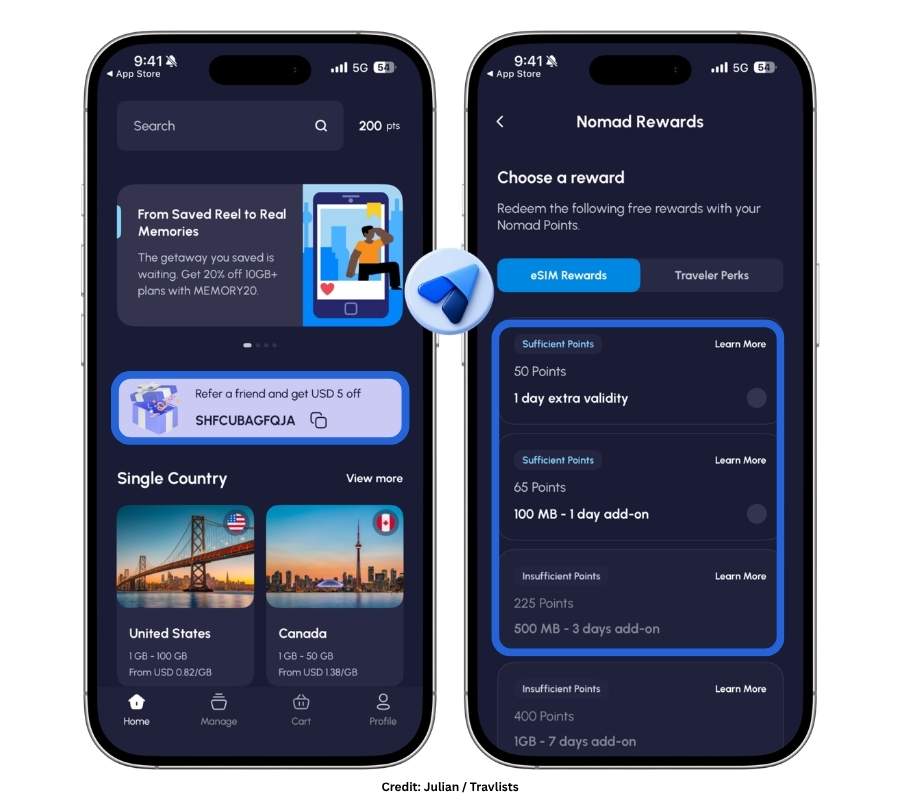
To compare, Ubigi’s app opens by showing your installed eSIMs, while BNESIM and Yesim also put your installed eSIMs and “Add eSIM” options front and center. Nomad still shows popular destinations on the homepage, but its layout feels more refreshing because Nomad Points and the referral code appear near the top of the screen.
Another useful section is “Manage,” where I could see the eSIM I purchased, my remaining data, and the exact time left before expiry in days and hours. You can also top up your plan directly from this screen. Tapping “Profile,” the fourth and final icon on the bottom navigation bar, opens the Help Center, where you can find guides for installing, managing, and troubleshooting an eSIM.
Nomad also currently has a “Weekly Wins” button in the top-right corner of the Profile screen. During my test, it showed rewards such as a free 100MB add-on eSIM, 25% off an add-on eSIM, and up to 100 Nomad Points or $1 off a future purchase. These app features really make it hard for me to uninstall Nomad even when I’m not traveling.
Plans & Pricing: Nomad eSIMs Worth Getting for Your Trip
Now that I’ve shared my thoughts about using a Nomad eSIM in South Korea, let’s take a look at the eSIMs you can get for your trip. First, I’ll share which destinations Travlists readers are choosing Nomad for. Then, we’ll look at the advantages of Nomad in certain destinations. The last part of this section covers unlimited data plans and Nomad’s Fair Usage Policy – a must-read if you are a heavy internet user like I am.
Most Booked Nomad eSIMs on Travlists
To help you see which destinations Travlists readers are booking Nomad eSIMs for, here is a breakdown of the top countries/regions based on the 71 sales we have tracked through our Nomad affiliate links between September 2025 and June 2026.
- India – 14.1%
- Canada – 9.9%
- China – 8.5%
- Japan – 5.6%
- Mexico – 5.6%
- South Africa – 5.6%
- South Korea – 4.2%
- United States – 4.2%
- New Zealand – 4.2%
- Morocco – 4.2%
- Thailand – 2.8%
- Colombia – 2.8%
- Dominican Republic – 2.8%
- Asia (Regional) – 2.8%
- Maldives – 1.4%
Aside from these, we have also tracked minimal eSIM sales for Europe (Regional), Sri Lanka, Georgia, Costa Rica, the United Kingdom, Latin America (Regional), Czech Republic, Iceland, and Australia, among others.
While this data can help show where Travlists readers are booking Nomad eSIMs for, it should not be treated as an indication of which destinations Nomad is best for or what the wider Nomad customer base is booking.
Nomad China eSIM
Picking an eSIM for China needs a little more thought given the country’s internet restrictions. To check if Nomad works in the country, I asked Nomad’s AI Agent on September 12, 2026, without logging in as a user. Here’s its response: “Yes — Nomad eSIM works in Mainland China… A key benefit: the China eSIM connects through international servers, so you can still use apps like Google, WhatsApp, Facebook, and YouTube without installing a separate VPN.” The agent also recommended purchasing and installing the eSIM before arriving in China, since buying new eSIMs while in the country can be restricted.
While it was reassuring to know that I would not need a separate VPN to access commonly used Google and Meta apps such as Facebook and WhatsApp, I noticed that the agent did not specifically mention TikTok. I followed up and was told: “TikTok can be unreliable in China, even with our eSIM… So it may work sometimes, but it’s not guaranteed to run smoothly in China.” The agent also said that the international version of TikTok is normally blocked in China, and device type can also affect whether it works. In short, TikTok may work, but Nomad does not guarantee reliable access.
If TikTok access is particularly important to you, one alternative is this eSIM on Trip.com. Its product information specifically states that TikTok and AI apps such as ChatGPT are supported because the connection is automatically routed through a Singapore IP address. I also found a September 7, 2026 review from a user named _TIES******i5cx9n, who said that TikTok initially did not work with the first eSIM they received, but worked after the provider sent a replacement.
Despite the unguaranteed TikTok access, I still think Nomad is worth considering if your priority is accessing Google and Meta apps in China without using a separate VPN. Aside from its China eSIM, Nomad also offers plans for Greater China (China, Hong Kong, Macau, and Taiwan), East Asia (China, Japan, and South Korea), and Asia.
Nomad USA eSIM
Similar to Saily and Airalo, Nomad is also headquartered in the United States. While this does not automatically mean that its eSIM is best for the US, as a consumer, the provider’s origin personally matters to me when the product I’m buying is one I’ll use in its home country.
But what makes Nomad worth noting? For one, Nomad’s unlimited data eSIM for the US connects to T-Mobile, while its fixed-data eSIMs connect to Verizon and AT&T. This means its US plans use some of the country’s major mobile networks. Having lived in the USA and subscribed to an AT&T mobile plan myself, I would definitely consider Nomad for a US trip.
Nomad may also be worth considering if you are traveling for business. One advantage is that its eSIMs work on select Windows laptops, which can be useful if you want mobile connectivity directly on a compatible computer instead of relying entirely on your phone or hotspot.
Nomad Europe eSIM
As of this article’s latest update, Nomad covers 35 countries in Europe, including the United Kingdom. To compare, Airalo includes 41 countries in its Europe eSIM, while Saily and BNESIM are tied with Nomad at 35 countries. Klook and Yesim’s Europe eSIMs each cover 33 countries.
Although Nomad does not have the widest coverage, it is still a decent choice for Europe because it includes most of the region’s popular destinations. The only instance I would not consider Nomad is if I needed a Europe eSIM that also works in Turkey, Ukraine, or parts of the Balkans, including Albania, Bosnia and Herzegovina, Montenegro, North Macedonia, and Serbia. Airalo’s Europe eSIM covers these destinations, while Nomad’s does not. On the other hand, Nomad does include a couple of destinations that Airalo’s Europe eSIM does not, including Vatican City and San Marino.
Nomad’s fixed-data plans for Europe start at $5.50 for 1GB valid for 7 days. For a more consistent comparison, I checked the price of 1GB Europe eSIM plans from other providers. BNESIM currently offers 1GB valid for 30 days for $2.89, Yesim offers 1GB valid for 30 days for $3.00, and Klook charges $4.10 for 1GB for a single day. Saily starts at $4.99 for 1GB valid for 7 days, while Airalo charges $5.00 for 1GB valid for 3 days. Among these providers, Nomad currently has the highest price for a 1GB Europe plan, although the difference from Saily and Airalo is relatively small.
If you want a discount on your Nomad eSIM for Europe or other destinations, use our coupon code TRAVLISTS to get 5% off. The code works for both new and existing users.
Nomad Unlimited Data Plans & Fair Usage Policy
Nomad offers unlimited data eSIMs for select destinations, but there is one important catch: unlimited data does not mean unlimited high-speed data. Nomad applies a Fair Usage Policy (FUP), which limits how much high-speed data you can use before your connection is slowed down.
For Nomad, the current allowance is 2GB of high-speed data per day. Once you use that amount, your speed is reduced to 512 kbps until the daily allowance resets. You can still connect to the internet after reaching the limit, but 512 kbps is considerably slower and may be noticeable if you are streaming videos, uploading files, or doing other data-heavy activities.
As a heavy internet user myself, this is one area where I think Nomad falls behind some of the other eSIM providers I compared. Airalo and Saily both provide 3GB of high-speed data per day before reducing speeds to 1 Mbps, while Klook provides 15GB per day before slowing to 1 Mbps. BNESIM also provides 3GB per day before reducing speeds to 1 Mbps, although hotspot use is not included with its unlimited plans.
Ubigi handles its Fair Usage Policy differently. Instead of a daily allowance, its unlimited plans have a cumulative high-speed allowance, such as 15GB-25GB over 7 days or 60GB over 30 days, before speeds are reduced to 2 Mbps. Yesim is harder to compare directly because it does not set a single Fair Usage Policy across its unlimited plans. According to Yesim, the threshold and reduced speed depend on the network provider you connect to, and Yesim does not add additional restrictions beyond those imposed by that provider.
Among the eSIM providers I compared that disclose a specific threshold and reduced speed, Nomad currently has both the lowest daily high-speed allowance at 2GB and the slowest reduced speed at 512 kbps. This does not necessarily make Nomad’s unlimited plans a bad choice, especially if you normally use less than 2GB per day. But if you are a heavy data user like me, I would consider the Fair Usage Policy before choosing Nomad specifically for unlimited data.
Data Plans with Phone Numbers
Although Nomad has 3-in-1 Call + SMS + Data plans for select few countries, they do not generally offer eSIMs with phone numbers. However, their data-only eSIMs can be used in messaging apps like WhatsApp, Facetime, KakaoTalk, LINE, Viber, and more. If you require an eSIM with a phone number, you can get one from aloSIM or BNESIM.
Nomad Promo Code, Rewards & Referral Program
Nomad eSIMs are not just about travel connectivity – they also come with rewarding perks. As someone who reviews and compares eSIMs, I must say that Nomad’s Rewards and Referral Program offer good incentives for both users and their friends. However, the discount from Nomad’s coupon code is smaller compared with some other eSIM providers and marketplaces. For instance, BNESIM offers a 30% discount to both new and existing users through our code TRAVLISTS, while our Ubigi promo code gives a 10% discount.
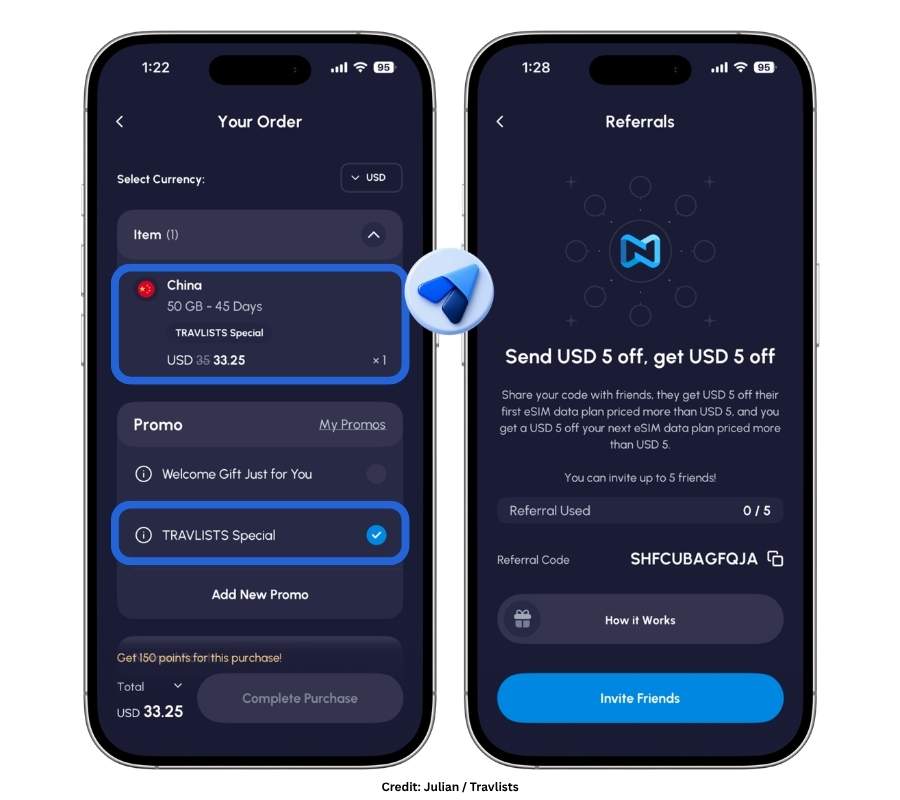
5% off with Promo Code TRAVLISTS
One advantage of our Nomad promo code is that it works for both new and existing users. Many eSIM discount codes are limited to first-time customers, but you can use our code again on your next Nomad purchases.
Enter the promo code TRAVLISTS at checkout to get 5% off your Nomad eSIM. I have personally verified that the code works as of this article’s latest update. If you notice that the discount is no longer applying, feel free to contact us so I can check it again.
Nomad Rewards
Nomad also has a loyalty program called Nomad Rewards. You earn 25 Nomad Points for every $5 you spend on eSIM plans, and every 100 points is worth $1 toward a future purchase. Points can be applied at checkout, so this is another way to save if you plan to use Nomad more than once.
Nomad also lets you redeem points for other perks. Depending on what is available in your account, these can include extra data, extended plan validity, and additional discounts. During my test of the Nomad app, for example, I saw options to extend a plan’s validity by one day for 50 points and get an additional 100MB valid for one day for 65 points.
Returning users can also earn bonus points when purchasing data plans of 10GB or more. This is one reason I think Nomad’s rewards program is more relevant to repeat customers than someone who only plans to buy a single eSIM for one trip.
Referral Program
The referral program was another feature that stood out to me while testing the Nomad eSIM app because my referral code was displayed prominently on the homepage. Nomad encourages existing users to share their personal referral code with friends, and both sides can receive a $5 credit.
For your friend, the referral code gives them $5 off their first Nomad eSIM plan. If they sign up and make their first purchase using your referral code, you also receive a $5 credit toward your next purchase. For new users under the Nomad Traveler membership tier, Nomad currently limits the referral reward to five friends, so you can earn up to $25 in referral credits. Keep using Nomad and you can increase your referral limit to 10 times (for Nomad Explorers or tho who have spent at least $21) and up to 30 times (for Nomad Elite or those who have spend $150 within 365 days).
There is one important restriction to know before using the credit. Your $5 referral credit can be applied to your next purchase priced at $5 or more, but referral credits generally cannot be combined with other Nomad promo codes or discounts unless a specific campaign says otherwise. That means if you have both a referral credit and our TRAVLISTS promo code available, check which one gives you the bigger saving before paying. For example, a $5 referral credit will usually be more valuable on a smaller purchase, while the 5% promo code can become more valuable on a sufficiently expensive order.
In Closing: Will I Recommend Nomad eSIM?
Yes, I would recommend Nomad eSIM. After using it myself in Seoul, what impressed me most was how easy the entire experience felt. Installation took me only about a minute, I connected to SK Telecom on 5G, and my Ookla speed test reached 1,247.72 Mbps – the fastest result among the South Korea eSIMs I have tested so far. More importantly, I had no issues using the apps I actually rely on, including Naver Map, Google Maps, Facebook Messenger, and TikTok. Mobile hotspot also worked smoothly with my MacBook Air.
I also think Nomad is particularly good at making people want to keep using its service. The app is one of my favorites among the eSIM providers I have reviewed, and features such as Nomad Points, Weekly Wins, and the referral program give returning users more reasons to come back. Add its local, regional, and global plans, and I can see myself using Nomad again for another trip.
That does not mean Nomad is the best eSIM for everyone. Its prices can be higher than some competitors, its unlimited plans have a relatively restrictive Fair Usage Policy, and my experience with live customer support was longer than I expected for a simple question. If getting the cheapest possible eSIM or having a generous unlimited data allowance is your priority, I would compare Nomad with other providers first.
But if you value easy setup, fast connectivity, a polished app, flexible plans, and rewards for repeat purchases, Nomad is an eSIM I can confidently recommend based on my experience. I accepted the complimentary eSIM expecting to find both pros and cons, and I did. Overall, though, the positives outweighed the drawbacks for me.
To see more brands and providers, check out Travlists eSIM Hub.
Frequently Asked Questions
Is Nomad eSIM good?
Yes. Based on my test in South Korea, I would recommend Nomad eSIM. Installation took me about one minute, I connected to SK Telecom on 5G, and Nomad reached 1,247.72 Mbps download on my Ookla test – the fastest result among the South Korea eSIMs I have tested so far. I also had no issues using Naver Map, Google Maps, Facebook Messenger, TikTok, or Mobile Hotspot.
Its main downsides are pricing, its Fair Usage Policy for unlimited data, and my experience with live customer support. Nomad is not always the cheapest provider, and its unlimited plans currently provide 2GB of high-speed data per day before speeds are reduced to 512 kbps.
Is Nomad eSIM legit?
Yes. I purchased, installed, activated, and personally tested a Nomad eSIM in Seoul. Nomad provided my 20GB/30-day South Korea plan at no cost for this review, but I told the company beforehand that my review would independently cover both pros and cons.
I also verified our Nomad promo code TRAVLISTS at checkout and tested Nomad’s app, Mobile Hotspot, AI Agent, and live customer support.
Is Nomad eSIM reliable?
Nomad was reliable during my test in Seoul. After restarting my iPhone, my eSIM connected to SK Telecom on 5G, and I was able to use maps, messaging, social media, Google searches, and Mobile Hotspot without connectivity issues.
However, eSIM performance can vary by destination, local network, coverage, congestion, and routing, so my experience in Seoul should not be treated as a guarantee that you will get the same speeds everywhere.
When should I install and activate my Nomad eSIM?
You can install your Nomad eSIM before your trip. Activating the eSIM on your phone during installation does not necessarily mean that your data plan immediately starts being consumed.
For my South Korea eSIM, I installed it by long-pressing the QR code on my iPhone and selecting “Add eSIM.” When I was ready to connect, I turned on the Nomad eSIM, enabled Data Roaming, and selected it for Cellular Data.
How long does it take to install a Nomad eSIM?
My Nomad eSIM took about one minute to install on an iPhone 15 Pro. I started the installation at 9:26 pm and received the “Travel eSIM Setup Complete” message at 9:27 pm.
Your setup time may be different depending on your phone and the installation method you use.
Can I install a Nomad eSIM without another device to scan the QR code?
Yes, at least on my iPhone. Instead of displaying the QR code on another device, I long-pressed the QR code until the “Add eSIM” option appeared and installed it directly from there.
Nomad also provides other installation methods, including Direct Installation.
Can I use my regular SIM and Nomad eSIM at the same time?
Potentially, yes, if your phone supports Dual SIM functionality. During my test, however, I turned off my primary line and selected my Nomad eSIM for cellular data.
Be careful with your primary SIM while traveling because leaving roaming enabled on your regular carrier could result in roaming charges.
Does Nomad eSIM work with WhatsApp?
Yes. Nomad provides mobile data, so you can continue using internet-based messaging apps such as WhatsApp, Facebook Messenger, KakaoTalk, LINE, and Viber.
Because Nomad’s standard travel eSIMs are data-only, using WhatsApp does not mean Nomad gives you a new phone number.
Does Nomad eSIM have a phone number?
No. Nomad’s travel eSIMs are data-only and do not provide a phone number for regular voice calls or SMS.
If having a phone number is important for your trip, I would consider an alternative such as aloSIM or BNESIM.
Can I make calls or send SMS with Nomad eSIM?
Not through a regular Nomad phone number because its eSIMs are data-only. You can still make internet-based calls and send messages through apps such as WhatsApp, Messenger, LINE, FaceTime, and similar services.
Does Nomad eSIM support hotspot?
Yes. I tested Mobile Hotspot by sharing my iPhone’s Nomad connection with my MacBook Air. The laptop connected without issues, and I was able to browse using Google Chrome.
Can I manually change networks with Nomad eSIM?
Yes, when multiple supported networks are available for your plan. I specifically asked Nomad about this during my South Korea test. Their live support told me I could go to Network Selection on my iPhone, turn off Automatic, and manually select a supported local network.
The networks available to you will depend on the eSIM plan and destination.
Does Nomad eSIM work on carrier-locked phones?
Your phone should be carrier-unlocked and eSIM-compatible before purchasing a Nomad eSIM. An eSIM-compatible phone can still be locked to your mobile carrier, so compatibility alone does not necessarily mean you can install a travel eSIM.
Does Nomad offer unlimited data?
Yes, Nomad offers unlimited data plans for select destinations. However, unlimited does not mean unlimited high-speed data.
Nomad currently provides 2GB of high-speed data per day on these plans. After reaching the daily allowance, speeds are reduced to 512 kbps until the allowance resets.
Does Nomad have a free trial?
Nomad currently advertises a free 1GB trial eSIM for new users. I would check the current eligibility and available destinations before relying on the free trial for a trip, since promotional offers can change.
Can I top up my Nomad eSIM?
Yes, eligible Nomad plans can be topped up through the app. During my test, the Manage section showed my remaining data and exact time until expiry, along with the option to top up my plan.
Does Nomad work in China without a VPN?
According to Nomad’s AI Agent when I checked on September 12, 2026, Nomad’s China eSIM routes its connection through international servers, allowing access to services such as Google, WhatsApp, Facebook, and YouTube without installing a separate VPN.
TikTok is different. Nomad told me that TikTok can be unreliable in Mainland China and does not guarantee that it will work smoothly.
Nomad eSIM Comparisons
Nomad vs Airalo: Which Is Better?
Between the two, I would consider Airalo if wider Europe coverage or a more generous unlimited-data policy were my priorities. Airalo’s Europe eSIM currently covers 41 countries compared with 35 for Nomad, and Airalo includes destinations such as Turkey, Ukraine, Albania, Bosnia and Herzegovina, Montenegro, North Macedonia, and Serbia that Nomad’s Europe plan does not.
Airalo’s unlimited plan also provides 3GB of high-speed data per day before speeds are reduced to 1 Mbps, compared with Nomad’s 2GB per day before speeds are reduced to 512 kbps.
Nomad still has advantages. Its 1GB Europe plan costs $5.50 for 7 days compared with Airalo’s $5 for 3 days, and based on my own Nomad test, I particularly liked its fast installation, polished app, rewards, and referral features.
Nomad vs Saily: Which Is Better?
For Europe, Saily has a slight advantage on both price and unlimited data. Both providers currently cover 35 countries, but Saily charges $4.99 for 1GB valid for 7 days compared with Nomad’s $5.50 for the same data and validity.
Saily’s unlimited plans also provide 3GB of high-speed data per day before speeds are reduced to 1 Mbps. Nomad provides 2GB per day before reducing speeds to 512 kbps.
Nomad vs BNESIM: Which Is Better?
I would consider BNESIM if price is one of my biggest priorities. Its 1GB Europe plan currently costs $2.89 and lasts 30 days, while Nomad charges $5.50 for 1GB valid for 7 days. Our BNESIM promo code TRAVLISTS also currently gives new and existing users 30% off, compared with 5% for Nomad.
BNESIM’s unlimited plans provide 3GB of high-speed data per day before speeds are reduced to 1 Mbps, compared with Nomad’s 2GB and 512 kbps. However, BNESIM does not include hotspot use with its unlimited plans.
Nomad would appeal to me more if I prioritized its polished app, rewards program, referral credits, and overall user experience rather than getting the lowest price.
Nomad vs Ubigi: Which Is Better?
Both performed well in my South Korea tests, but Nomad recorded the faster Ookla result. Nomad reached 1,247.72 Mbps, while Ubigi reached 293.13 Mbps. In normal travel use, however, both were already fast enough that I would not choose between them based on those numbers alone.
Ubigi currently has the larger Travlists discount at 10% off with our promo code, compared with 5% for Nomad. Its unlimited-data policy is also different: Ubigi uses cumulative high-speed allowances rather than Nomad’s daily 2GB allowance and reduces speeds to 2 Mbps after the allowance is reached, compared with Nomad’s 512 kbps.
Nomad vs Yesim: Which Is Better?
Nomad performed better in some of my firsthand tests. My Nomad installation took about one minute compared with four minutes for Yesim, and Nomad recorded the faster speed result in my South Korea testing.
For Europe pricing, however, Yesim currently offers 1GB valid for 30 days for $3, compared with Nomad’s $5.50 for 1GB valid for 7 days.
Unlimited data is harder to compare. Nomad discloses a 2GB daily high-speed allowance followed by speeds of 512 kbps. Yesim does not impose one universal threshold itself; its Fair Usage Policy depends on the underlying network provider.
Nomad vs Klook: Which Is Better?
I would choose between Nomad and Klook based more on the specific destination and plan than on the brand alone. In my installation tests, Nomad took about one minute compared with three minutes for Klook.
Their unlimited-data policies differ substantially. Nomad currently provides 2GB of high-speed data per day before reducing speeds to 512 kbps, while the Klook plan I compared provides 15GB per day before reducing speeds to 1 Mbps. That makes Klook considerably more attractive to me as a heavy data user when those particular unlimited plans are available.
For Europe, Klook’s 1GB/1-day plan currently costs $4.10, while Nomad’s 1GB/7-day plan costs $5.50. Those are not equivalent validity periods, so I would compare the actual plan required for the length of your trip rather than looking only at the starting price.
Order Confirmation
This is the order confirmation for the 20GB/30-day South Korea eSIM that Nomad provided for my test. The plan normally cost $28 but was fully discounted using the credit provided by Nomad.
Before accepting the eSIM, I told Nomad that my review would be based on my actual experience and would include both pros and cons. Receiving the complimentary eSIM did not affect my editorial recommendations.