Disclosure: Travlists is reader-supported. We may earn a small commission if you book through some of the links on this page, at no additional cost to you.
In a Nutshell
- TOPIK II Registration. I applied for the TOPIK II IBT exam on the very first day, exactly at 10:00 AM, but I was placed somewhere above 3,500 in the queue. It only took around 16 minutes to get through and enter the registration system, but all of the testing sites in Seoul, Incheon, and Bucheon were already full.
- TOPIK I Registration. Since I wanted to take both TOPIK I and II on the same day (TOPIK I is usually held in the morning, while TOPIK II is administered in the afternoon), I immediately applied for TOPIK I after securing a slot for TOPIK II. The second queue started at around 700 people. At 10:22 AM, there were 552 people ahead of me, but I entered the registration system at around 10:25 AM. (If you’re taking both TOPIK I and TOPIK II on the same day, make sure to select the same test center when registering for each exam. A TOPIK ID can only be used for one test center during the same test session.)
- Photo. Aside from your personal information, you will also need to upload a color passport-style photo that was taken within the previous six months. It has to be 3.5 x 4.5 cm in size and with a white background. It also must not be digitally altered. If you are looking for an accessible photo studio in Seoul that specializes in ID/passport photo packages, I have listed some recommendations in our Quick Book section below:
Quick Book: TOPIK Registration Essentials
Find the TOPIK registration link, as well as some study materials I personally used to study for TOPIK and photo studios you can visit in Seoul. If anything seems off, feel free to drop me a message.
Start preparing
- CODE
- TRAVLISTS
- OFFER
- 3% off
- NOTE
- Usable up to 3x on eligible Klook activities, including eSIMs, hotels, and transportation. Minimum $50 spend applies
- CODE
- TRAVLISTS
- OFFER
- 3% off
- NOTE
- Usable up to 3x on eligible Klook activities, including eSIMs, hotels, and transportation. Minimum $50 spend applies
- IDEAL FOR
- When you will be taking a test outside of your city
- CODE
- TRAVLISTS
- OFFER
- 3% off
- NOTE
- Usable up to 3x on eligible Klook activities, including eSIMs, hotels, and transportation. Minimum $50 spend applies
- IDEAL FOR
- When you want to do a multi-city trip after taking a test
- CODE
- TRAVLISTS
- OFFER
- 3% off
- NOTE
- Usable up to 3x on eligible Klook activities, including eSIMs, hotels, and transportation. Minimum $50 spend applies
- IDEAL FOR
- When you want to take the bus instead of the train
- CODE
- TRAVLISTS
- OFFER
- 3% off
- NOTE
- Usable up to 3x on eligible Klook activities, including eSIMs, hotels, and transportation. Minimum $50 spend applies
- IDEAL FOR
- If you want to book a hotel or hostel near your TOPIK testing location
- NOTE
- For account creation and test registration
See More Travel Promo Codes → Save on other travel essentials, activities, and tours for your trip in South Korea.
TOPIK Account Registration
Before you can register for a TOPIK test in South Korea, you’ll need to create a TOPIK account. You can sign up regardless of when you intend to take the test (even months in advance).
Having an account is also important because some of the personal information saved there will be automatically pulled when you register for an exam.
TOPIK Schedule
Before deciding when and where to take the TOPIK test, check the official TOPIK schedule: Homepage > TOPIK Information > Test Schedule
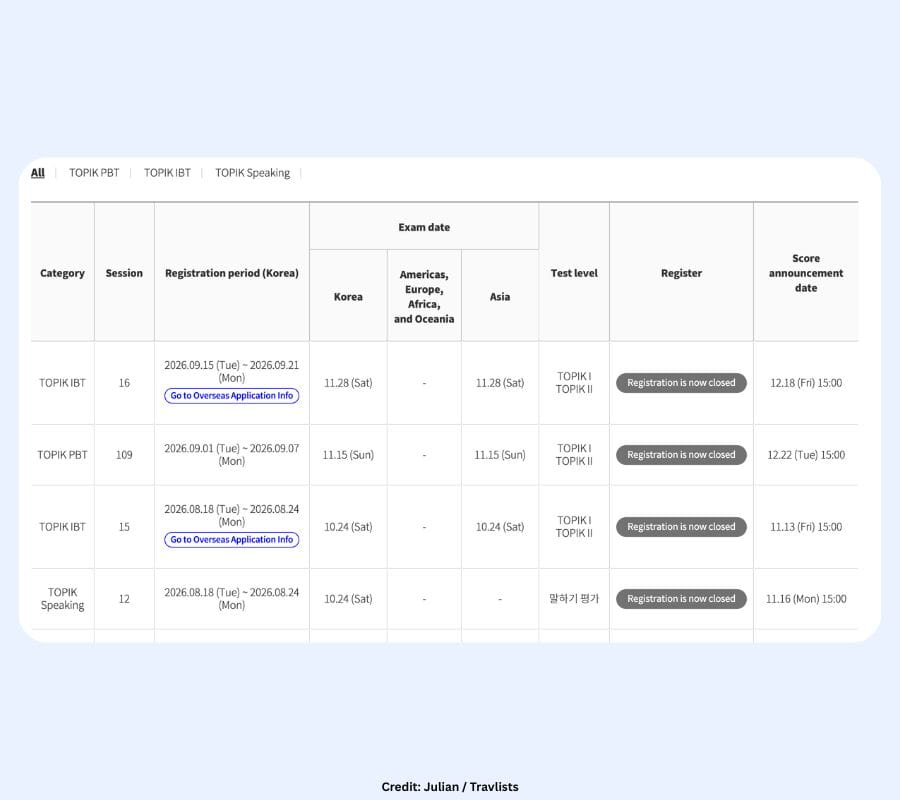
TOPIK has multiple test dates and locations throughout the year, and registration is held a few months before the actual exam.
TOPIK IBT vs. PBT
One of the first decisions you’ll need to make is whether to take the Internet-Based Test (IBT) or the Paper-Based Test (PBT). The biggest practical difference between the two is how you take the exam. PBT uses a traditional paper-based format, while the IBT is taken on a computer or tablet at the test center. I chose the IBT for my November 2026 TOPIK I and II exams.
Whichever format you’re considering, check the current TOPIK schedule, available test centers, test format, and registration information before deciding.
TOPIK I vs. TOPIK II
You’ll also need to decide whether to register for TOPIK I or TOPIK II. TOPIK I is intended for Levels 1 and 2, while TOPIK II is used for Levels 3 through 6.
But you don’t necessarily have to choose only one. For the November 28, 2026 IBT, I registered for both TOPIK I and TOPIK II. I registered for TOPIK II first and then went through the registration process again for TOPIK I.
Both of my exams are scheduled for the same day, and I was able to secure the same test center for both: Woosong Information College (우송정보대학교) in Daejeon. If you’re thinking about taking the two exams, check the official timetable for your specific test session before registering to make sure the schedules allow it.
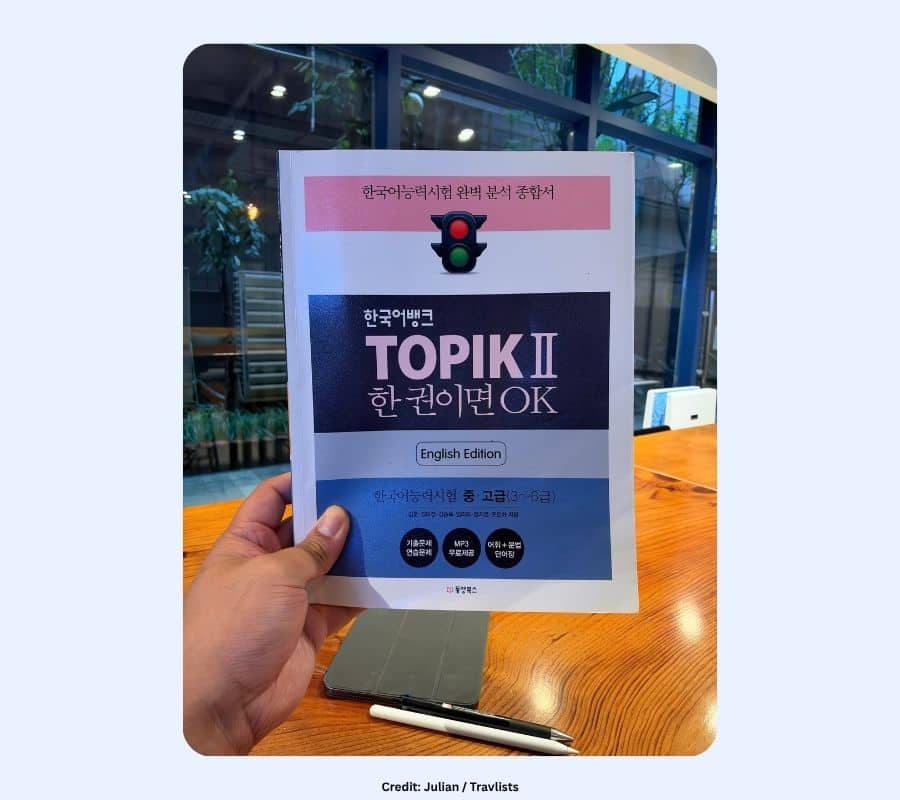
If you are looking for study guides that include vocabulary and grammar, practice questions, and tips on how to tackle each question, I recommend the following books. These have helped me get a feel for the test format and study for around three months:
TOPIK Photo Guidelines
Your TOPIK account requires a photo, and this is another requirement I recommend sorting out before registration day. The official website lists the following guidelines (based on the Korea Immigration Service’s guidelines when applying for a Registration Card), so make sure to adhere to them to avoid any issues on your test date.
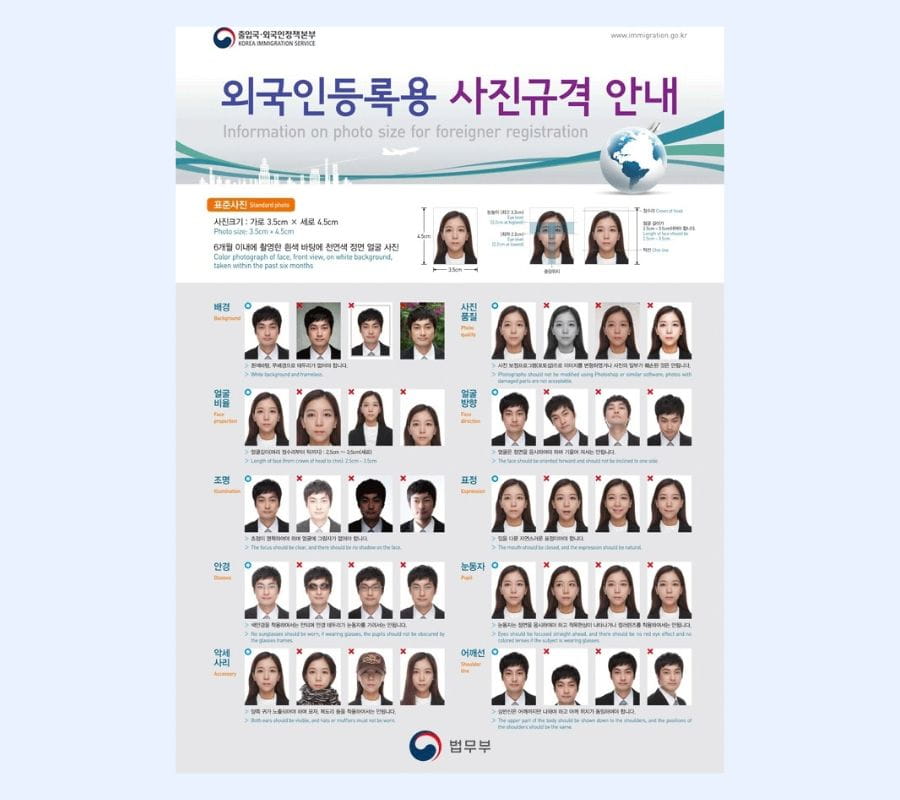
- 3.5 x 4.5 cm
- Color photo (not black and white) with a white background
- Front-facing upper-body passport-style photo
- Taken within the previous six months without digitally altering the original image
- JPG or JPEG format
- 200 KB or smaller
If you need a new ID photo while you’re in Seoul, click below to see studios that specialize in ID photos.
How I Registered for TOPIK IBT in South Korea
Registration for the November 2026 TOPIK Internet-Based Test (IBT) opened on September 15, more than two months before the test. This was a Tuesday, so I took a half-day off from work to focus on registration. Since I don’t have a Windows laptop, I went to an internet cafe near my home at around 9:20 AM. Here are the steps I followed:
1. Check Your TOPIK Account Information Before Registration
Part of registering for a TOPIK exam in South Korea is providing personal information like your name, email address, home address, and mobile number. However, you don’t have to enter all of this information from scratch during registration. Some of the details will be pulled from your existing TOPIK account. This saves time on registration day, but it also means you should make sure your account information is accurate beforehand. To do this, visit the official TOPIK website and go to My Page (마이페이지) > Edit Information (회원정보수정).
One thing I encourage you to check is your Full English Name. The TOPIK website specifically states that your English name must match the approved ID you will present, including the spelling and the complete name.
A tiny observation: each time I accessed the Edit Information page, the TOPIK website displayed the following pop-up:
- English: “Even if the membership information is modified, the application information will not change. Applicants who want to change the application information, such as photos and date of birth, should change the application status within the correction period. TOPIK Home Page -> My Page -> Status of Reception”
- Korean: “회원정보 수정에서 수정하더라도 접수정보는 변경되지 않습니다. 사진, 생년월일 등 접수정보를 변경하고자 하는 지원자는 정정기간 내 접수현황에서 변경하시기 바랍니다. 토픽홈페이지 -> 마이페이지 -> 접수현황”
This is important to remember after you register. Changing the information in your TOPIK user account does not automatically update the information attached to an existing TOPIK exam application. According to the message, if you need to change application information such as your photo or date of birth, you need to make the change separately during the allowable correction period through My Page > Status of Reception (접수현황).
2. Visit the TOPIK Website When Registration Opens
For my September 15 application, TOPIK IBT registration opened at 10:00 AM KST. Before then, I made sure the computer was ready and that I had a stable internet connection.
I saved my TOPIK account login credentials on a sticky note on the PC as well. This sounds like a tiny thing, but I found it really helpful because my email address and password are quite long. When you’re already thinking about queues and test centers, the last thing you want is to waste time trying to remember a password. I would also recommend having your address typed in a sticky note or notepad beforehand to save time.
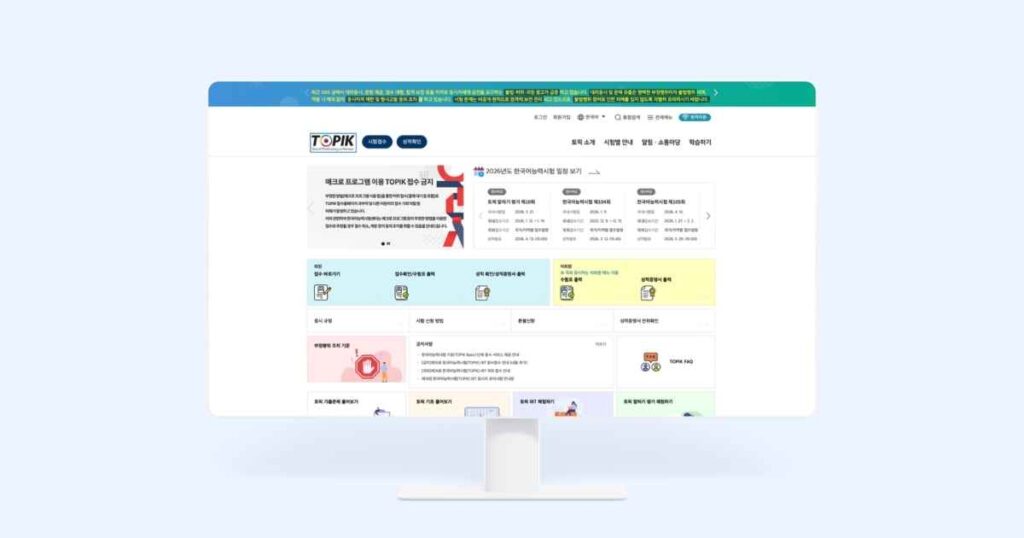
At 10:00 AM, or shortly afterward, visit or refresh the TOPIK website and click 시험접수 (Register for TOPIK). This button is located directly beside the TOPIK logo.
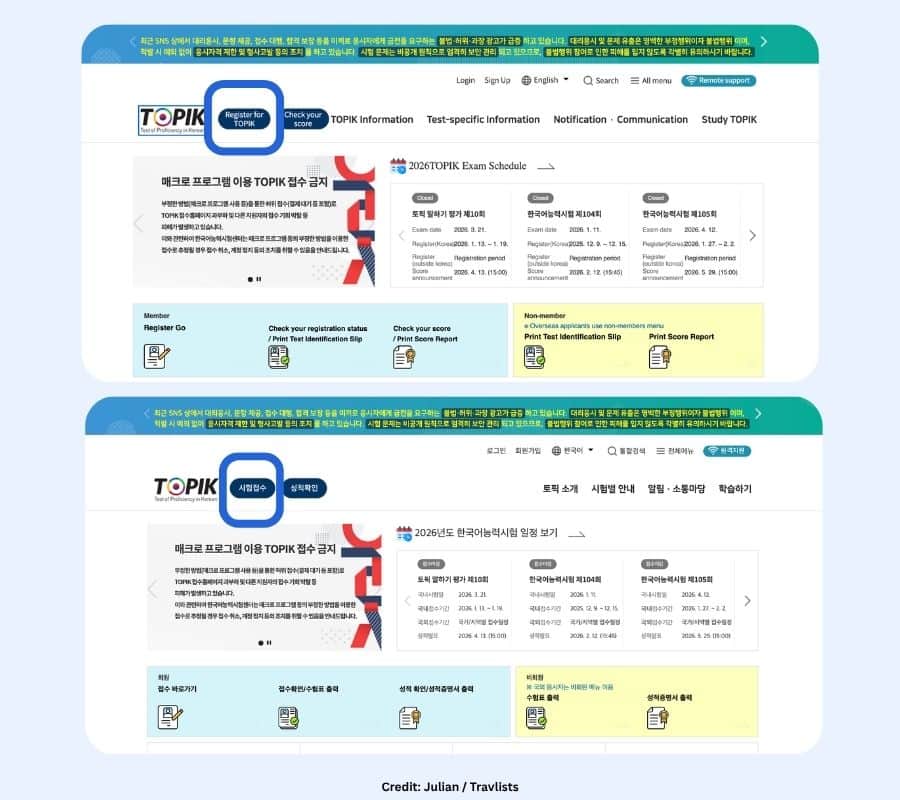
3. Log In to Your TOPIK Account
After clicking 시험접수, I entered my TOPIK username and password.
4. Select the TOPIK Test and Level
After logging in, I selected the TOPIK exam I wanted to register for. In my case, this was the 16th TOPIK Internet-Based Test (IBT) scheduled for November 28, 2026.
You also need to choose which level you want to take: TOPIK I or TOPIK II. These are registered for separately, even if you plan to take both on the same day.
Since TOPIK II was my priority, I registered for TOPIK II first. After selecting the exam and proceeding with the application, I was placed into the registration queue.
5. Enter the Registration Queue
This was where the registration process became interesting. Once I entered the TOPIK II registration process, I was placed into an online queue. The system showed how many people were ahead of me, and the displayed number refreshed approximately every five seconds.
Since there was nothing to do, I kept track of the queue while I waited.
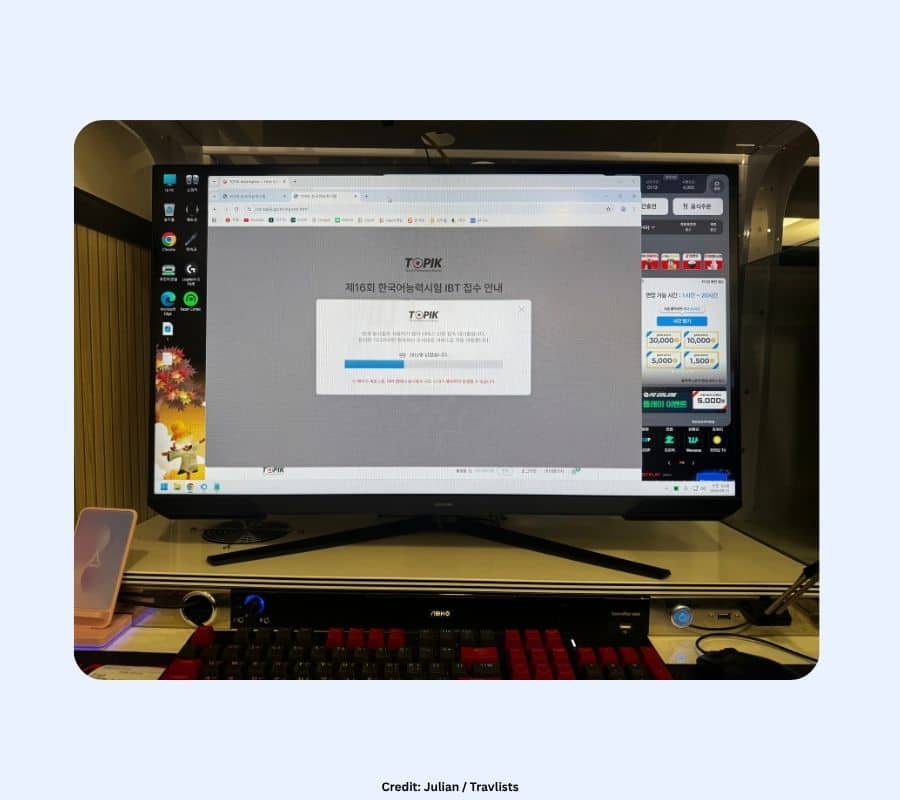
- 3,500+ when I entered between 10:00 AM and 10:01 AM
- 3,129 people remaining at around 10:02 AM
- 2,529 at around 10:03 AM
- 1,878 at around 10:06 AM
- 1,590 at 10:08 AM
- 1,086 at 10:11 AM
- 996 at around 10:11 AM
- 753 at 10:12 AM
- 453 at 10:13 AM
- 282 at 10:14 AM
- 189 at around 10:15 AM
- 90 at 10:15 AM
- QUEUE FINISHED at 10:16 AM
The queue moved much faster than I initially expected. Watching thousands of people ahead of you can look intimidating, but in my case the number dropped quickly. I didn’t refresh the page manually or leave the queue. I simply waited for the system to move me forward. It took me around 16 minutes to get in.
6. Choose a TOPIK Test Center
Once I got through the queue, the next major decision was choosing a test center. Unfortunately, during the 16 minutes that I waited, all four of the test centers I was considering in Seoul, Incheon, and Bucheon were already full. Instead of panicking, I looked at the next accessible city for me, which was Daejeon. The moment I saw that there were still available slots, I selected one and continued with my application.
As a tip, look at the available test centers in South Korea in advance, then think about which locations you’re realistically willing to travel to. If your preferred Seoul test center is unavailable, ask yourself beforehand whether you’re willing to travel to Daejeon, Busan, Jeju, or another city. Making that decision before you’re staring at the registration screen can save you time.
In my case, Daejeon was workable. My plan is to travel there the day before the exam and stay overnight near Daejeon Station rather than traveling from Seoul early on the morning of the test.
7. Complete the TOPIK II Registration
After I selected my test site, a pop-up appeared containing the terms and test regulations. You’ll be asked to review these and provide consent to items such as the collection and use of your personal information.
Once you get past the pop-up, you’ll fill out your examinee registration details. The page will show your uploaded photo at the top, along with the following information. Items marked with an asterisk (*) are required:
- 한글 성명 (Korean name)
- 영문 성명 (English name) *
- 생년월일 (Date of birth) *
- 성별 (Gender) *
- 태어난 국가/지역 (Country/Area of Birth) *
- 모국어 (Native language)
- 직업 (Occupation) *: Options include 학생 (Student), 공무원/군인 (Public official/Military), 회사원 (Company employee), 자영업 (Self-employed), 주부 (Homemaker), 교사 (Teacher), and others.
- 이메일 (Email address) *
- 한국 연락처 (Contact number in South Korea)
- 휴대전화 번호 (Mobile phone number) *
- 주소 (Address)
- 알게 된 경로 (How you learned about TOPIK) *
- 응시목적 (Purpose of taking the test) *: Options include 비자 VISA 영주권 (Visa/Permanent Residency), 학점취득 (Academic Credits), 사회통합프로그램 (Korea Immigration and Integration Program), 체류자격 관리 (Status of Stay Management), and others.
Some of your personal details will be pulled in automatically from your TOPIK account, so focus on reviewing that information and completing the remaining required fields.
8. Pay the TOPIK Registration Fee
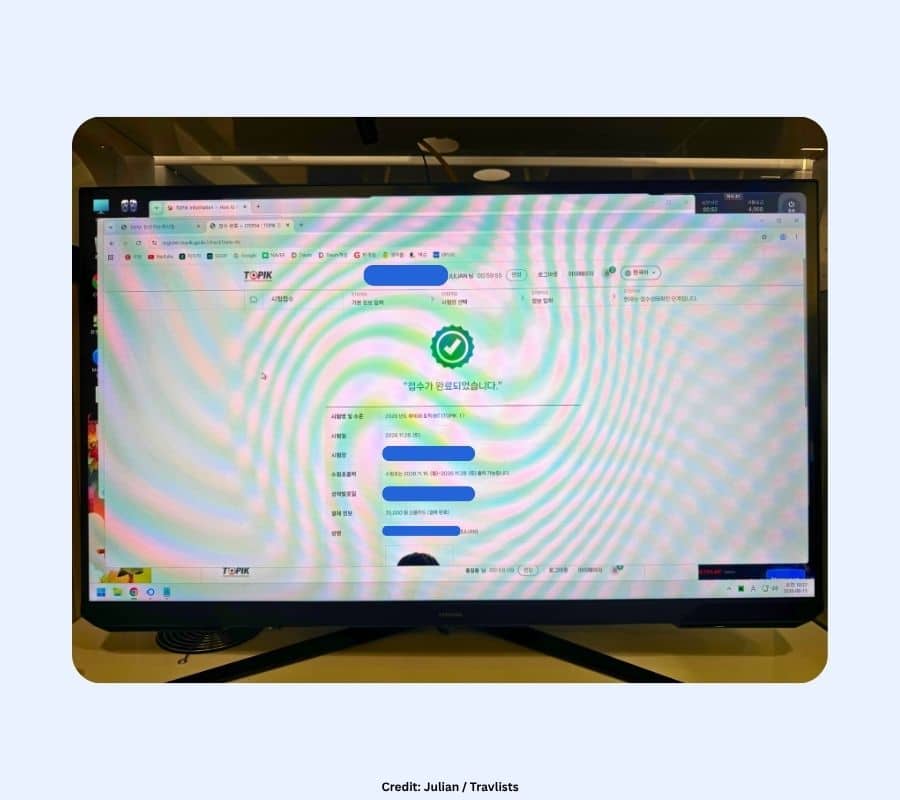
For the November 2026 IBT, I paid KRW 95,000 for TOPIK II using a credit card. After the payment went through, the confirmation page displayed “접수가 완료되었습니다,” or “Registration completed.”
At this point, my TOPIK II registration was complete.
9. Go Through the Queue Again If You’re Taking Both TOPIK I and TOPIK II
Because I wanted to take TOPIK I as well, I had to go through the registration process again, this time selecting TOPIK I.
As I expected, the queue was much shorter than the first one. I saw approximately:
- 700 people initially
- 552 at 10:22 AM
- 90 at 10:24 AM
I entered the TOPIK I registration system at approximately 10:25 AM. This meant that despite registering for TOPIK II first, I was still able to return and register for TOPIK I shortly afterward. I would not assume that future registration sessions will have the same queue sizes or move at the same speed. This is simply what I experienced during the September 15, 2026 registration.
If you’re planning to take both TOPIK I and TOPIK II on the same day, I strongly recommend choosing the same test center for both registrations. I was able to secure Woosong Information College in Daejeon for both exams.
10. Check Your TOPIK Registration Details
After completing the registration and payment, go to My Page (마이페이지) > Registration Status (접수현황) and check that your application has been successfully completed.
For both my TOPIK I and TOPIK II registrations, I checked the test level, test date, test center, and payment status to make sure everything was correct. My applications showed 결제 완료 (Payment Complete), and both exams were scheduled at Woosong Information College in Daejeon on November 28, 2026.
This page also shows when you can print your admission ticket (수험표). For my November 28 exam, admission ticket printing opens on November 16, 2026 at 10:00 AM.
I recommend checking your registration details immediately after payment rather than waiting until closer to the exam. If you’re taking both TOPIK I and TOPIK II, check each application separately and make sure the test center and other important details are correct.
Plan Your Trip If Your Test Center Is Outside Your City
One thing I hadn’t necessarily expected when I started planning for TOPIK was that registration could turn into a small domestic trip. I live in Seoul, but both of my exams ended up being in Daejeon. Rather than taking an early train on November 28 and worrying about delays, finding the university, and arriving on time, I’m planning to travel to Daejeon the day before and stay overnight.
If you also end up with a test center outside your city, I would consider the entire journey rather than looking only at the train time. Here’s what I would factor in:
- How long it takes to reach the city
- How far the test center is from the train or bus station
- What time you need to arrive at the test center
- Whether public transportation will be running early enough
- Whether staying overnight would make the morning less stressful
For me, booking a KTX ticket and a hotel in Daejeon is worth considering because I’ll be taking both TOPIK I and TOPIK II on the same day. If you ever end up needing to do the same, you can get up to a 5% discount on KTX tickets (or Korail Pass) and hotels (nationwide) when you book below with my promo code TRAVLISTS. (The promo code gives 5% for new Klook users and 3% for existing users on eligible activities, with a minimum purchase of $50).
In Closing: What I Learned From Registering for TOPIK IBT
My biggest takeaway from TOPIK registration is that much of the preparation can be done before registration actually opens. You can create your account, check your English name and other personal information, review your photo, save your login credentials, check the test schedule, look at potential test centers, and decide how far you’re willing to travel before registration day. Then, when applications open, your main job is getting through the queue and securing the test you want.
The queue also looked more intimidating than it actually was in my case. I had more than 3,500 people ahead of me for TOPIK II, but the number fell quickly enough that I was able to register for TOPIK II and then go through a second queue to register for TOPIK I. (Don’t assume that every registration period will work the same way, though. My experience reflects the November 28, 2026 IBT registration that opened on September 15, 2026.)
If there’s one thing I’d do the same way again, it’s preparing everything before 10:00 AM rather than trying to fix account details once registration has already started.
If you are taking the TOPIK in South Korea as a tourist and want to explore before or after your test, you can find activities and sample itineraries in our South Korea Guide.
Klook.comFAQ
How quickly do TOPIK test centers fill up in South Korea?
They can fill up quickly, especially if you’re trying to register for a specific location. When I registered for TOPIK IBT on September 15, 2026, I joined the TOPIK II registration queue as soon as registration opened at 10:00 AM. I entered the registration system around 16 minutes later, but all of the test centers I had been considering in Seoul, Incheon, and Bucheon were already full.
Availability will vary between exams, but I recommend registering as soon as applications open if you have a preferred test center.
How long is the TOPIK registration queue?
It depends on the registration period. For my TOPIK II registration, there were more than 3,000 people ahead of me shortly after registration opened. Despite that, I reached the registration system in around 16 minutes.
When I registered for TOPIK I immediately afterward, the queue started at around 700 people and I got through in only a few minutes.
What should I do if TOPIK test centers in Seoul are full?
Check other cities that you would realistically be willing to travel to. When the locations I was considering in Seoul, Incheon, and Bucheon were full, I checked Daejeon and found availability at Woosong Information College.
I recommend deciding on a few backup cities before registration opens. That way, you don’t have to make the decision while available slots are disappearing.
Can I register for TOPIK I and TOPIK II on the same day?
Yes, depending on the schedule for your specific test session. I registered for both TOPIK I and TOPIK II for November 28, 2026.
The two exams require separate registrations. I registered for TOPIK II first, completed the payment, and then returned to register separately for TOPIK I.
If you’re planning to take both, check the official schedule for your test session before registering.
Should I register for TOPIK I or TOPIK II first if I’m taking both?
There isn’t one order that everyone needs to follow. I personally registered for TOPIK II first because TOPIK II was my priority.
After completing my TOPIK II registration, I went back through the registration process for TOPIK I and was still able to secure the same test center.
If one exam is more important to you, I would personally prioritize securing that one first.
Can I take TOPIK I and TOPIK II at different test centers?
If you’re taking TOPIK I and TOPIK II during the same test session, make sure you select the same test center when registering for each exam. A TOPIK ID can only be used for one test center during the same test session.
I registered for both TOPIK I and TOPIK II at Woosong Information College in Daejeon.
Can tourists take TOPIK in South Korea?
Yes. According to the official TOPIK FAQ, your visa status does not affect whether you can take TOPIK in South Korea. Tourists can also use a valid, unexpired passport for identity verification on test day.
If you’re using your passport as your identification, make sure the English name on your TOPIK application matches the name shown on your passport.
Can Korean citizens take TOPIK?
Yes. According to the official TOPIK FAQ, there is no nationality restriction for taking TOPIK, so Korean citizens can also register for the test.
However, TOPIK is primarily intended for overseas Koreans and people who do not use Korean as their native language. The official FAQ recommends checking whether TOPIK is appropriate for your intended purpose before registering.
What photo do I need for TOPIK registration?
According to the official TOPIK photo guidelines, your registration photo should meet the following requirements:
- 3.5 x 4.5 cm
- Color photo with a white background
- Front-facing photo showing your face
- Taken within the previous six months
- JPG or JPEG format
- 200 KB or smaller
Your registered photo will also appear on your admission ticket and score certificate.
TOPIK warns that if your photo does not meet the requirements or the person taking the test appears different from the registered photo, you may not be allowed to take the exam or your result may be invalidated.
Can I pay the TOPIK registration fee with an overseas credit card?
No. According to the official TOPIK FAQ, credit card payments through the Korean registration system are limited to cards issued in South Korea. Overseas-issued cards cannot be used.
A virtual bank account is another available payment method, but overseas transfers to the virtual account are not supported.
Payment periods can vary depending on the payment method, so check the payment information for your specific registration period before applying.
Can I cancel my TOPIK registration and get a refund?
Yes, but the amount you receive depends on when you request the refund.
According to the official TOPIK refund information:
- From the beginning of registration until 10:00 AM on the registration closing date: 100% refund
- For seven days after the registration closing date: 50% refund
- From eight days after registration closes until 1:00 PM on the day before the test: 40% refund
- After 1:00 PM on the day before the test: No refund
You can request a refund by logging in with the account used for registration and going to My Page (마이페이지) > Registration Status (접수현황) > Refund Request (환불신청).
Check the rules and dates for your specific test before cancelling.
Can I change my information after registering for TOPIK?
Only certain information can be corrected after the registration period, and corrections must be made during the designated correction period.
Changing your information under Edit Member Information (회원정보수정) does not automatically update the information attached to an existing TOPIK application.
According to the official TOPIK guidance, the correction period runs from the day after registration closes until three business days before admission ticket printing begins.
The procedure depends on what you need to change. Your photo can be changed through My Page (마이페이지) > Registration Status (접수현황) during the correction period, while changes to information such as your English name, date of birth, or gender require an Applicant Information Correction Request (지원자 정보 정정 신청).
Because the corrections allowed after registration are limited, I recommend checking your information carefully before submitting your application.
When can I print my TOPIK admission ticket?
According to the official TOPIK FAQ, admission tickets can normally be printed from 10:00 AM on the Monday two weeks before the exam until the test begins. If that Monday is a public holiday, printing begins at 10:00 AM the following day.
You can find your admission ticket by going to My Page (마이페이지) > Registration Status (접수현황) > Print Admission Ticket (수험표 출력).
For my November 28, 2026 TOPIK IBT, my registration page shows that admission ticket printing begins on November 16, 2026 at 10:00 AM.
Do I need to print my TOPIK admission ticket?
TOPIK instructs applicants to print their admission ticket and bring it to the test center together with an approved identification document.
If you’re unable to print your admission ticket, the official FAQ also suggests saving a screenshot or photo of it so that you can more easily find your test room and assigned seat.
I would still print the admission ticket before the exam whenever possible.
How long are TOPIK scores valid?
TOPIK scores are valid for two years from the date the results are announced.
Once the validity period has expired, you can no longer view the result or issue a score certificate through the TOPIK website. If you expect to need your TOPIK result for university, immigration, employment, or another purpose, keep the two-year validity period in mind.
How do I get my TOPIK score certificate?
You can issue a TOPIK score certificate through the official TOPIK website while your result is still within its two-year validity period.
If you’re logged in with the account you used to register, you can access it through the Score Check (성적확인) menu.
The official TOPIK FAQ also provides a non-login option. You can select Score Check (성적확인) without logging in and search using information including your test session, examinee number, and date of birth.
TOPIK does not send score certificates by mail, fax, or email.
Can I get an English TOPIK score certificate?
No. According to the official TOPIK FAQ, an English-language TOPIK score certificate is not provided.
The personal information shown on your score certificate, including your English name, reflects the applicant information entered when you registered for the test. This is another reason to check your personal information carefully before completing your TOPIK registration.