Disclosure: Travlists is reader-supported. We may earn a small commission if you book through some of the links on this page, at no additional cost to you. See how we review and our purchase receipt.
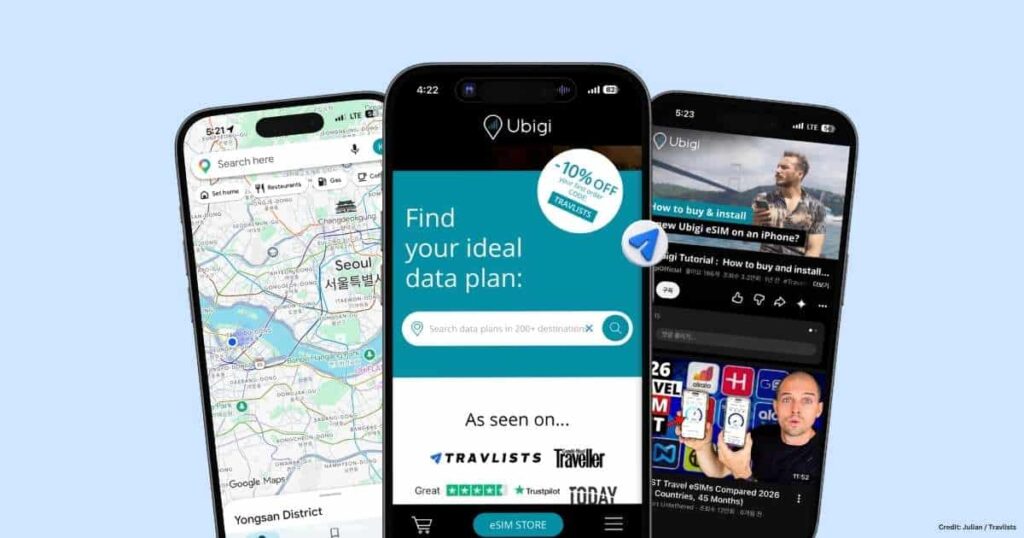
What is your go-to eSIM when traveling? I have four favorites, but I’m happy to add Ubigi to my list after using it (it’s pronounced you-bee-gee, by the way — you’re very welcome). It worked well when I was trying to book Warner Bros. Studio Tour for my upcoming Tokyo trip, using Google Maps to plan my route, and even watching YouTube and TikTok to learn Korean.
As someone who runs a blog covering attractions, hotels, transport, and internet connectivity, I make sure that what I recommend works for me and my readers. So, for this Ubigi eSIM review, I purchased and tested an eSIM for South Korea. Even if you are going to Japan, the Philippines, the Dominican Republic, or other countries, you can still learn from my experience in installing and activating the eSIM, as well as troubleshooting with Ubigi’s customer support. I’ll also share our coupon code so you can get a 10% discount.
As you’ll find in my review below, Ubigi is good, but it wasn’t perfect. However, I still think it deserves the popularity that it has among other travelers.
In a Nutshell
- What is Ubigi? Ubigi is owned and operated by the French company Transatel, which is a subsidiary of Japan’s NTT Group. This is worth mentioning since the name Transatel comes up a few times during setup — it’s the default eSIM label, for example. To avoid confusion, you can simply rename it as “Ubigi eSIM”. Having ties with a Japanese telco may also explain why Ubigi often comes up as a recommendation for Japan-bound travelers.
- How did my experience go? The highlights included instant eSIM delivery, simple installation using “hold-and-press”, quick activation, and fast internet speeds (based on my Ookla and Google speed test). The eSIM worked out of the box, which supports what Ubigi says about “Immediate Installation” on their website. However, I did encounter some hiccups with connecting my laptop via mobile hotspot and finding my order on the Ubigi app.
- What are Ubigi’s popular destinations? Ubigi lists the United States, Europe, and Japan as top destinations on their website, although I couldn’t confirm whether these are their bestsellers or featured routes. Based on Travlists’ booking data, the five most booked Ubigi eSIM destinations are Japan, Malaysia, the Dominican Republic, the United States, and Costa Rica. I based this on 420+ Ubigi purchases tracked through Travlists’ affiliate links between January 1 and July 20, 2026.
Ubigi Promo Code
Quick Book: Get Ubigi
Choose your destination below and get 10% off on Ubigi eSIMs when you book with our coupon code TRAVLISTS. Verified working as of this article’s last update. Feel free to contact us if anything seems off!
Choose your destination
Meet Ubigi
Ubigi was already an established brand when I first started writing about eSIMs in early 2023. There were not as many providers then as there are now, so I consider them one of the first-generation travel eSIM providers. I continue to use them as a reference, sometimes a benchmark, when writing about embedded SIMs. Over the years, I also saw them make some additions, including unlimited data plans and their loyalty program called UbiClub, which they announced on their Instagram in June 2026.
There are two things that I’m trying to say: Ubigi has been in the business longer than others, and they’re introducing new offers or features over time. But the question still stands — should you get a Ubigi eSIM?
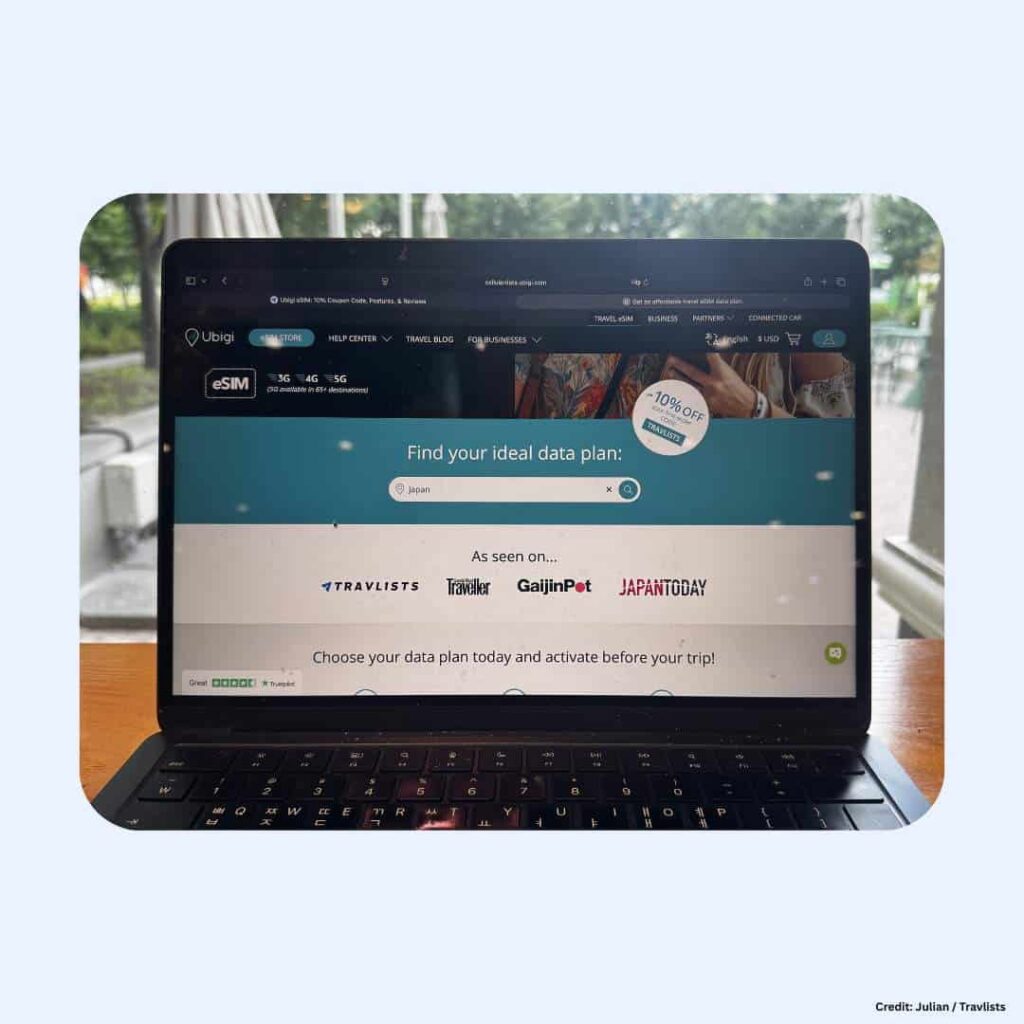
Before I go over my review below, there are some things that I think are worth knowing about the brand. The following information is public, and chances are you may have come across some of it already. But I still think it’s worth sharing for those who have not. My goal is to give a balanced overview before I focus on my personal experience.
- Coverage: Local, regional, and world eSIMs across 200+ destinations
- Reusable eSIM: Ubigi offers a “lifetime eSIM” that allows their users to use the same eSIM profile and purchase a new plan for future trips
- Plan types: One-off, monthly, and annual plans, depending on the destination
- Network access: Local 3G, 4G, or 5G network, depending on the destination’s infrastructure and the user’s device
- Data-only service: Ubigi says their “eSIM is data-only” on their homepage’s Good to Know section. Messaging apps like WhatsApp, FaceTime, Messenger, Teams, and other VoIP services are supported.
- Keep your primary line: Ubigi says that their users can keep using their main phone number for calls and SMS while using Ubigi for data.
- Rewards: UbiClub, which requires no separate registration, lets users earn up to 8% in UbiCoins on eligible eSIM plan purchases. UbiCoins are said to be valid for 365 days.
- Company background: Ubigi was launched in 2017 by Transatel, a France-based subsidiary of the NTT Group in Japan.
- In the press: Ubigi has partnerships with airlines like TAROM and was designated the Officially Licensed eSIM Provider for EXPO 2025 in Japan.
Ubigi checks a lot of boxes, starting with wide coverage. The way I read it, it’s as if they’re saying that no matter where I’d choose to go, they are able to provide an internet connection with 3G, 4G, or 5G speeds. That’s reassuring, especially if I want to stick with one provider only. Their recurring plan is also interesting and something that I have only seen from a few other providers. I would likely consider the monthly plan if I were traveling for education or business and don’t necessarily need a phone number for calls and texts.
That said, I would also highlight a few things to manage expectations. Yes, Ubigi’s technology allows users to use the same eSIM profile for future trips (or a lifetime, to borrow their term). However, this won’t be automatic across devices. If you switch phones, you’ll need to delete the eSIM profile on your old device first, then reinstall it on the new one through the same Ubigi account. You can reinstall up to five times after deletion.
Another thing: I’d be careful about keeping your primary line active for calls and texts while traveling overseas, unless you’re ready for possible roaming charges. That kind of defeats the purpose of getting a cheaper travel eSIM. If you really need a phone number for calls or texts, there are alternative providers that are available.
Based on this information alone, I would say Ubigi is suitable for frequent travelers who want to keep using one provider across different trips, especially with the new UbiClub Rewards Program. The recurring plans may also work for those who need long-term use. I would probably skip it if I needed a phone number or cellular calls and SMS. View Ubigi eSIM Plans →
Ubigi eSIM Review: My Experience
To see how Ubigi works, I bought a South Korea eSIM that includes 1GB for 7 days. I tested the eSIM on my iPhone 15 Pro in Seoul, specifically in Yeouido. Here’s a quick summary:
| What Ubigi Says | My Experience |
|---|---|
| Purchase: Simple checkout through the website or app | It was easy. I searched for South Korea, chose my plan, applied TRAVLISTS for 10% off, and paid through Apple Pay. |
| QR code delivery: May take up to 15 minutes | Mine arrived almost instantly, in the same minute that I completed the payment. |
| Installation: “Quick and easy setup” | This was true for me. It took around two minutes, and I used the Hold & Press method instead of scanning the QR code with another device. |
| Activation: Immediate installation, with SmartStart available | I activated the plan manually because I was already in Seoul. It connected without any issue. |
| Speed: 4G or 5G, depending on the destination | My connection stayed on LTE, but it was still fast. I recorded 293.13 Mbps on Ookla and 171.8 Mbps on Google’s Speed Test. |
| Browsing experience: None specified | Google Maps, Klook, TikTok, KakaoTalk, YouTube, and my blog all loaded quickly. |
| Mobile hotspot: Tethering is allowed | It did not work right away. I had to contact support and adjust my APN settings before I could connect my laptop. |
| Customer support: AI chatbot with human escalation | I reached the chatbot first. The handover to a human was not very clear, but a support agent eventually helped me fix the hotspot issue. |
| UbiClub Rewards: Up to 8% back, with no separate registration | I did not earn UbiCoins from this purchase because I booked through the mobile website rather than the app. |
Purchase
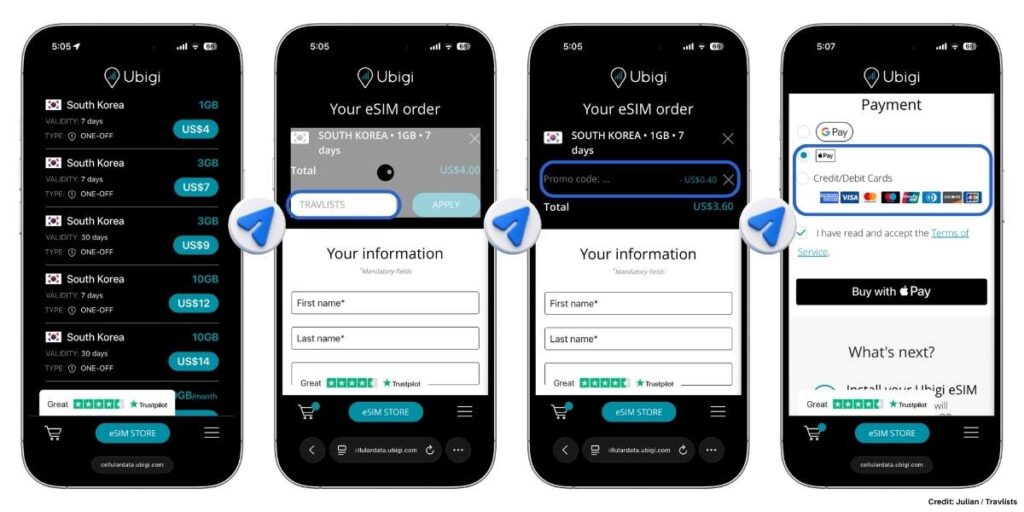
The purchase process on the mobile site was easy. I searched for the country, selected a plan, and checked out via Apple Pay (Google Pay and card payments were the other options). I used our Ubigi promo code TRAVLISTS and was able to get a 10% discount — just a note for you that it works. Before payment, Ubigi prompted me to confirm whether my eSIM was compatible (by dialing *#06# and checking for my EID) and my device was unlocked (a quick check in the phone settings).
I then received an email as soon as the payment went through. It mentioned that I would receive the QR code within 15 minutes, but the QR code arrived almost instantly. I was able to proceed with setup right after.
Ubigi eSIM Installation and Activation
Ubigi says “Quick and easy setup” on their website, and this was true based on my experience. It took me just 2 minutes to install, including going through the welcome email that says two things: hold and press the QR code (or scan), and create an account to link the eSIM.
This was the first time that I saw the Hold & Press method, so I did as told instead of scanning the QR code (which requires another device). I was then prompted to add and activate the eSIM. After a few taps, my eSIM profile was created. Honestly, it was so simple and satisfying.
Below I share the steps based on my experience. Since I was already in Seoul, I activated my South Korea plan straight away.
How to Install Ubigi eSIM
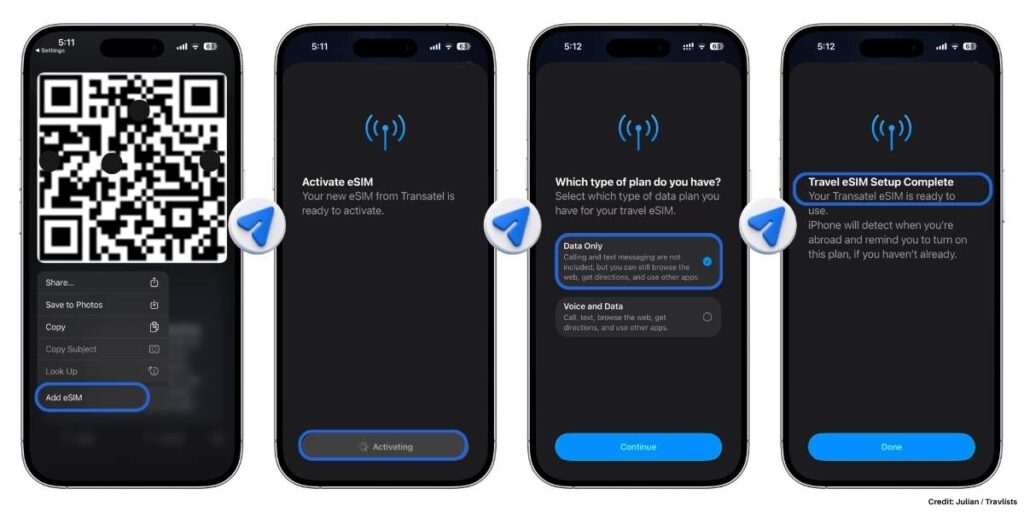
- Hold and press the QR code.
- Tap “Add eSIM” when the QR code is enlarged.
- Tap “Activate.” My iPhone then showed: “Your new eSIM from Transatel is ready to activate.” As mentioned earlier, Ubigi is a brand of Transatel.
- Tap “Abroad” and “Data Only” when asked where you’ll use the eSIM and which plan type you have.
How to Activate Ubigi eSIM
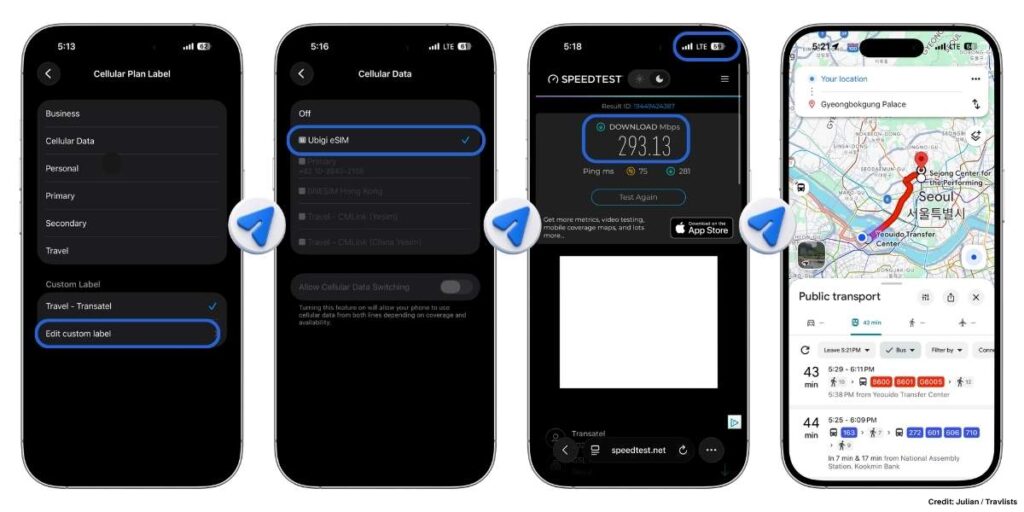
- Go to Settings and click Cellular.
- Under SIMs, find your Ubigi eSIM. Mine was labeled “Travel – Transatel” by default.
- Customize the label as you like, such as “Ubigi eSIM,” to avoid confusion if you have another eSIM.
- Tap “Turn On This Line.”
- Optionally, turn off your primary line if you’d rather avoid possible roaming charges.
- In Cellular, choose your Ubigi eSIM.
- Turn on mobile/cellular data for the Ubigi line.
Installation and activation steps may vary based on model and device, so do check the latest instructions on the website. A note on activation: Ubigi also says they have a SmartStart feature. I think this relates to a message I saw on my iPhone during setup, which said, “iPhone will detect when you’re abroad and remind you to turn on this plan, if you haven’t already.” I didn’t get to test this since I activated my plan manually while already in Seoul, but it’s a helpful feature to know about if you’re installing your eSIM before you leave for your trip.
Overall, I found this process easy to follow, and I think first-time eSIM users will not have a difficult time getting set up. The two-minute installation and activation would now make me think twice before going back to a physical SIM card.
Speed and Browsing Experience
Excited about the breezy installation, I quickly checked my online connection. I loaded my blog on Chrome, used Google Maps to find directions to Gyeongbokgung, browsed tickets on Klook, watched videos on TikTok, checked messages on KakaoTalk, and watched a Ubigi eSIM top-up tutorial on YouTube. Everything loaded fast, and if I were just arriving in Seoul for the first time with this connection, I would feel like I made the right choice.
The only thing that caught my attention was that the connection showed LTE throughout. With my local 5G SIM, I usually only see LTE when the connection falls back from 5G. But this was not the case with Ubigi. At LTE speeds, my Ookla speed test showed 293.13 Mbps download, while Google’s Speed Test showed 171.8 Mbps download, 22.0 Mbps upload, and 84ms latency. To put this into context, SpeedGeo’s South Korea averages for the same period were 233.1 Mbps for SK Telecom, 200.4 Mbps for KT, and 154.4 Mbps for LG U+. The LTE label did not translate into slow performance during my test. In fact, it was within range, if not beyond.
On the more technical side, Ubigi relies on the performance of the local network in the destination, as well as their arrangements with these networks, among other factors. This means that my browsing experience was fast because the local network was fast, and Ubigi was essentially mirroring that performance, so to speak. Still, it was good to see that Ubigi worked excellently. For this, I would say it was worth getting.
Mobile Hotspot & Customer Support
Like many, I travel for business with my laptop. There were times when I had to enable hotspot to get it connected, so whether I can share my data across devices is worth checking for me. Ubigi says tethering is allowed on their homepage, but it took more effort than expected. Four minutes after trying to get my hotspot to work, I decided to contact Customer Support.
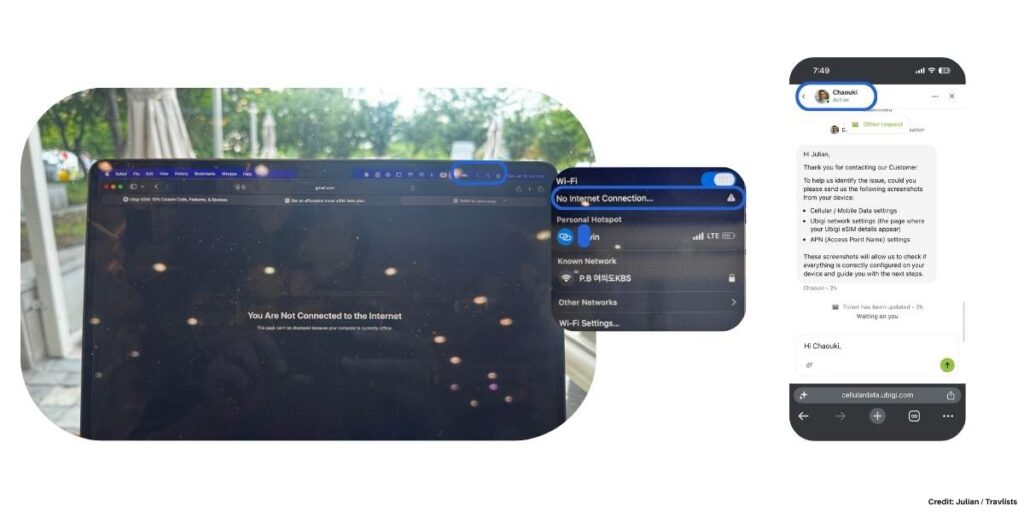
I got Ubi, Ubigi’s AI chatbot. It gave me responses that made me think, “Could this be the solution?” or “Could this be what I missed?” Unfortunately, after going over the steps provided by Ubi, I felt the need to ask for human support. The chatbot said it would connect me to someone, which was reassuring. It asked for my name and email address, then gave me two messages: “The ticket has been created” and “The conversation has ended.”
The last line was a bummer. It didn’t say when I was going to be contacted, so I thought I’d just drop it. Two hours later, I went back to my chat and actually saw an alert that said: “Chaouki from Ubigi needs more information.” When I checked the timestamp, it showed that the message was sent two hours ago. My best guess was that it only took 6 minutes to get a human response. Chaouki helped me go over my device’s APN settings, which settled the issue. (Even with no issues, Travlists’ eSIM testing methodology involves contacting customer service just to rate their response, but my reaching out was unexpectedly prompted by the issue.)
Ubigi App & UbiClub Loyalty Program
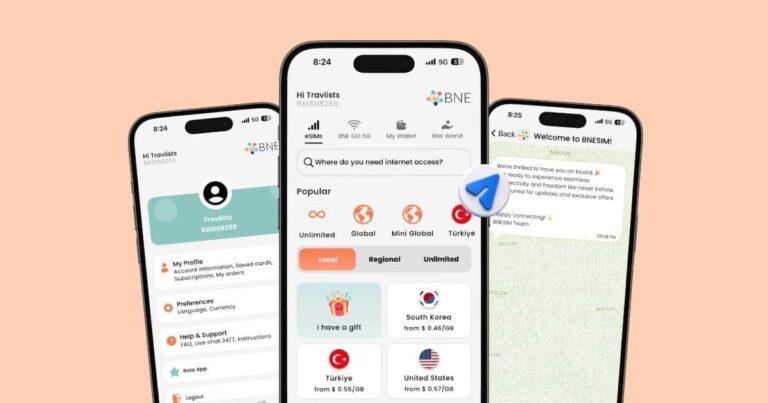
The last two things I checked were the app and loyalty program. When my chat with Ubigi’s AI chatbot ended, I went to check out the mobile app. I assumed I already had an account under the email address I provided during purchase, so I just tried to reset my password to log in. I did this a few times, until I realized the oversight on my part. The email that had my Ubigi eSIM QR code also said I needed to sign up for an account. I forgot to create an account, but after doing so, I was able to log in and enable Face ID.
One thing I found was that the Ubigi app did not show my purchased eSIM on the homepage. The Orders menu also did not show my transaction, just a message saying “You don’t have any orders yet.” I checked if the email address that I used during purchase and account registration was the same, and it was. For some reason, it did not sync. I opened the app a few days later to see if it was updated, but it stayed that way. I’d leave it for now since I have the records in my email, anyway.
On the app design: it was a bit lackluster. It looked more like a stripped-down version of their mobile site. I would have liked it if they had put graphics on the menu or on the dashboard, but it was functional. I’d leave it at that.
On the loyalty program: I saw Ubigi launched this in June 2026 based on their Instagram post. They call it UbiClub, and users can get up to 8% UbiCoins on eligible purchases without having to sign up separately. Initially, I wondered why I never received any cashback (the app still shows 0 UbiCoins for me). After checking Ubigi’s own UbiClub terms, I found the answer: the program only applies to purchases made through the Ubigi app, not the website. I’d bought mine through the mobile site. Lesson learned: if you want to earn UbiCoins, buy an eSIM plan through the Ubigi app instead.
Ubigi eSIM Destinations Booked by Travlists Readers
Aside from provider reviews, I also write comparisons of eSIM brands and plans for specific destinations. I have recommended Ubigi in many of these posts, and this has let me see which countries and regions our readers are booking through our affiliate links. This may help you see if others are choosing Ubigi for your travel destination, but note that the data is limited to our audience.
The top destinations for Ubigi eSIM among Travlists readers include the following, based on our 427 sales covering January 1-July 20, 2026 (arranged from the highest to lowest sales):
- Japan — 21.3%
- Malaysia — 11.2%
- Dominican Republic — 9.6%
- United States — 8.7%
- Costa Rica — 6.3%
- France — 4.9%
- Philippines — 4.4%
- Panama and South Korea — 2.6% each
- United Kingdom and Portugal — 2.3% each
- Spain and Europe (regional) — 1.6% each
- South Africa, Ireland, and Iceland — 1.4% each
Ubigi’s Popular Destinations on their homepage include Japan, the US, France, South Korea, the UK, Italy, Spain, Vietnam, China, Thailand, the Philippines, and Germany, which overlaps with what I’m seeing. The biggest surprise to me was how much love Costa Rica and Panama are getting. I wouldn’t have guessed that Central America would show up this strongly.
Ubigi eSIM for Japan
When I first learned about Ubigi, Japan was already listed as one of its most popular destinations. A quick Google search also shows that there is plenty of buzz around it, which may make you wonder whether it is actually worth booking for your own trip.
Japan was the most-booked Ubigi destination among Travlists readers, accounting for about 1 in 5 of our tracked sales based on the same scope I shared earlier. Ubigi is clearly popular with our audience, so I looked more closely at a few possible reasons why:
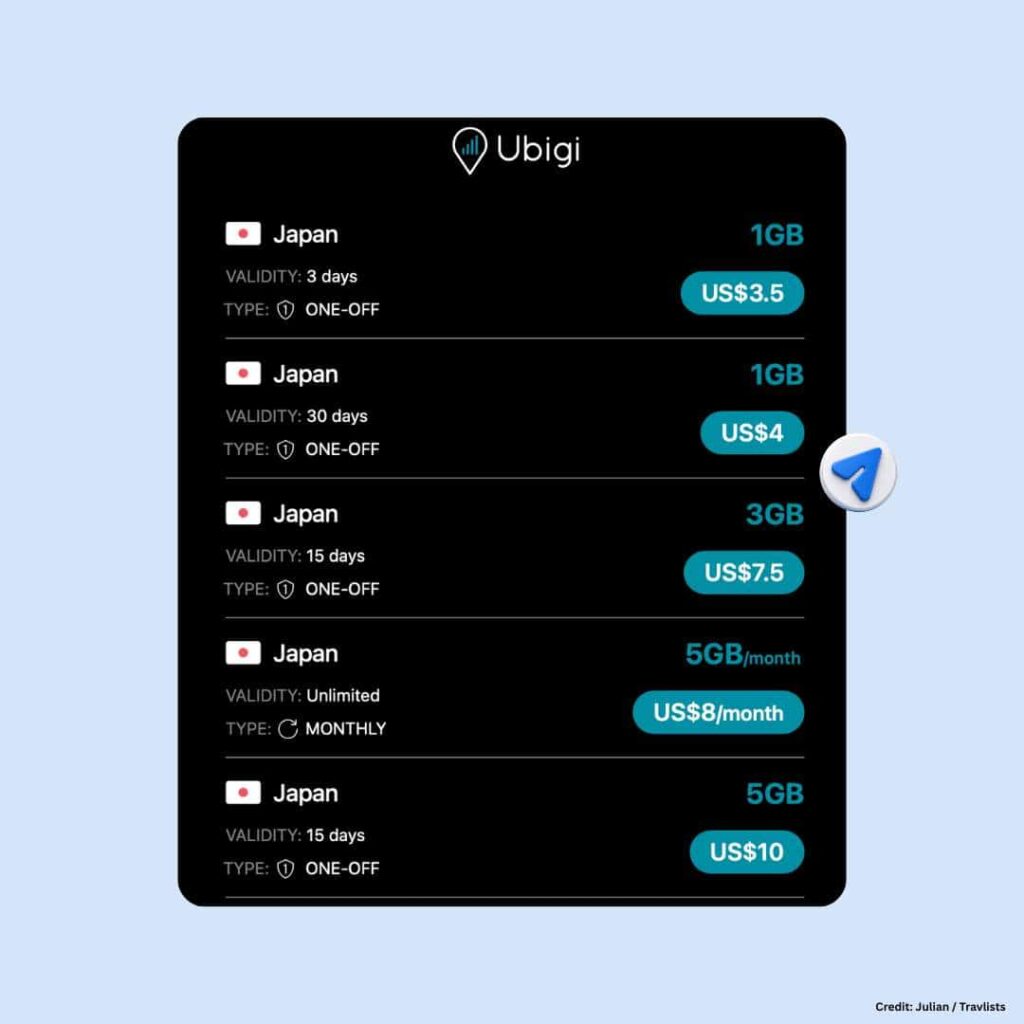
- Plans: Like Airalo and Saily, Ubigi offers one-off fixed and unlimited data plans for short trips. What sets Ubigi apart is its recurring monthly and annual plans, including options with 5G, 20GB, or unlimited data each month. This makes Ubigi suitable for frequent and long-term travelers, not just short vacations.
- Pricing: At the time of this update, Ubigi’s Japan plans start at $3.50, compared with $4 for Airalo and $3.99 for Saily. Their 7-day unlimited plan is also cheaper at $25, versus $27 for Airalo and $26.99 for Saily. (Saily, however, offers a 5-day unlimited plan that Ubigi and Airalo do not.) From these plans only, Ubigi shows that they are the cheaper option.
- Promo code: Ubigi gives Travlists readers 10% off, while Saily offers 5%. Airalo provides a 15% discount for new users and 10% for existing users, so the better deal depends on whether you have used Airalo. Get the current discount codes on our Travel Promo Codes page.
- Local networks: Ubigi eSIMs for Japan connect to KDDI and NTT Docomo, while Airalo uses KDDI and SoftBank. (Saily does not publicly name their Japan partner networks.) The listed carriers do not give Ubigi a clear advantage on their own, but their public ties to NTT Group make me think that they are the next best thing to buying a SIM card or eSIM from an actual local provider.
- Refund policy: Ubigi, Airalo, and Saily are all flexible when it comes to getting a refund for unused eSIMs. Their policies are broadly similar, so I do not see this as a major deciding factor.
Ubigi offers unique features and competitive pricing for Japan, which may help explain why their eSIMs are booked so often. However, the booking data only tells me that our readers are choosing it, not how their actual experience with Ubigi went.
Would I Recommend Ubigi?
Yes, I’d recommend it, as long as we’re talking about data eSIMs and not the ones that come with a phone number. I would even use it again in South Korea. If my friends or family had asked me the same question, I would share the simple hold-and-press setup, quick activation, and speeds I experienced. I’d also talk about the competitive pricing, especially if they are going to Japan. I won’t leave out the issue I had with the hotspot, and I’ll share how it was handled by Ubi and their support team.
Ubigi has a clear following and is being booked by Travlists readers for several countries in Asia, Europe, South Africa, and the Americas. Now I definitely get why.
FAQ: Ubigi eSIM
What is Ubigi?
Ubigi is a travel eSIM provider offering data-only plans in 200+ destinations, sold as local, regional, or world (global) options.
Is Ubigi safe and legit?
Yes. Ubigi is a brand of Transatel, a French company under Japan’s NTT Group since 2019. My purchase, payment, and eSIM activation all went through without issues.
Why does Transatel show up during Ubigi’s setup?
Transatel is Ubigi’s parent company, so seeing it during activation is normal. Rename your eSIM to “Ubigi eSIM” in your settings to avoid confusion.
Does Ubigi eSIM include calls and SMS?
No, it’s data-only. However, you can still use messaging apps like WhatsApp or FaceTime, and keep your primary SIM active for traditional calls and texts.
Which devices are compatible with Ubigi eSIM?
Any eSIM-compatible and carrier-unlocked device. To check if your phone supports an eSIM, dial *#06#. If an EID number appears, your device supports eSIM.
Can I install Ubigi eSIM without scanning a QR code?
Yes. Hold and press the QR code in your confirmation email, then tap “Add eSIM.” No second device needed for scanning. That’s how I installed mine.
How long does it take to receive the Ubigi QR code?
Ubigi says up to 15 minutes. In my test, it arrived the same minute I paid.
Can I use the same Ubigi eSIM if I switch phones?
Yes, but not automatically. Delete the profile on your old device, then reinstall it on the new one through the same account. You can transfer the eSIM up to 5 times only.
Why did my Ubigi eSIM show LTE instead of 5G?
Depends on the local network, not Ubigi. In my test, LTE speeds were still excellent.
Does Ubigi’s mobile hotspot work?
Ubigi says yes, but I had trouble connecting my laptop at first. Support helped after adjusting APN settings, so test this early if hotspot matters to you.
How do I earn UbiClub rewards (UbiCoins)?
You’re enrolled automatically on your first purchase, earning up to 8% back in UbiCoins that stay valid for 365 days. One catch: only purchases made through the Ubigi app earn UbiCoins, not the website.
Does Ubigi have a promo code?
Yes, our promo code TRAVLISTS gets you 10% off. I tested and confirmed it works, as of this article’s last update.
What’s the difference between one-off, monthly, and annual plans?
One-off is for single trips. Monthly and annual are recurring options for frequent or long-term travelers.
If you’re weighing Ubigi against other options, or just want a refresher on things like eSIM compatibility, data-only limitations, or how hotspot generally works, I cover all of that in more depth on our eSIM hub. It’s where I keep all my provider reviews, comparisons, and setup guides in one place.
How I Reviewed Ubigi
I purchased a Ubigi eSIM and documented the experience from checkout to troubleshooting. I tracked installation and activation time, ran speed tests using Ookla and Google’s Speed Test, checked mobile hotspot performance, used common travel apps, and contacted Ubigi’s customer support. I also saved screenshots and receipts throughout the process.
View My Detailed Ubigi Experience Timeline
I recorded the main steps from purchasing the eSIM to resolving the hotspot issue.
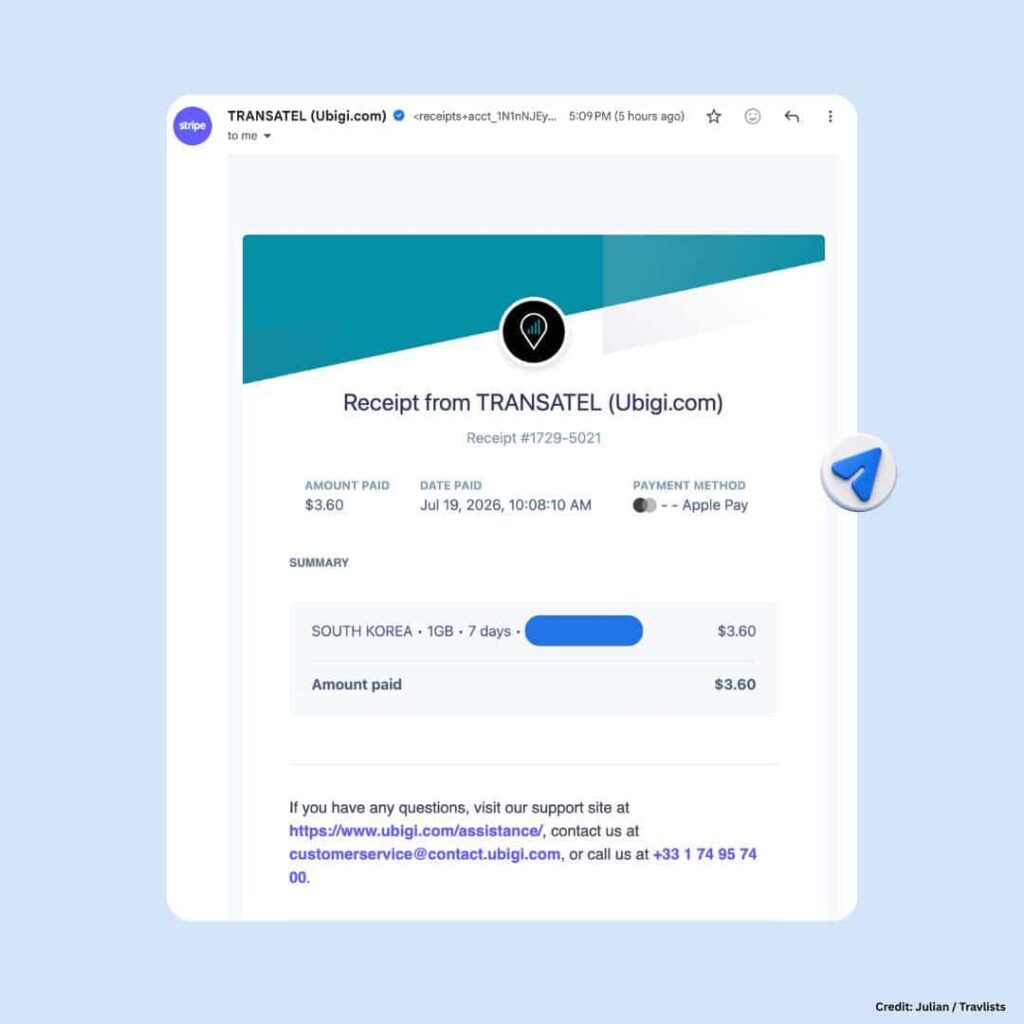
5:05 PM — Selected the South Korea 1GB/7-day plan on Ubigi’s mobile site and applied the TRAVLISTS code, dropping the price from $4 to $3.60.
5:07 PM — Confirmed my device was eSIM-compatible and unlocked, then paid via Apple Pay.
5:08 PM — Received the QR code email almost instantly, despite Ubigi’s 15-minute delivery disclaimer.
5:11–5:12 PM — Used the Hold & Press method to add the eSIM directly from the QR code image, so I didn’t need a second device. My iPhone identified it as a Transatel eSIM, and installation and activation were complete within about two minutes.
5:16–5:17 PM — Turned on the Ubigi line, and “Ubigi LTE” appeared on my status bar. Ran an Ookla speed test: 293.13 Mbps download.
5:19 PM — Checked SpeedGeo’s reported South Korea carrier averages for general context: SK Telecom 233.1 Mbps, KT 200.4 Mbps, and LG U+ 154.4 Mbps.
5:20–5:26 PM — Used real travel apps to check the connection: Google Maps, Naver Map, Klook, TikTok, YouTube, and KakaoTalk. Everything loaded without issue.
5:27–5:31 PM — Tried connecting my laptop through mobile hotspot. It didn’t work after several minutes, so I contacted Ubigi support.
5:32–5:41 PM — Ubi, Ubigi’s AI chatbot, guided me through several troubleshooting steps, including an APN adjustment. When that didn’t resolve the issue, I asked for a human agent.
5:42 PM — Received a ticket confirmation, with no clear timeline for when I would hear back.
5:49 PM — While waiting, I ran a Google Speed Test: 171.8 Mbps download, 22.0 Mbps upload, and 84 ms latency.
5:53–6:02 PM — Created my Ubigi account through the link in the original email and linked the active eSIM. The eSIM appeared in the app, but the purchase never showed under Orders. I also didn’t earn any UbiCoins. I later confirmed that UbiClub rewards only apply to purchases made through the app, not the website.
7:47 PM — Saw that Chaouki from Ubigi had responded to my ticket. The rounded timestamp made it difficult to confirm the exact response time.
Later — Chaouki helped me check my device’s APN settings, which resolved the hotspot issue.
Purchase Receipt
For this review, I purchased a Ubigi eSIM for South Korea. Here’s the receipt I received via email: